8
Connections
V
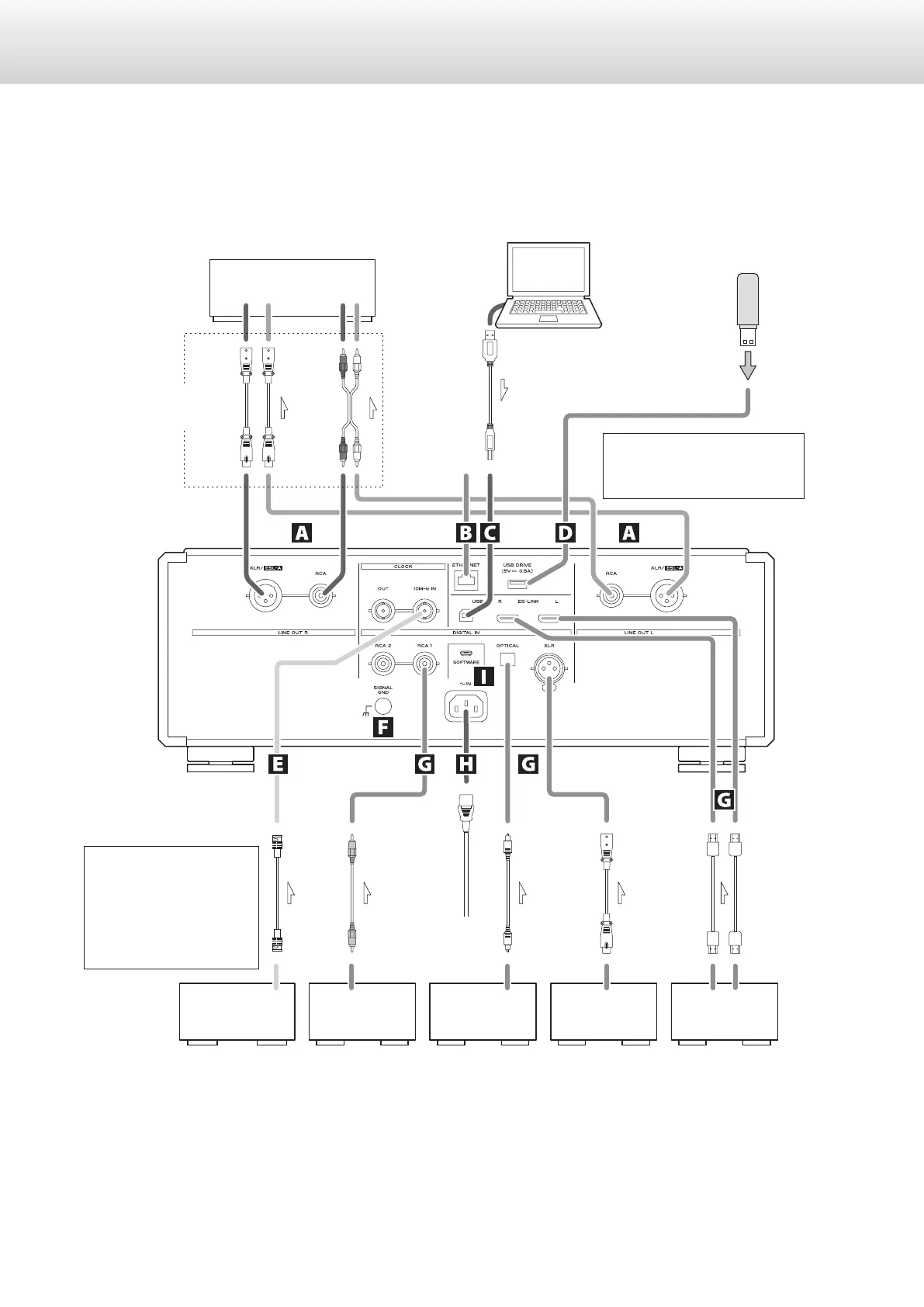
Precautions when making connections
o After completing all other connections, plug the power plug into a power outlet.
o Read the owner’s manuals of all devices that will be connected, and follow their instructions.
If the clock generator has
two or more outputs, it can
also be connected directly to
each device. Use the connec-
tion method that provides
the preferable sound quality.
RL
RL
RL
Stereo amplifier
Computer
RCA cables
XLR cables
USB cable
Included
power cord
RCA coaxial cable
BNC coaxial cable
Equipment
with digital
audio output
Equipment
with digital
audio output
Equipment
with digital
audio output
Equipment
with digital
audio output
(P-05X, etc.)
Device that outputs
clock signal
(G-01X, G-02X etc.)
DIGITAL OUT
(COAXIAL)
DIGITAL OUT
(XLR)
DIGITAL OUT
(ES-LINK)
DIGITAL OUT
(OPTICAL)
10MHz OUT
Audio input
(LINE IN, etc.)
Optical digital cable
USB flash drive
Make this connection when
using this unit as a USB DAC.
XLR digital cable
HDMI cables
c
Wall outlet
Connect using a set
of only one type.
The polarity of the XLR connectors
can be set so that either 2 or 3 is
HOT (page17).


 To Next Page