driveways to clear snow while leaving gravel
undisturbed.
Normal – Allows the tracks to be suspended
independently for continuous ground contact.
Deep Cutting – Locks the front end of the snow
thrower down to the ground for had-packed or icy
snow conditions.
Adjustments
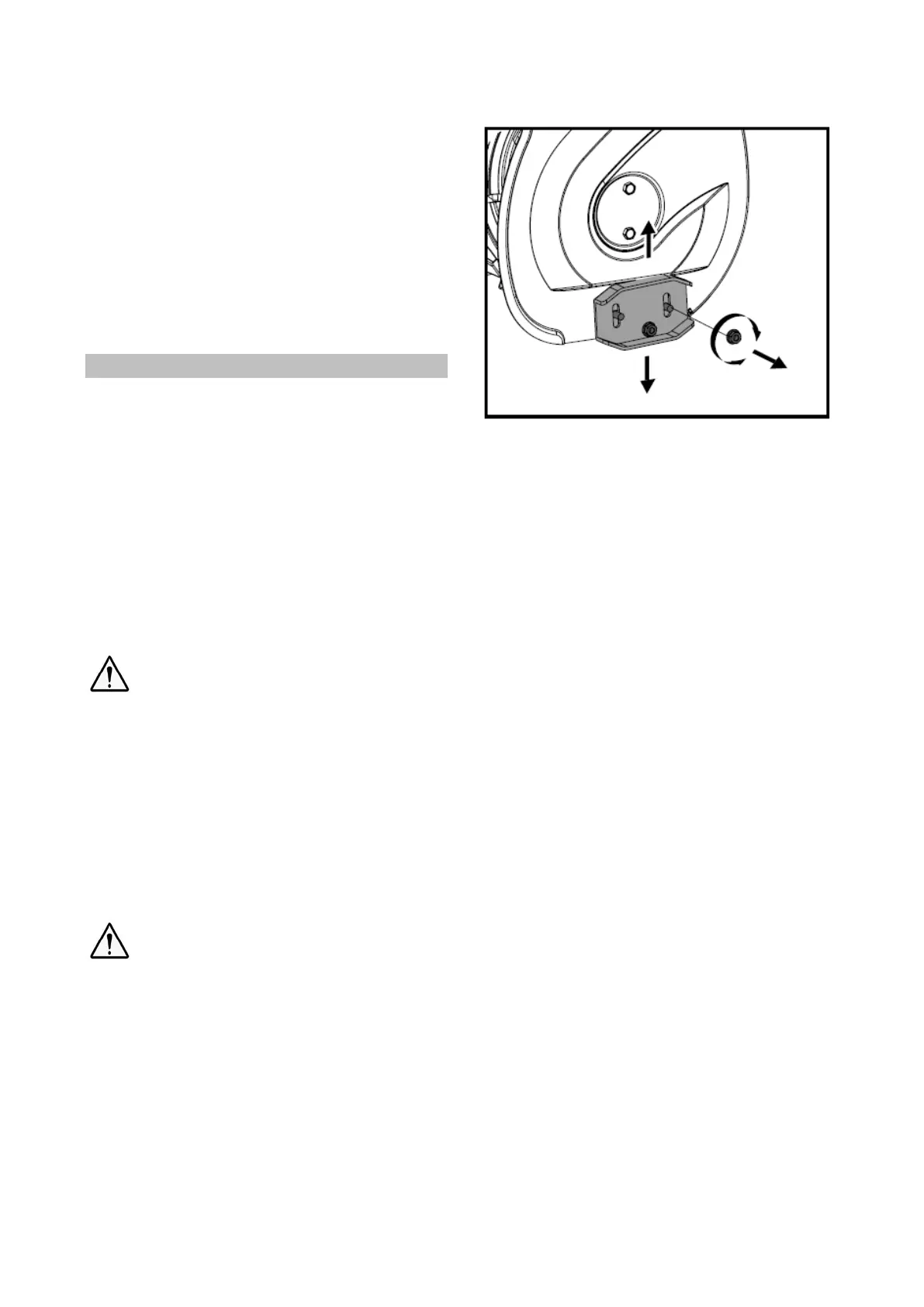
Skid Shoes
Position the skid shoes based on surface
conditions. For removal of snow in normal
conditions, such as a paved driveway or sidewalk,
place skid shoes in the higher position to give a
3mm (1/8”) clearance between the scraper blade
and the ground. Use a middle or lower position
when the area to be cleared is uneven, such as a
gravel driveway.
It is not recommended to operate the
snow thrower on gravel as it can easily
pick up and throw by the impeller, causing
personal injury or damage to the snow
thrower and surrounding property.
If you choose to operate the snow thrower on a
gravel surface, use extra caution and keep the
skid shoes in position for maximum clearance
between the ground and the scraper blade.
Always adjust skid shoes after adjusting
scraper blade to prevent premature wear
to scraper blade or damage to auger
housing.
To adjust the skid shoes:
1. Loosen the four hex nuts (two on each side)
and carriage bolts. Move skid shoes to
desired position.
2. Make sure the entire bottom surface of skid
shoe is against the ground to avoid uneven
wear on the skid shoes.
3. Retighten nuts and bolts securely.
Auger Clutch and Drive Clutch
When the auger clutch lever or drive clutch is
released and in the disengaged position, the
cable should have very little slack. It should bolt
be tight.
Auger must stop within 5 seconds when the auger
clutch lever is released. If auger clutch does not
engage or disengage properly, adjust auger
clutch before operation.
If the snow thrower’s drive is disengaging
intermittently during operation, or it drives when
you release the drive clutch lever, adjust the drive
clutch before operation.
Both auger clutch and drive clutch can be
adjusted at either end of their control cables.
Loosen adjusting nuts on cable support bracket.
1. Slide the control cable up or down by
threading adjusting nuts to increase cable
tension or provide more slack.
2. Thread the adjusting nuts to slide the cable
down or up to increase tension or provide
more slack.
3. Tighten nuts after proper adjustment is


 To Next Page