
 Need help?
Do you have a question about the Essentials BE-MSFM and is the answer not in the manual?
Essential safety precautions and warnings for using the TV wall mount.
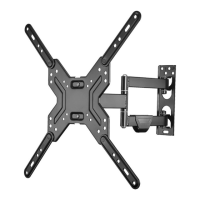
Highlights the key functionalities and capabilities of the TV wall mount.
Lists the VESA hole patterns compatible with this TV wall mount.
Provides the overall dimensions of the TV wall mount and its components.
Lists the tools necessary for the installation of the TV wall mount.
Details all parts included in the package and the TV hardware bag.
Identify if your TV has a flat, irregular, or obstructed back for correct assembly.
Choose the appropriate screws, washers, and spacers based on TV back type.
Attach the TV plate to the back of the TV using the correct hardware and adapters.
Specific instructions for mounting the TV plate on TVs with a flat rear surface.
Specific instructions for mounting the TV plate on TVs with non-flat rear surfaces.
Measure and mark the wall for the correct placement of the wall plate.
Securely mount the wall plate to a wall with wooden studs.
Securely mount the wall plate to a solid concrete or concrete block wall.
Lift and attach the TV to the securely mounted wall plate.
Route and secure cables along the mounting arm for a clean look.
Adjust the TV to ensure it is perfectly level after installation.
Modify the resistance of the arm for desired TV movement ease.
Learn how to rotate and tilt the TV for optimal viewing angles.
Details the warranty coverage, duration, and how to obtain service.
Lists items and conditions not covered by the product's limited warranty.
 General
| Brand | Essentials |
|---|---|
| Model | BE-MSFM |
| Category | Racks & Stands |
| Language | English |

 To Next Page