Click , select “DX” parameter, “DLY” parameter, “PP”
parameter respectively.
Set up parameter to 50mm, 2s, 10 by numerical key.
Click , system execute according to this program.
2.2.2 Multi-step programming
Multi-step program is used for processing single work piece of different processing steps,
realize consecutive implementation of multi-steps, and improve processing efficiency.
Operation step
Step 1 Power on, the device enters to single-step parameter set up page automatically.
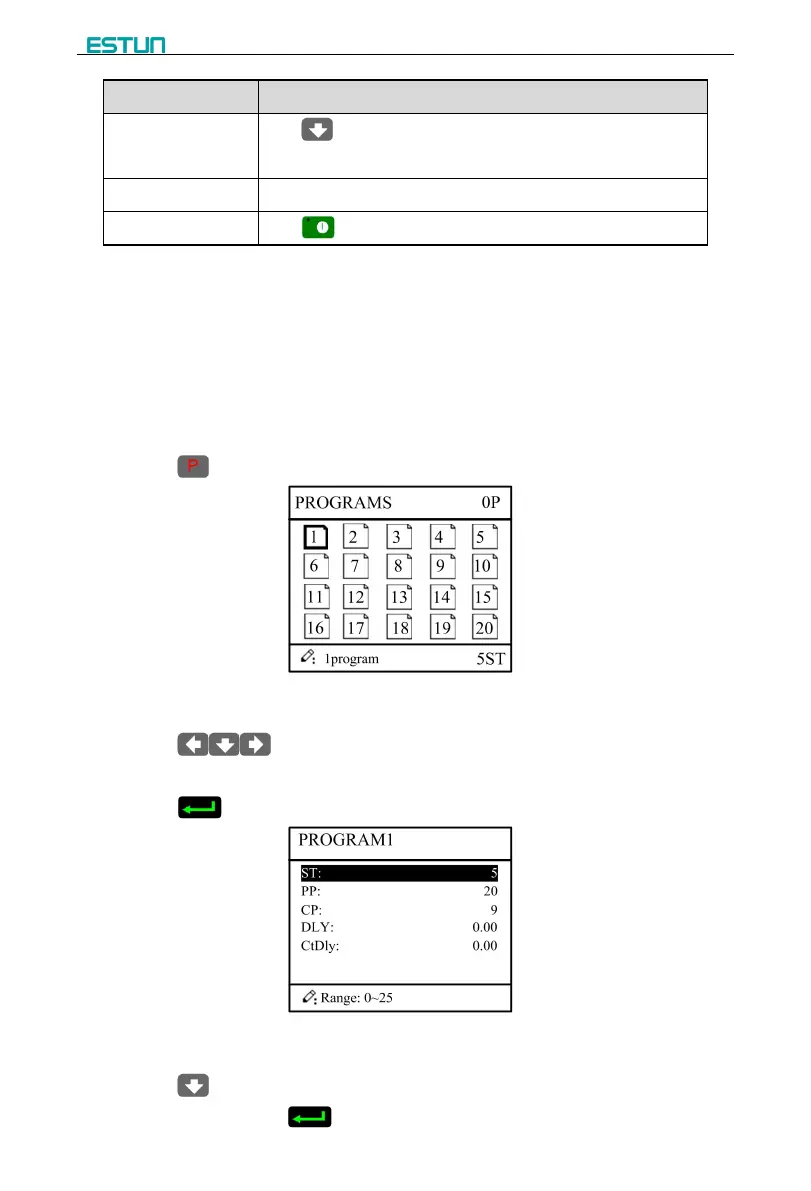
Step 2 Click , switch to program manage page, as shown in Figure 2-4.
Figure 2-4 Program management page
Step 3 Click , select program serial number, or input program number directly,
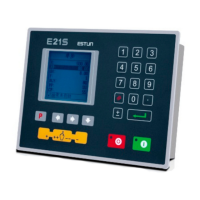
Step 4 Click , enter multi-step program setting page, as shown in Figure 2-5.
Figure 2-5 Multi-step program setting page
Step 5 Click , select multi-step programming parameter which requires set up, input
setting up value, click , and the configuration takes effect.


 To Next Page