Similar to step 3 and step 4, set “DLY” to 3 respectively.
Click to enter first step setup page of step parameter.
Select “XP”, input 50, click , the setup takes effect.
Similar to step 7, set up “concession distance” and “repeat
times” to 50, 1 respectively.
Click to enter second step setup page of step parameter,
the setup method is similar to that of step one.
Click again, to enter third step setup page of step
parameter, the setup method is similar to that of step one and
step two.
Click , return to setup page of the first step.
Click , system will operate according to this program.
In completion of multi-step programming, you should back to starting step before
launching the system; otherwise, the program will start position processing at current
step.
Press left and right direction key to circulate page turning and browsing among all step
Program can be called and revised again.
In completion of processing all work pieces (50 in the example), the system stops
automatically. Restart directly will start another round of processing 50 work pieces.
User can setup the general parameters for the device, including the metric or imperial and
the language.
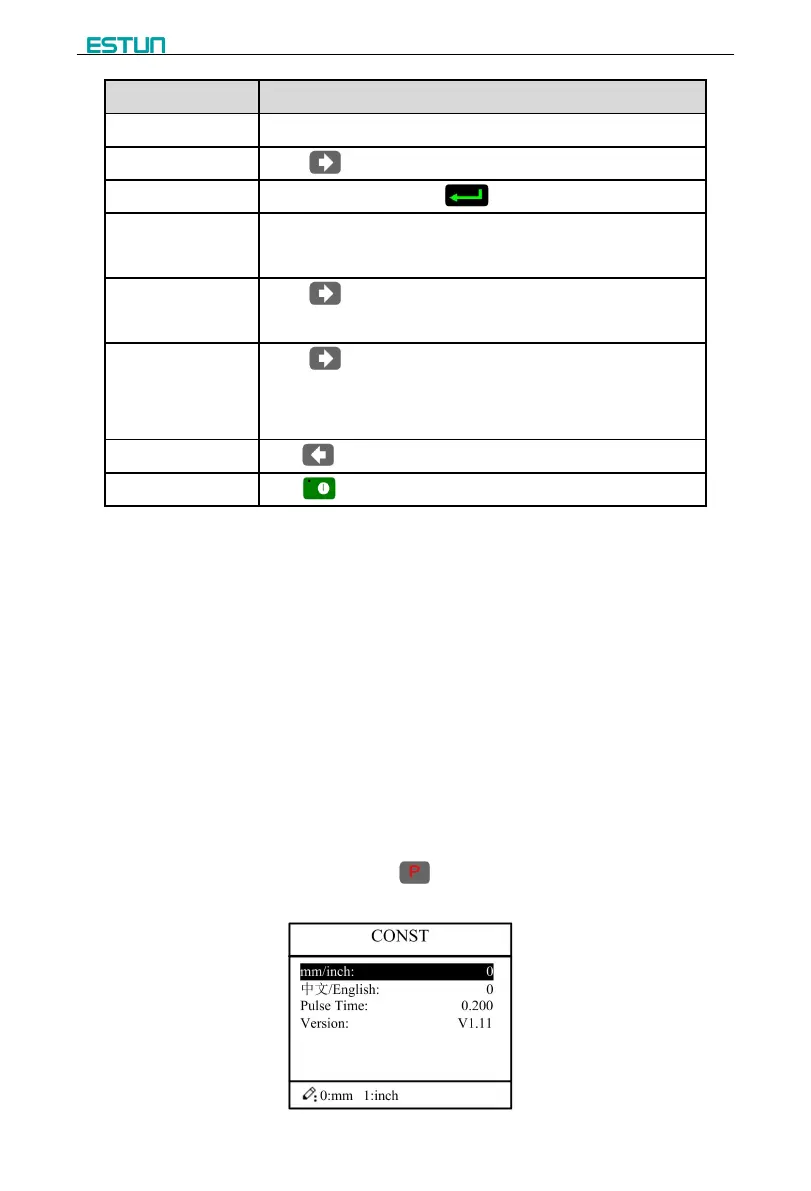
Step 1 On program management page, click to enter programming constant page, as
shown in Figure 2-8. On this page, programming constant can be set.
Figure 2-8 Programming constant page


 To Next Page