The main menu is displayed as soon as you touch the appropriate button.
You may also toggle between the basic functions “Drive” or “Switch” in the
main menu. In addition you can call up two lists:
•You can display all locomotives stored in the ECoS in the “Locomotive
list“.
•Youcandisplayandselectallavailableswitchingpanelsinthe“Accessory
control panel list”.
•With“Read / WriteCVs“youcanaccesstheprogrammingtrackofthe
ECoS.
•With“DCCaddress”youcanreadoutandchangetheaddressofaloco-
motive on the programming track.
•The“Settings”buttonenablesyoutoaccessthecongurationmenu.Find
more information about this in chapter 13.
You may exit the main menu by pressing the touch button “Return” at the
bottom right at any time.
11. Controlling locomotives and consists
The most important function of the Mobile Control is controlling locomotives
and consists. All locomotives stored in the ECoS may be called up.
11.1. Selecting a locomotive
First one must call up the locomotive that shall be operated.
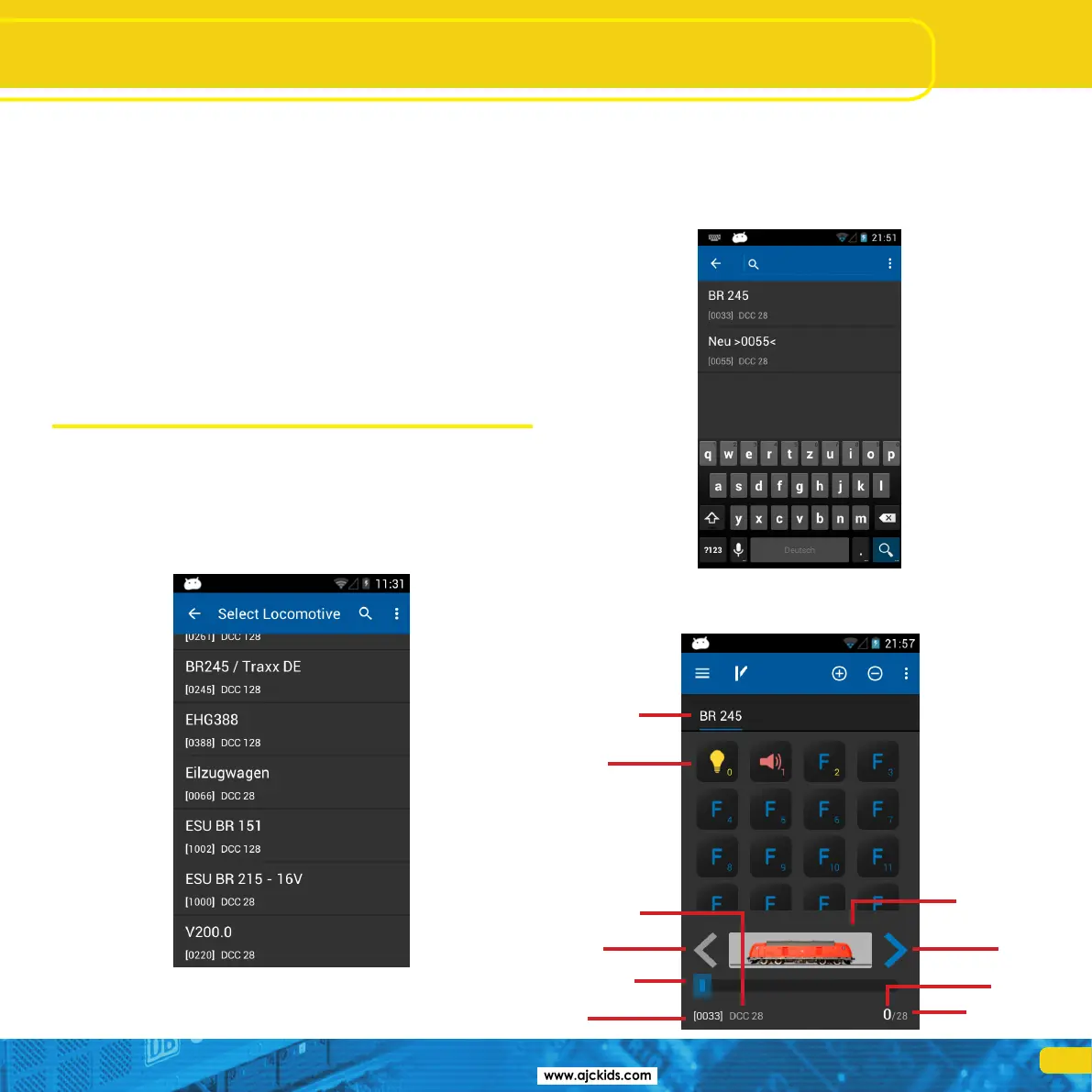
•Pressthe“+”symbolinordertoenterthelocomotivelist.
•Selectthedesiredlocomotivebytouchingtheicon.
Locomotives and consists
11.1.1. Searching locomotives
If there are many locomotives in the list, one can accelerate the search by
pressing the magnifier icon in order to call up the search.
•Touchpartsofthenameor(ifknown)theaddressofthedesiredlocomo-
tive.
•The“hits”willbeshownevenwhileyouaretyping.
11.2. Running locomotives
You have direct access to a locomtive as soon as it has been selected.
a)
b)
j)
f)
e)
c)
d)
h)
i)
g)



 To Next Page