32
QUICK CHARGE (optional)
BASIC FUNCTIONS
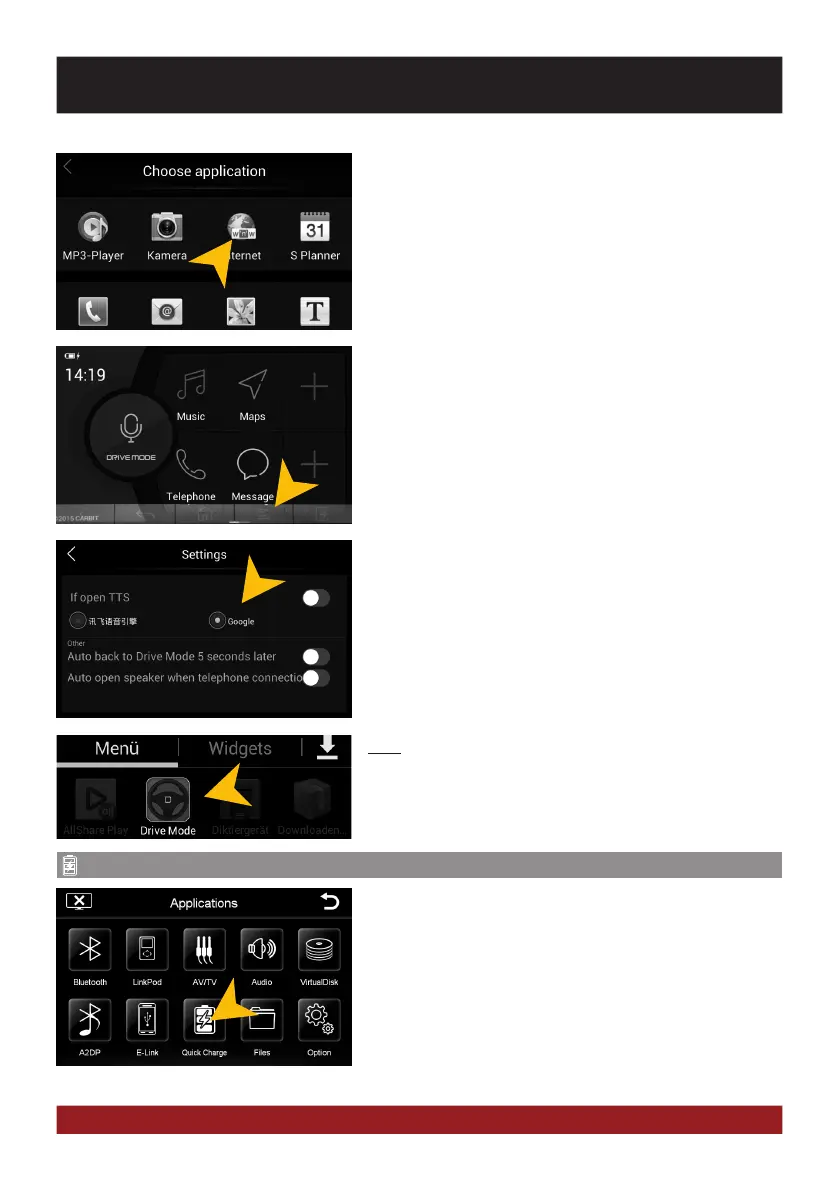
Under „Choose Application“ you can select the desired appli-
cation.
Note: In order to increase road safety, every time you start the
„E-Link“ feature, the „Drive Mode“ app will be installed/ or
started on your smartphone.
By tapping on the transparent „>“ arrow on the bottom left, a
further window opens in the lower third of the screen.
There you find more options such as „Back“, „Home“, „Set-
tings“ or „Forward“.
Under „Settings“ you can select:
„If open TTS“: Selection of the internet search
engine for Voice Control
„Audio back ...“: After 5 seconds of inactivity jumps
the application will automatically
return to the „Drivemode“ app menu.
„Audio open ...“: Automatic answer for incoming calls.
With „Quick Charge“ you can quick charge your mobile device
via USB.



 To Next Page