8
2 31
7
5
9
11
4
6
8
10
12
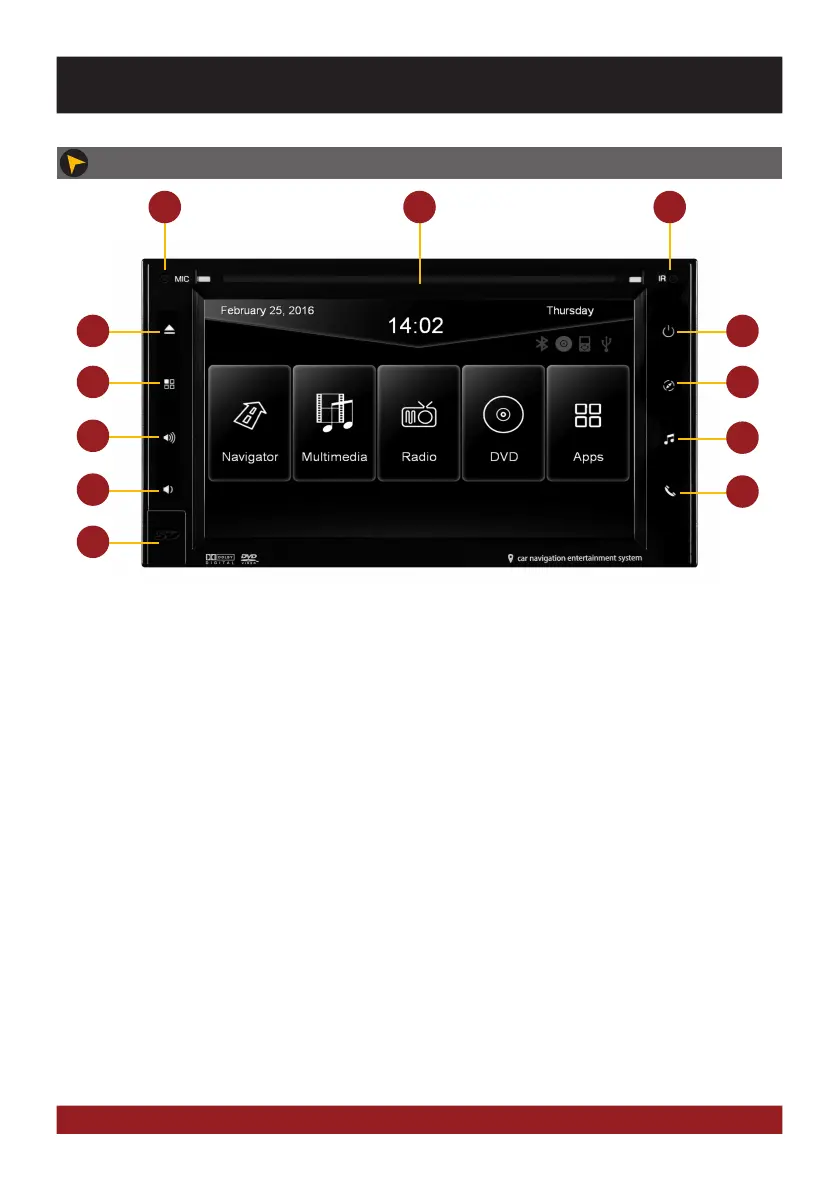
1. Internal Bluetooth™ microphone
2. Slot for CD/DVD disks (Ø 12 cm).
3. Infrared sensor for the remote control
4. Eject the inserted CD/DVD.
5. Press briefly: Mute
Press and hold: the device switches to
stand-by (push and hold - no audio, display
darkens, running navigation stops,
Bluetooth connection interrupts)
6. Opens main menu.
7. Opens navigation system.
8. Turns volume up
9. Starts media playback from USB
10. Turns volume down
11. Press briefly: Opens voice control
Press and hold: Opens Bluetooth™ mode
12. MicroSD card slot and reset button
OPERATING ELEMENTS VN630W
BASIC FUNCTIONS



 To Next Page