40E700-17
Installation
Connection to a Personal Computer
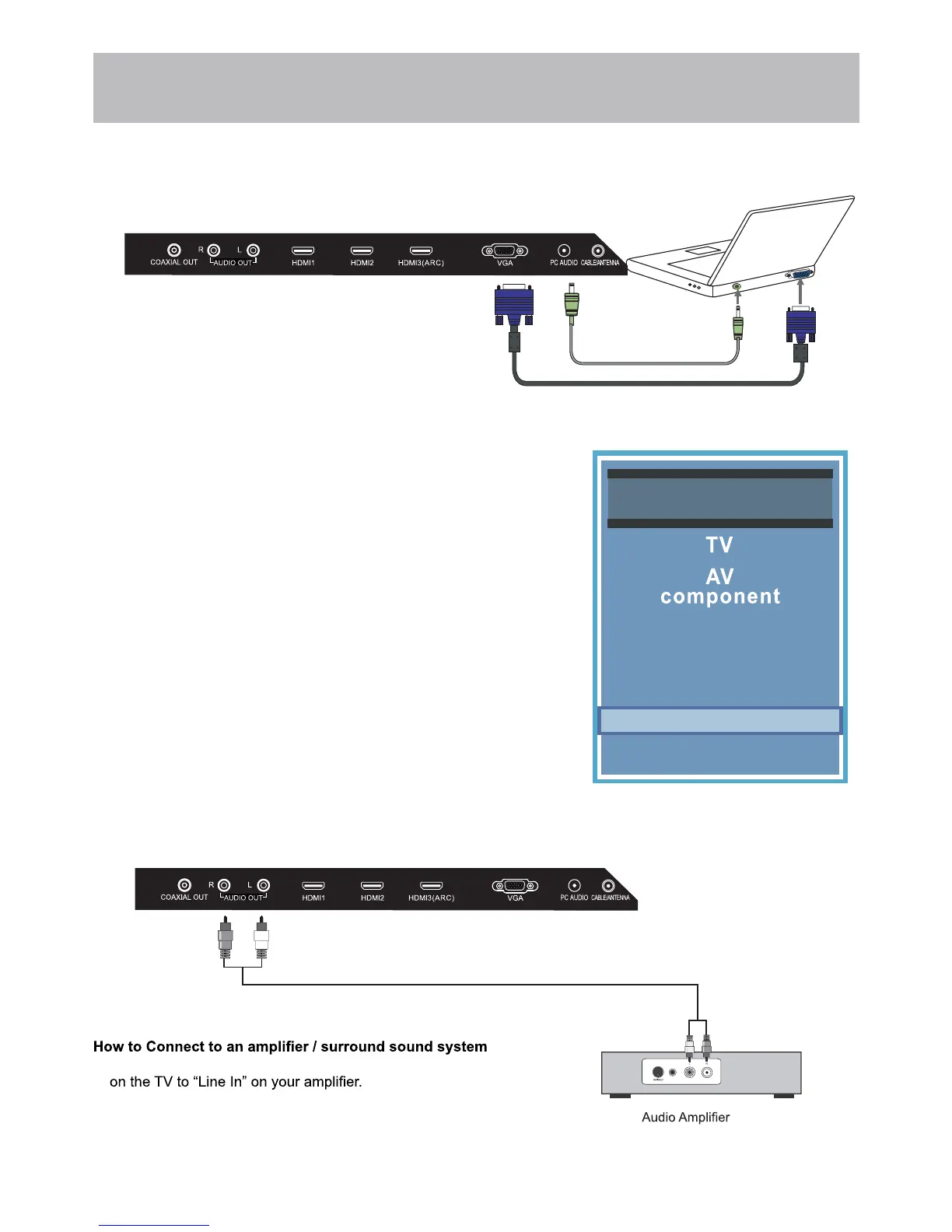
Connecting a PC or laptop
Connecting to an amplifer or home theater system
Recommended computer display resolution:1920x1080@60 Hz
How to Connect a PC
• Connect using a male to male VGA cable (not included) from your PC to
the “VGA” on the TV’s panel.
How to Connect Audio Sound
• Connect a 3.5mm audio cable (not included) from the computer’s mini
audio output jack to the audio input on the TV’s panel.
How to Use
• Press the INPUT button on the remote control. Use the buttons qp to
highlight PC. Press ENTER.
NOTE: If your PC uses a standard signal mode, the screen will adjust
automatically.
VGA & Audio Cable (not included)
Audio Cable (not included)
• Match and insert the red and white audio cables from “Line Out”
NOTE: The TV’s speakers will still output audio. You can turn the
TV’s speaker volume to 0 to prevent echoing.
Input Source
Media
PC
HDMI1
HDMI2
HDMI3


 To Next Page