19 / 36
Change a detector’s zone
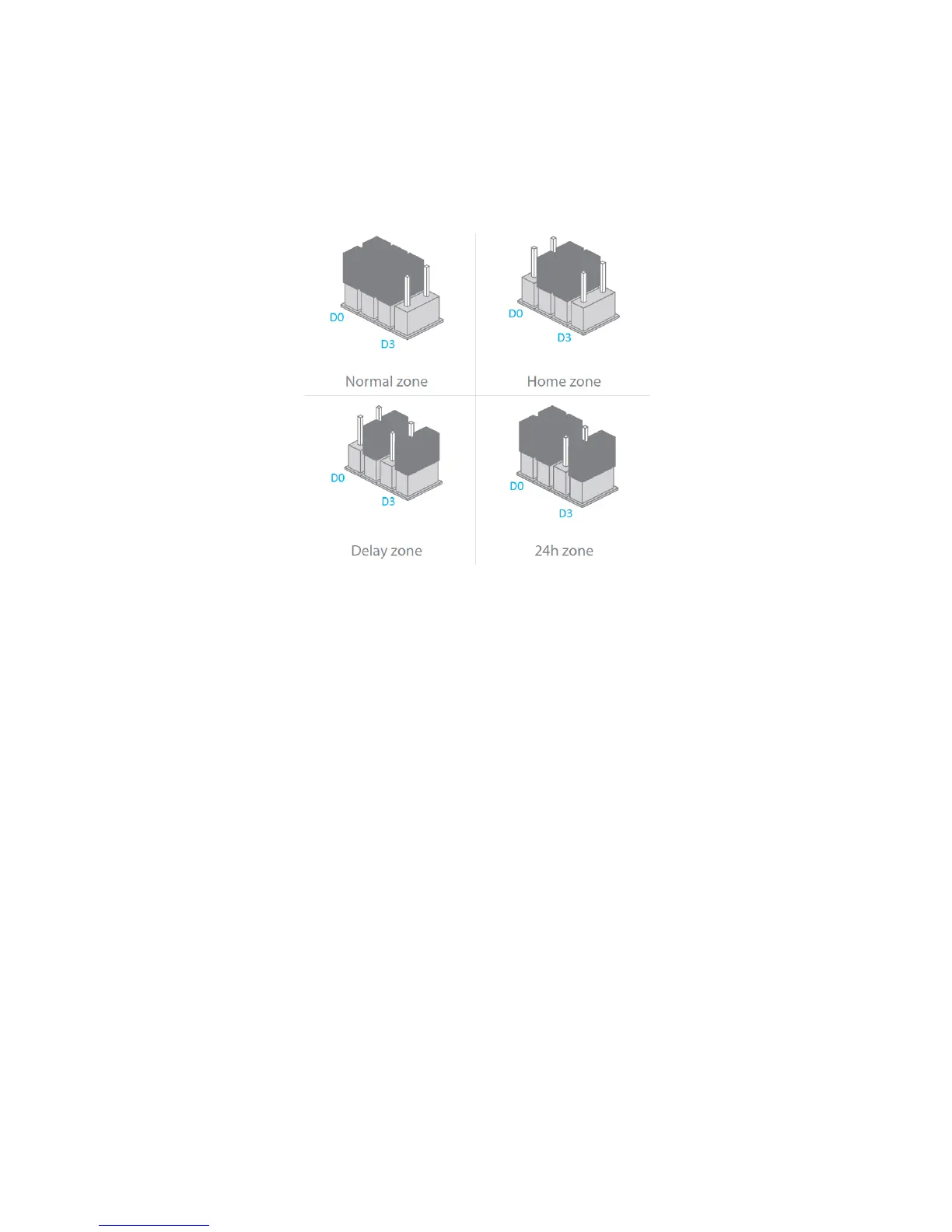
You c an modif y t he z one of a d etector by moving the jumpers with tweezers,
according to the drawings below. The jumpers are located on each detector’s
circuit board.
What do zones do?
Normal zone: when the system is armed, a detector on the Normal zone is
active. When the system is disarmed, the detector is not active.
Home zone: when the system is armed in Home mode, all detectors are active
except those assigned to the Home zone.
Delay zone: only detectors on the Delay zone will be impacted by the entry
delay.
24h zone: a detector on the 24h zone is always active, regardless the system
is armed or not.
Reset Wi-Fi
If the Secual Box is secured or you want to change the network of your control
panel, you can reset the Wi-Fi by press the connection button of the control
panel for 5 seconds. The control panel beeps 3times, as a confirmation that it
has reset successfully.
Restore default settings
Press and hold on the Connection button, then press the Panic button(SOS),
Release them after 3 beeps. Wait 10 seconds, the control panel beeps twice:
The system is restored to default settings.
The stored phone numbers and settings will be restored to factory settings, all
accessories will be deleted from the control panel.


 To Next Page