8 / 36
Step 2: Turn the control panel on
1. Plug the power adapter to AC socket.
2. Plug the output connector of the power adapter into the AC adapter interface.
3. Push the power switch.
Step 3: Install App and create account
1. Download the “Secual Box V2” app on your smartphone. The app is available on the
App Store and Google Play.
2. Connect your phone to your home’s Wi-Fi router.
3. Open the “Secual Box V2” app on your smartphone.
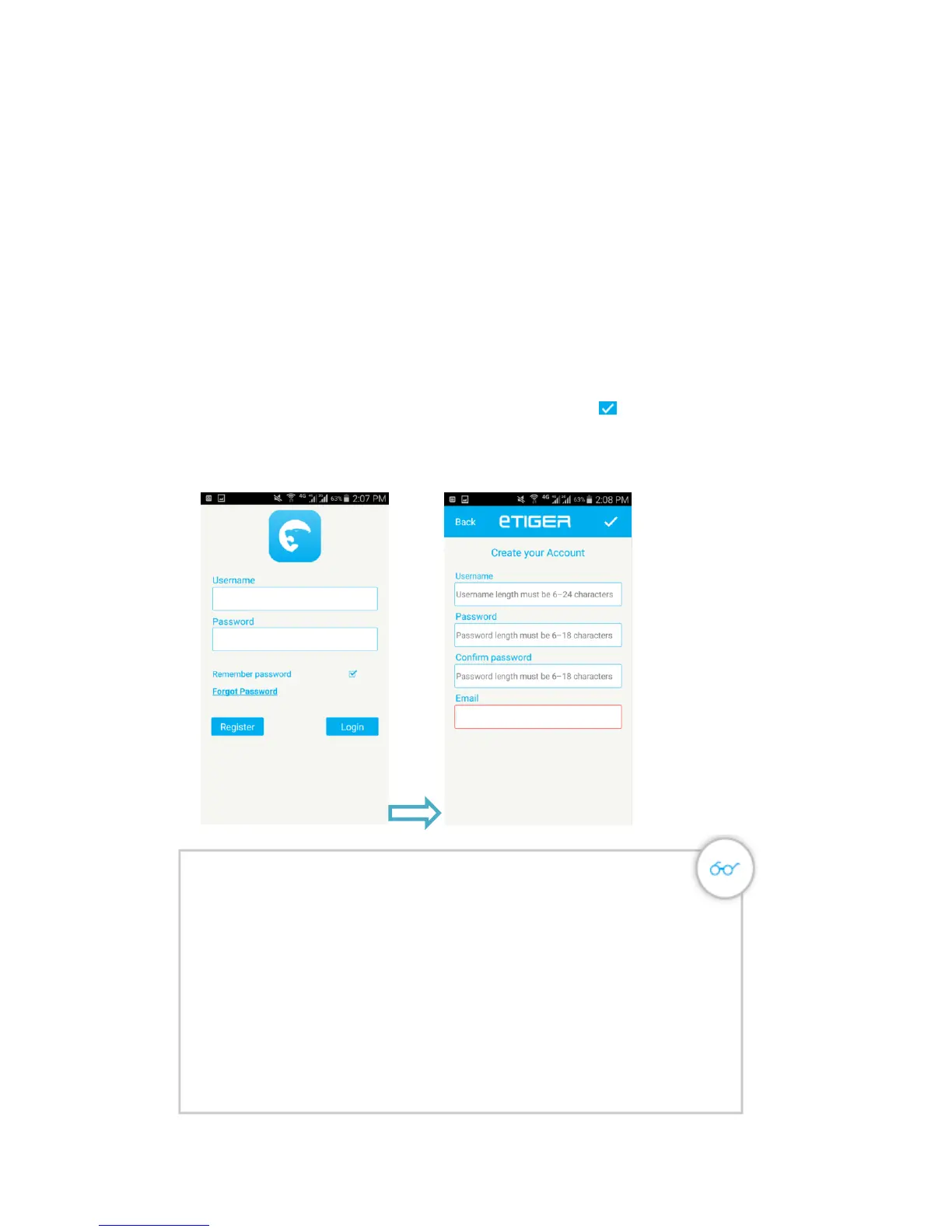
4. Click “Register” to enter “Create your Account” interface.
5. Fill the Username, Password and Email in the fields, click “ ” to save the
information.
6. After register successful, enter the “Username” and “Password”, click “Login” to
enter the APP.
A piece of advice
Even if your control panel is connected to your Wi-Fi network, you
can add a SIM card in your Secual Box. This enables you to receive
notifications by SMS and phone calls, which can be very useful when
you do not have an Internet connection on your smartphone when the
alarm is triggered.
If the Wi-Fi network of the Secual Box is secured
Reset the Secual Box's Wi-Fi by pressing the Connection button 3 of
the control panel for 5 seconds. The control panel beeps 3times, as a
confirmation that it has reset successfully.


 To Next Page