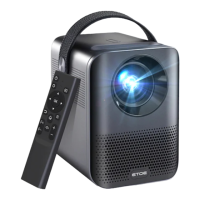
Need help?
Do you have a question about the ETOE A1332 and is the answer not in the manual?
General safety guidelines for device setup, including avoiding moisture, dust, and ensuring proper ventilation.
Identifies and labels key components of the projector's front and rear views, including ports and ventilation.
Safety notices regarding direct viewing of the lens and blocking air ventilation.
Guidance on projector positioning, installing remote batteries, and ensuring proper operating distance.
Steps for powering on the projector using the power button on the device or remote control.
How to use automatic and manual focus features for a clear projected image.
Steps for selecting the display language and pairing the remote control via Bluetooth.
Covers Bluetooth pairing, using the remote app, adding accounts, and Dolby Audio support.
Details on adjusting projection modes, including desktop and ceiling installations.
Resizing the projected image from 50% to 100% without moving the projector.
Automatic and digital methods for correcting vertical and horizontal image distortion.
Correction for image distortion along both axes using four-point adjustment.
Restoring keystone correction settings to their default values.
Instructions for casting content from sites/apps and mirroring screens from Android/iOS devices.
Connecting to HDMI devices, flash drives for media playback, and headphones via AUX cable.
Detailed options within projection settings, including zoom, vertical, horizontal, four-point correction, and reset.

 To Next Page
 General