Instruction Manual COND 6+, TDS 6+, SALT 6+
-7-
2.8 Switching the Meter On
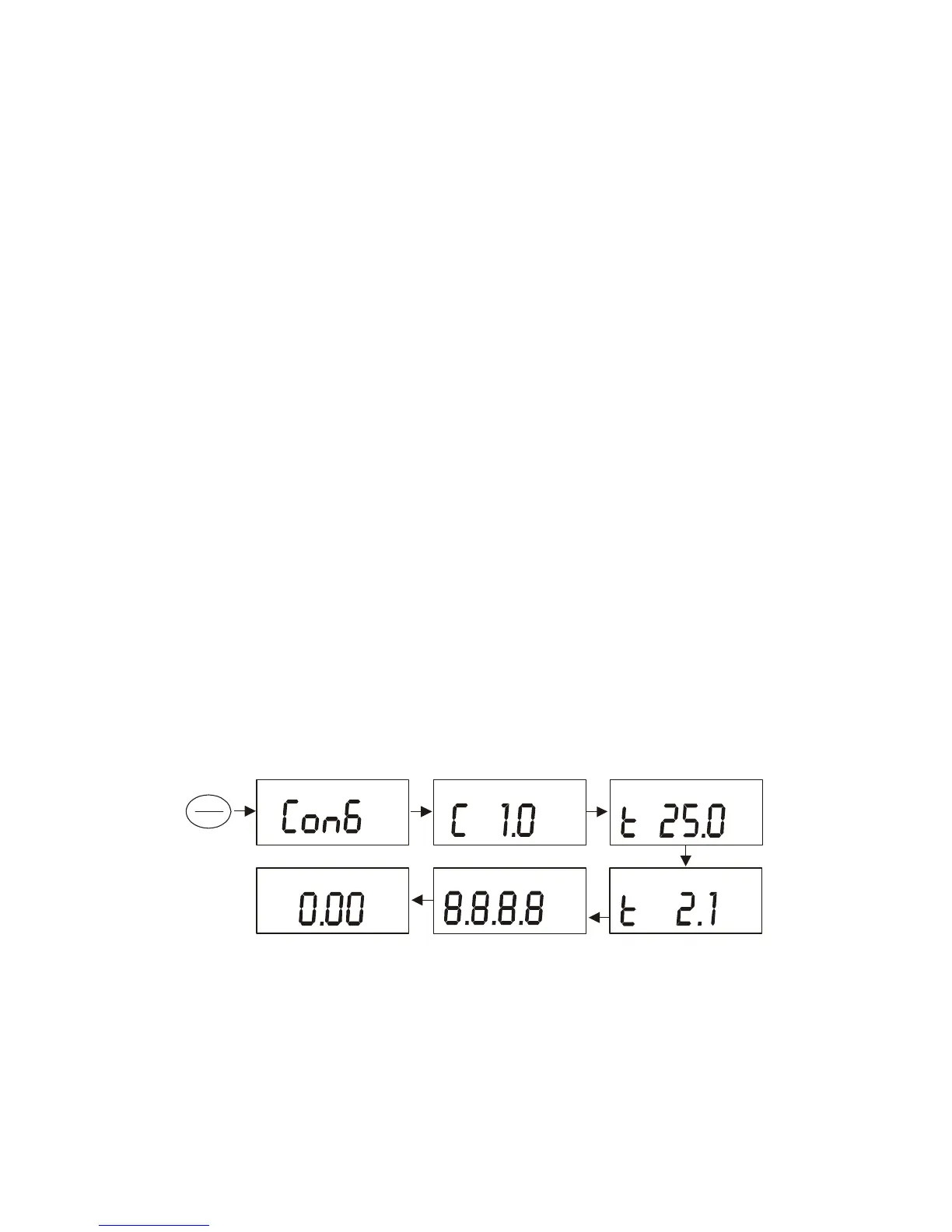
Press ON/OFF to power up your meter. Your meter will cycle through various setup
parameters when switched on.
1. The first screen shows the model [Con6] [tdS6] [SAL6].
2. The second screen shows the nominal cell constant value. The Cond 6+ and TDS
6+ meters can accept electrodes with k = 0.1, 1.0 or 10.0 nominal cell constants.
The Salt 6+ can be used with 1.0 only. Default value is k = 1.0 [C 1.0].
See Section 5.2 Advanced Setup to modify.
3. The third screen shows the Normalization Temperature which can be set to 25 °C
or 20 °C. Default value is 25 °C [t 25.0 °C].
See Section 5.6 Advanced Setup to modify.
4. The fourth screen shows the Temperature Coefficient which can be set from 0.0
to 3.0 % per °C. Default value is 2.1 %/°C [t 2.1%].
See Section 5.5 Advanced Setup to modify.
5. All LCD segments light for 2 seconds before entering measurement mode. Note:
the meter will use the measurement mode that was in use when it was previously
powered off.
Cond 6+
Measurement Mode
m
S
µ
C°
%
pptmV
pH %MINMAXLOHO
F
C°
°
m
S
µ
S
µ
ON
OFF




 To Next Page