Instruction Manual COND 6+, TDS 6+, SALT 6+
-22-
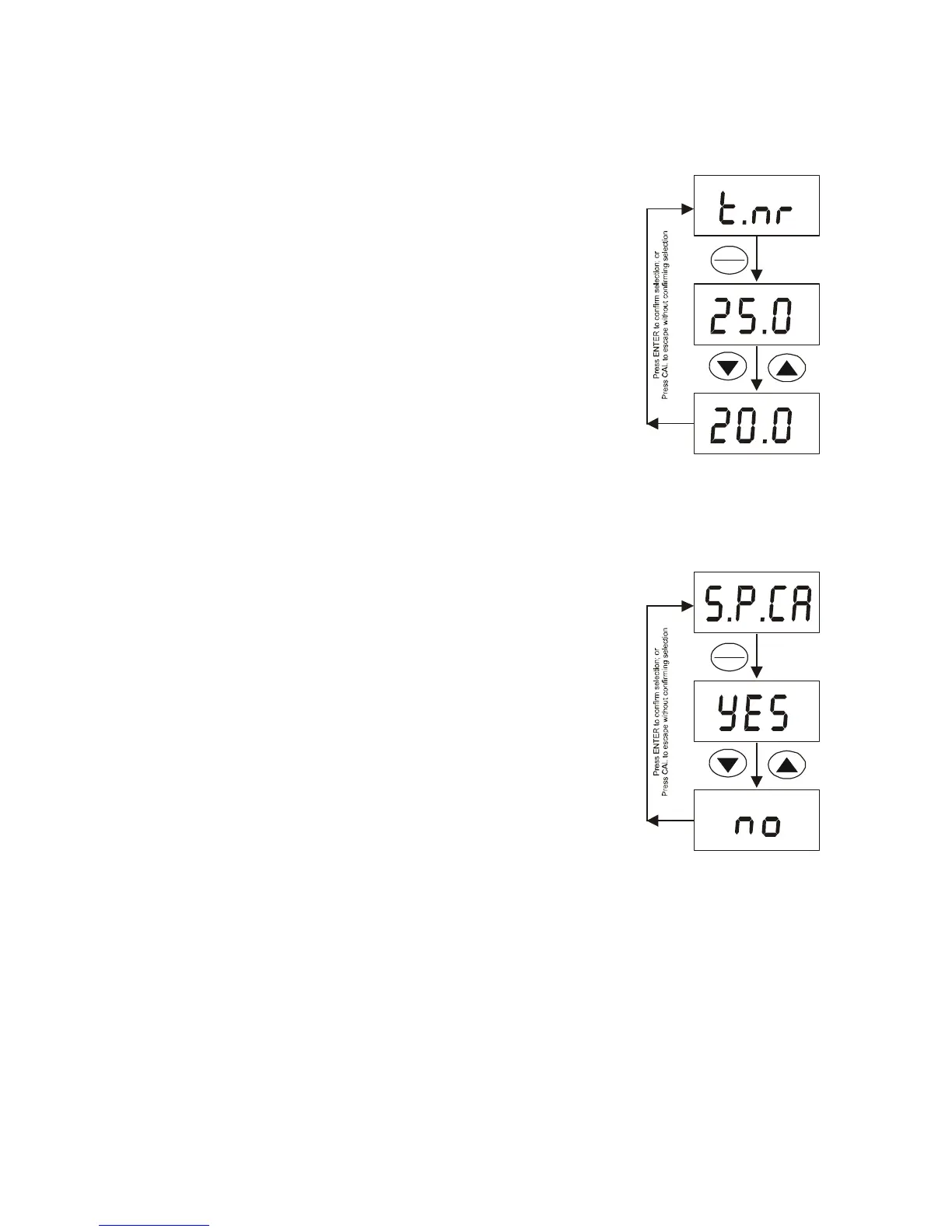
5.6 Normalization Temperature
You can set the meter to normalize its measurements to a temperature of either 25 °C
or 20 °C. Default value is 25 °C.
1. Enter advanced setup as described in
Section 5.1.
2. Press ▲ or ▼ until [t.nr °C] appears. Press ENTER.
3. Press ▲ or ▼ to select [25.0 °C] or [20.0 °C].
4. Press ENTER to select and return to the [t.nr °C]
setup function.
5. Press ▲ or ▼ to move to the next setup function or
press CAL to exit to measurement mode.
5.7 Single-Point Calibration (COND 6+, TDS 6+ only)
Select “YES” to apply a single calibration value across all ranges.
Select “no” to allow separate calibrations for each range, or
to restrict an individual calibration so that it is applied to one
range only. Default value is “Yes”.
1. Enter advanced setup as described in Section 5.1.
1. Press ▲ or ▼ until [S.P.CA] appears. Press ENTER.
1. Press ▲ or ▼ to select [Yes] or [no].
1. Press ENTER to select and return to the [S.P.CA]
setup function.
1. Press ▲ or ▼ to move to the next setup function
menu or press CAL to exit to measurement mode.
C°
C°
C°
HOLD
ENTER
HOLD
ENTER




 To Next Page