Page 7 of 13
www.ev-hub.com.au
Certification and compliance
See Declaration of conformity
Max. installation altitude
600 x 255 x 205 mm (single)
10 kg (single socket)
Double: Combipole in or on the ground, or on a wall.
Single: Combipole in or on the ground, or on a wall.
Wall spacer for direct installation on a wall.
RAL 7016 (dark gray), RAL 9016 (white), RAL 5017
(blue)
5 Using BusinessLine
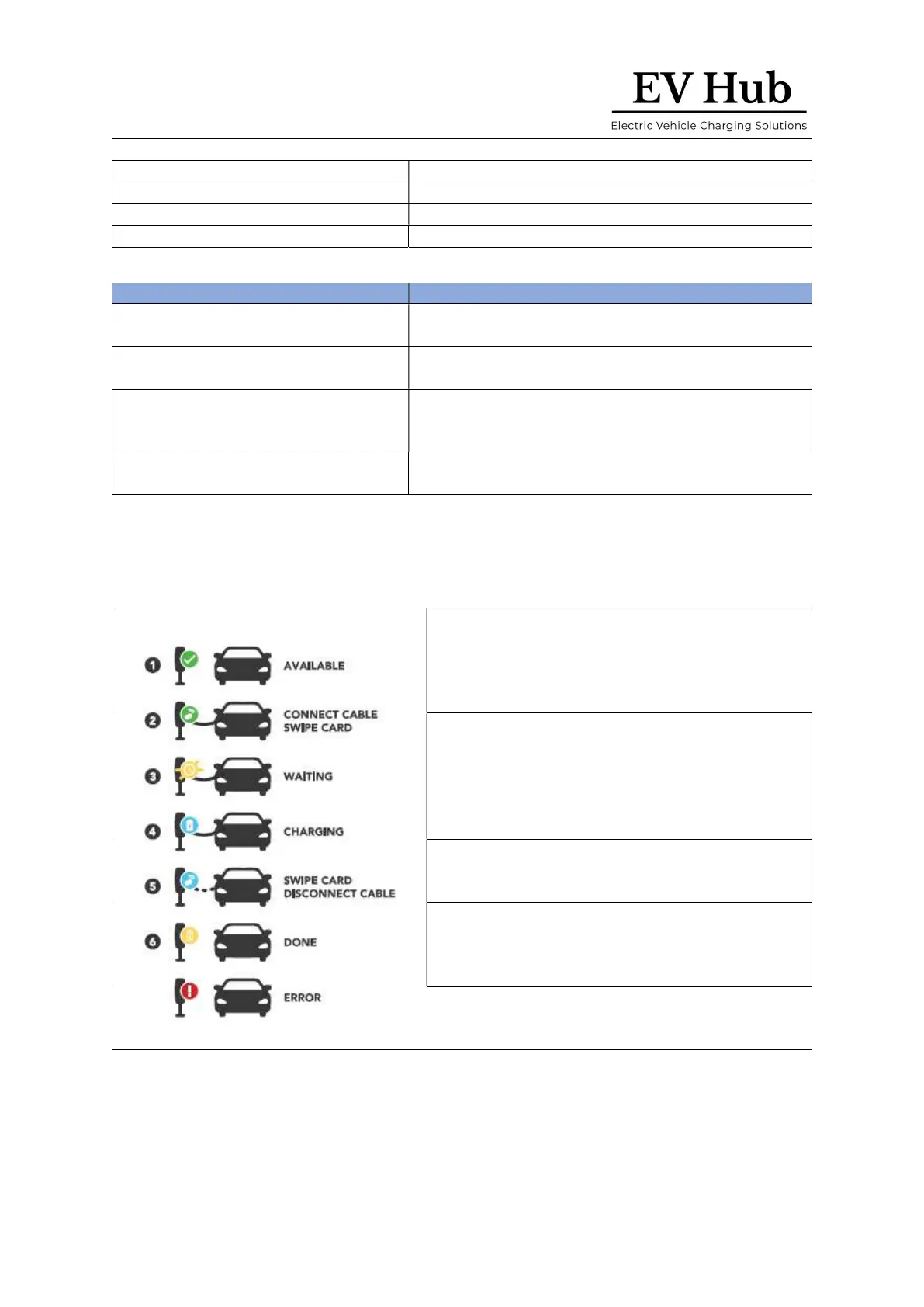
5.1 Start charging with BusinessLine
Plug your charging cable into your car and
into the BusinessLine charging station.
The LED ring shows green.
Hold your charge card (RFID card) in front of
the reader on the charging station.
The LED ring flashes green and you hear a
beep. Your card is being authorized.
The charging station LED ring shows blue
when your car is charging.
The charging station LED ring flashes yellow
when your car is on pause and waiting to
start charging.
The charging station LED ring shows
continuous yellow when your car is charged.
Note:




 To Next Page