The EVlink Wi-Fi module, developed by EVCO S.p.A., is a hardware component designed to integrate EVCO controllers with the EPOCA cloud system, enabling remote monitoring and control functionalities. This module facilitates Wi-Fi connectivity for compatible EVCO controllers, allowing them to access and leverage the features offered by the cloud platform.
Function Description
The primary function of the EVlink Wi-Fi module is to provide Wi-Fi connectivity to EVCO controllers, thereby enabling them to communicate with the EPOCA cloud system. This connection allows for remote monitoring, data logging, and potentially remote configuration of the connected controllers. The module is available in two main variants: EVIF25TWX and EVIF25SWX, differing primarily in their communication ports (TTL MODBUS and RS-485 MODBUS, respectively). Both variants can be powered either directly by the EVCO controller, if the controller is capable of supplying sufficient power, or independently via a 12 VAC/15 VDC power supply. This flexibility ensures compatibility with a wide range of EVCO controllers, regardless of their power output capabilities.
Once connected and configured, the EVlink Wi-Fi module acts as a bridge, transmitting data from the EVCO controller to the cloud server and relaying commands from the cloud back to the controller. This enables users to monitor the status and performance of their systems (e.g., refrigeration units, HVAC systems) from anywhere using a multimedia device such as a PC, laptop, tablet, or smartphone. The module's internal clock ensures accurate timekeeping for data logging, even in the absence of a continuous power supply, thanks to a secondary lithium battery.
The module's operation involves several key steps:
- Physical Connection: The EVlink Wi-Fi module is physically connected to the EVCO controller via its respective MODBUS port (TTL or RS-485). If the controller cannot power the module, an independent power supply is connected.
- Network Configuration: The module is configured to connect to a local Wi-Fi network. This involves accessing the module's control panel via a web browser on a multimedia device, identifying available Wi-Fi networks, and entering the security key.
- Cloud Integration: After network setup, the module is registered with the EPOCA cloud server. This typically involves creating a new account or logging into an existing one on the epoca.cloud website and linking the module to the user's plant.
- Data Exchange: Once integrated, the module continuously exchanges data between the controller and the cloud, allowing for real-time monitoring and remote control.
The module's LEDs provide visual feedback on its operational status: a red LED indicates MODBUS communication status (on for activity, slow flash for activity, off for no activity), and a green LED indicates Wi-Fi communication status (on for connection to both Wi-Fi and cloud, off for no Wi-Fi connection, rapid flash for Wi-Fi connection but no cloud connection).
Usage Features
The EVlink Wi-Fi module offers several features that enhance its usability and integration:
- Flexible Powering Options: The ability to be powered by the controller or an independent 12 VAC/15 VDC supply makes it adaptable to various EVCO controller models and installation scenarios.
- Two Communication Port Variants: The availability of TTL MODBUS (EVIF25TWX) and RS-485 MODBUS (EVIF25SWX) ensures compatibility with different EVCO controller communication interfaces.
- Web-Based Configuration: The module's configuration is performed through a user-friendly web interface, accessible via a standard web browser on any multimedia device. This simplifies the setup process, allowing users to configure network settings, plant details, and cloud access.
- Remote Monitoring and Control: Through the EPOCA cloud system, users can remotely monitor their EVCO controllers, view logged data, and potentially adjust settings, providing convenience and operational efficiency.
- Firmware Update Capability: The module supports firmware updates via its web interface, allowing for improvements, bug fixes, and new features to be deployed over time. This ensures the device remains up-to-date and secure.
- Plant Configuration Management: The system allows for downloading and uploading plant configuration files, which is useful for replicating settings across multiple EVlink Wi-Fi devices within the same plant or for backup purposes.
- Diagnostic Tools: Features like DNS testing aid in troubleshooting network connectivity issues, ensuring reliable communication with the cloud.
- Security Protocols: The module supports various Wi-Fi security protocols (Open, WEP, WPA/WPA2 Personal aka PSK) and encryption methods (TKIP, CCMP), providing secure wireless communication.
Maintenance Features
Maintenance of the EVlink Wi-Fi module primarily involves ensuring its proper functioning and addressing any connectivity issues:
- Battery Charging: The internal secondary lithium battery, which powers the clock in the absence of a main power supply, requires a full charge at least once a year to ensure correct operation and accurate timekeeping. The battery charges automatically when the module is powered.
- Firmware Updates: Regularly updating the module's firmware is a key maintenance practice. This can introduce performance enhancements, security patches, and new functionalities. Users should be aware that updating firmware may reset existing settings on the Plant and Network screens, requiring re-configuration.
- Factory Reset: In cases of severe configuration issues or when re-deploying the module, a factory reset option is available. This process involves physically accessing the module to note down a password, then using a specific "resetPlant" command in the web interface to clear the Plant and Network settings. It's important to note that a factory reset does not delete data recorded by the EVlink Wi-Fi data logger.
- Electromagnetic Interference Mitigation: To reduce electromagnetic interference, power cables should be routed as far away as possible from signal cables.
- Environmental Precautions: The module should be installed in an environment where the Wi-Fi signal is strong, away from metal parts that could impede communication, and away from heat sources, strong magnetic fields, direct sunlight, rain, damp, excessive dust, mechanical vibrations, or shocks. These precautions help ensure the longevity and reliable operation of the device.
- Disconnection for Maintenance: Before performing any maintenance, the device should be disconnected from both the controller and any independent power supply.
- Condensation Prevention: If the device is moved from a cold to a warm environment, it is recommended to wait for about an hour before connecting it to prevent condensation from forming inside, which could damage the electronics.
- Proper Installation: Ensuring the device is installed properly, with all protective parts fixed securely (requiring a tool for removal), is crucial for safety and to prevent accidental contact with electrical components.

 Need help?
 General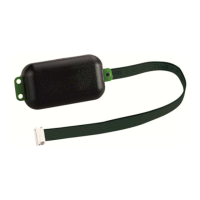

 To Next Page