EVCO S.p.A. EVlink Wi-Fi | Installer manual ver. 1.1 | Code 144IF25TWXE114
page 6 of 18
4 ELECTRICAL CONNECTION
N.B.
- The compatibility of the controller with the EPoCA remote monitoring system and the possibility of powering EVlink Wi-Fi from the controller depend on
the type of controller. See the document "EPoCA - List of compatible controllers" available on the website www.evco.it and/or the label on the controller
- Do not power more than one EVlink Wi-Fi with the same power supply
- If EVlink Wi-Fi is to be independently powered, do not power it with the same power supply as the controller connected to EVlink Wi-Fi
- The battery of EVlink Wi-Fi is charged by the power supply of the device or by the independent power supply: for correct operation, the battery must be
fully charged at least once a year
- To reduce any electromagnetic interference, locate the power cables as far away as possible from the signal cables
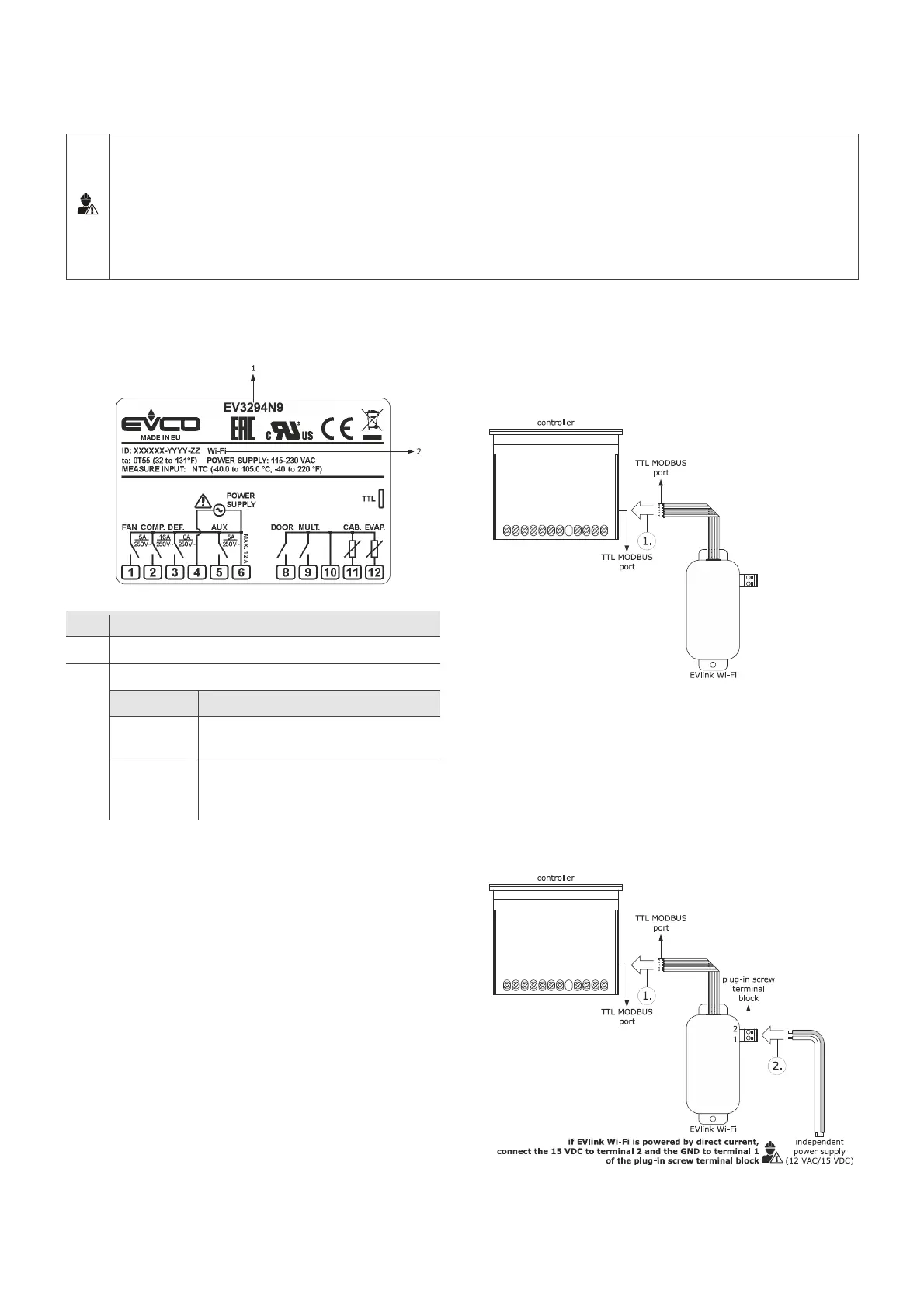
4.1 Example of controller label
Part Description
1 Purchasing code
2 Additional information
Abbreviation Meaning
Wi-Fi The controller is compatible with the EPoCA
system and is able to power EVlink Wi-Fi
Wi-Fi + PS The controller is compatible with the EPoCA
system but the EVlink Wi-Fi module must be
independently powered
4.2 Electrical connection of EVIF25TWX
to a controller able to power EVlink
Wi-Fi
1. Connect the TTL MODBUS port on the EVlink Wi-Fi to the TTL
MODBUS port on the controller.
Before powering up the controller, see the section FIRST-TIME USE.
4.3 Electrical connection of EVIF25TWX
to a controller unable to power
EVlink Wi-Fi


 To Next Page