EVCO S.p.A. EVlink Wi-Fi | Installer manual ver. 1.1 | Code 144IF25TWXE114
page 11 of 18
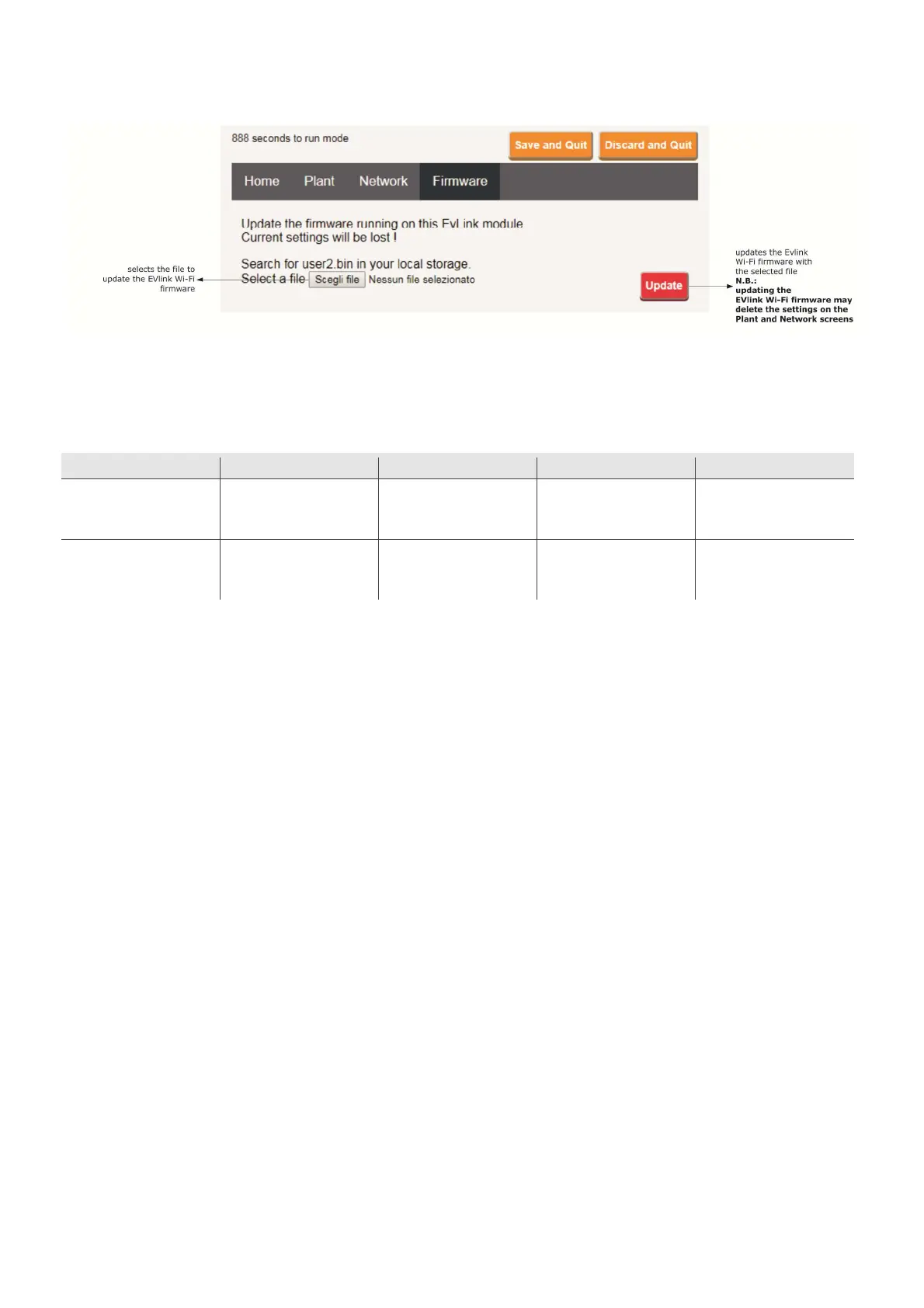
12. Select the Firmware screen on the EVlink Wi-Fi control panel.
13. Disconnect the controller and disconnect the independent EVlink Wi-Fi power supply, if used, from the power source.
14. Power up the controller.
15. Connect the independent EVlink Wi-Fi power supply, if used, to the power source.
5.2 Description of the EVlink Wi-Fi LEDs
LED ON OFF SLOW FLASH RAPID FLASH
red
(MODBUS communication
status)
- no MODBUS activity MODBUS activity -
green
(Wi-Fi communication status)
connection with both the Wi-Fi
network and the cloud server
no connection with the Wi-Fi
network
connection with the Wi-Fi
network, no connection with
the cloud server


 To Next Page