OPERATING INSTRUCTIONS
Cooling ventilation
In order to cool down the exterior of the appliance, some models are equipped with a cooling fan which comes on
automatically when the oven is hot.
When the fan is on, a normal flow of air can be heard existing between the oven door and the control panel.
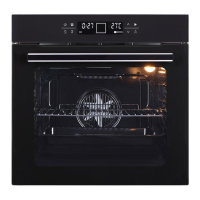
Set the clock
When the machine is on, the LED screen displays 12:00 and the current time icon on the LED screen flashes
continuously. At this time, press the or keys to set local time, the setting will be automatically confirmed if
no any action in 5 seconds.
Activate the Oven and switch off
Each time you want to cook the dishes, you need to activate the oven first. Press the key for 2 seconds to
activate it. Press and hold the key for 3 seconds again to switch off the oven.
Set the cooking mode, Cooking time and cooking temperature
1. Press the key. The digital display will show different cooking function, select the one you want. Press Ok key
to confirm or it should be automatically confirm if no any action in 5 seconds.
2. After the cooking function is selected, the display will show the default cooking time and cooking temperature
according different function. Set the cooking time by pressing the and keys.
3. Press the key, the temperature reading in the display flickers, set the temperature by press the and
keys.
4. To let the temperature reach desired setting, press the key for 3 seconds. The oven will heat up to desired
setting temperature in a very short time.
Pyrolytic Self Cleaning
Before starting the Pyrolytic cleaning function, all excess spillage must be removed from inside the oven.
Remove all cooking utensils, side racking, oven trays and oven racks. The temperature when using the pyrolytic
function can be extremely hot and higher than temperatures used during the normal cooking process.
Ensure children are always kept away from the oven when the Pyrolytic self-cleaning function is activated.
In standby mode (under no function operation), press key to choose Pyrolytic Self-Cleaning function, the
indicator lights of the and keys flash and only and key are lit. The default self-cleaning time is
60mins (“P:60” shows in the display). The self-cleaning ranges from 45min to 120min. Press and key to choose
time. During the pyrolytic clean process, all the touch keys are deactivated unless the power key . Hold the key
for 3 seconds to cancel the cleaning process. The door automatically locks during Pyrolytic operation. Do not
open the door during self-cleaning process. After self-cleaning function is completed, the door can be opened until
furnace temperature cool down.
Child lock / PAUSE/START
Child lock: Press and hold the key for 3 seconds to lock all the keys. Press and hold 3 seconds again to unlock.
Pause/ Start: While the oven is working, press the key to pause and press again to resume working.


 To Next Page