64
Electrical System
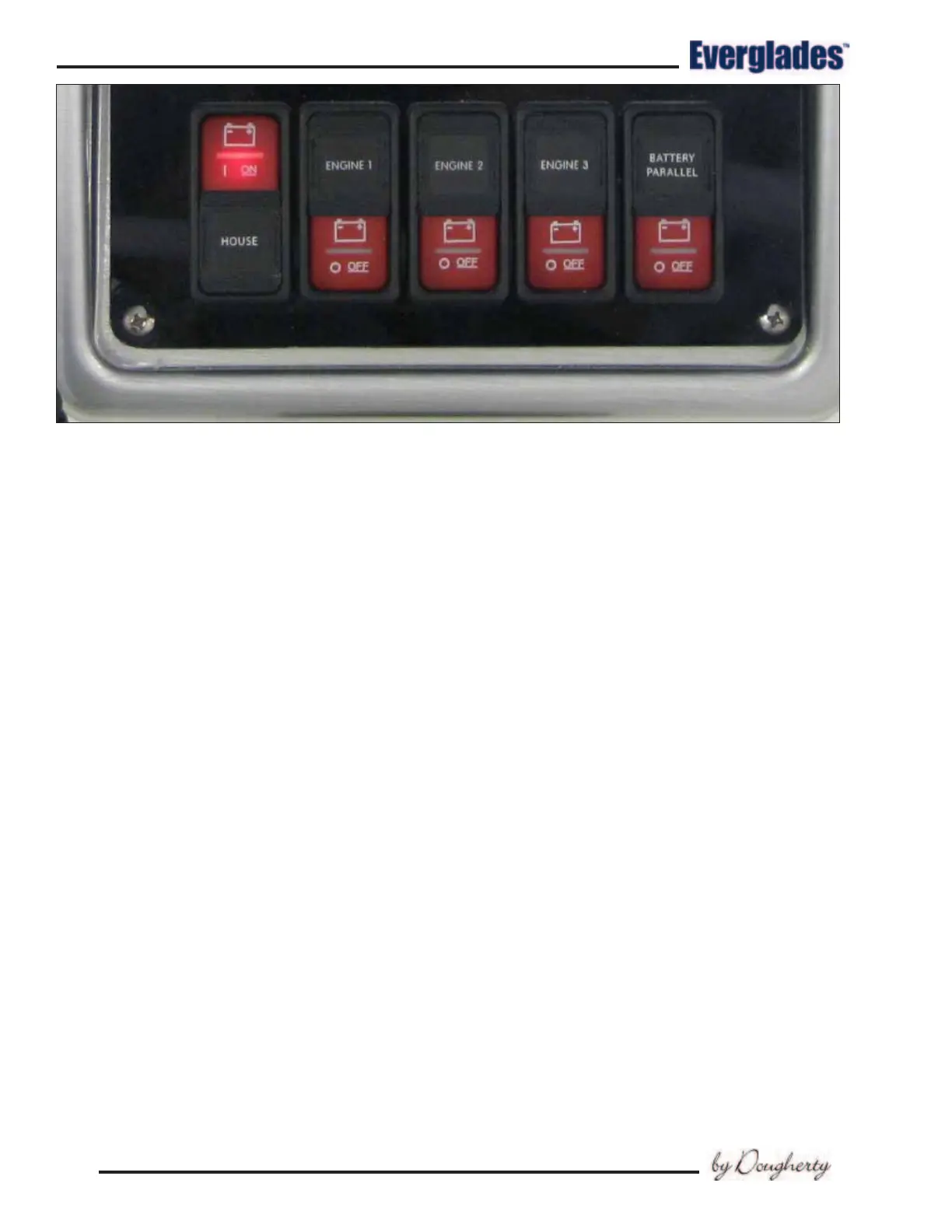
House
Remotely activates the House battery switch. A
red LED light in the switch glows when the bat-
tery switch it controls is activated. Slide the label
down and press the top of the switch to activate
the indicated battery switch. Slide the label up
and press the bottom of the switch to turn the
indicated battery switch off. The red light may
not turn off immediately or will slowly fade out if
there are no loads present on the system.
Engine 1
Remotely activates the Port Engine battery switch.
A red LED light in the switch glows when the bat-
tery switch it controls is activated. Slide the label
down and press the top of the switch to activate
the indicated battery switch. Slide the label up
and press the bottom of the switch to turn the
indicated battery switch off. The red light may
not turn off immediately or will slowly fade out if
there are no loads present on the system.
Engine 2
Remotely activates the Starboard Engine battery
switch. A red LED light in the switch glows when
the battery switch it controls is activated. Slide
the label down and press the top of the switch to
activate the indicated battery switch. Slide the
label up and press the bottom of the switch to
turn the indicated battery switch off. The red light
may not turn off immediately or will slowly fade
out if there are no loads present on the system.
Engine 3 (Optional)
Remotely activates the Center Engine battery
switch. A red LED light in the switch glows when
the battery switch it controls is activated. Slide
the label down and press the top of the switch to
activate the indicated battery switch. Slide the
label up and press the bottom of the switch to
turn the indicated battery switch off. The red light
may not turn off immediately or will slowly fade
out if there are no loads present on the system.
Notice:
The Emergency Parallel and remote battery
switches are always supplied power when-
ever the house battery is connected.
Hardtop Accessory Switch Panel
The Hardtop accessory switch panel is located
in the Hardtop liner above the helm. The circuit
breakers that protect the accessories are located
in the head compartment breaker panel. LED
lights built into the switches indicate that the
circuit is activated.
The following accessories are controlled by
the Hardtop switch panel:
Windshield
A momentary, three-position switch that activates
the hydraulic rams that raise and lower the wind-
shield to provide ventilation for the helm area
and/or improve visibility. The center position is
OFF. Move the switch in one direction to lower the
Parallel and Battery Switches in Helm Switch Panel



 To Next Page