32
ABF 05-10-15
ENGLISH
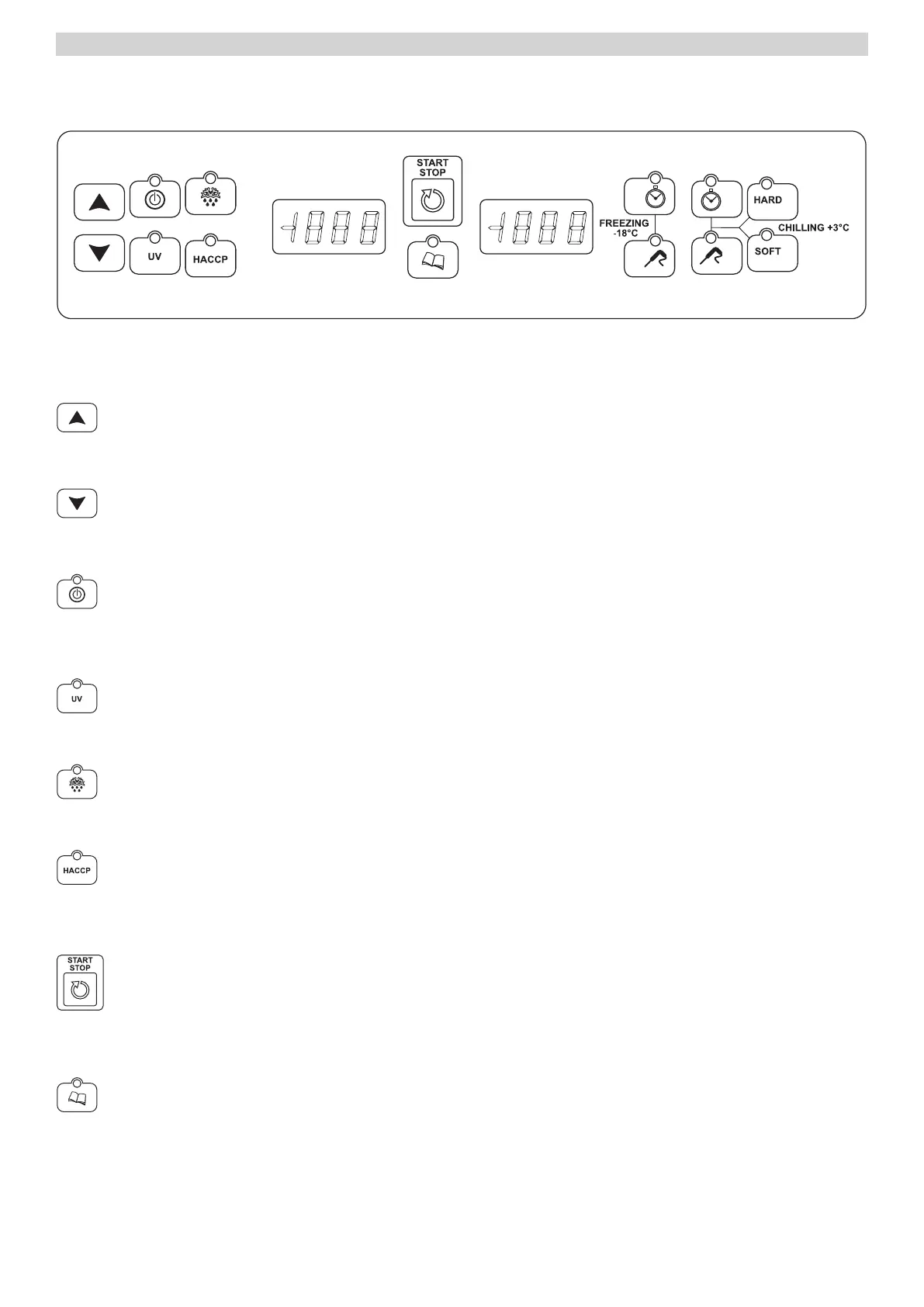
USER INTERFACE
KEYS
INCREASE key
Increase the parameter value in the display
DECREASE key
Decrease the parameter value in the display
Key ON/OF
With card in OFF: the single pressure input’s the STANDBY
With card in STANDBY or with in progress: the continuous pressure for five seconds puts in OFF
STERILIZATION Key
With card in STANDBY: the single pressure selects the sterilization.
DEFROSTING key
Con files in STANDBY: the single pressure selects and starts the defrosting cycle.
HACCP Key
With card in OFF: pressed for five seconds allows vision of the alarms list.
Once visualized the alarm list: a single pressure allows the printing operation
START / STOP KEY
With a selected cycle: a single press to start on.
With a cycle in progress: a single pressure to the off.
PROGRAM KEY
With card in Standby: the single press select’s a memorized program.
In phase of selection: the continuous pressure for five seconds to enter in memorization program menu.
View Historic HACCP: the single pressure allows to check the parameters of the historic memory.



 To Next Page