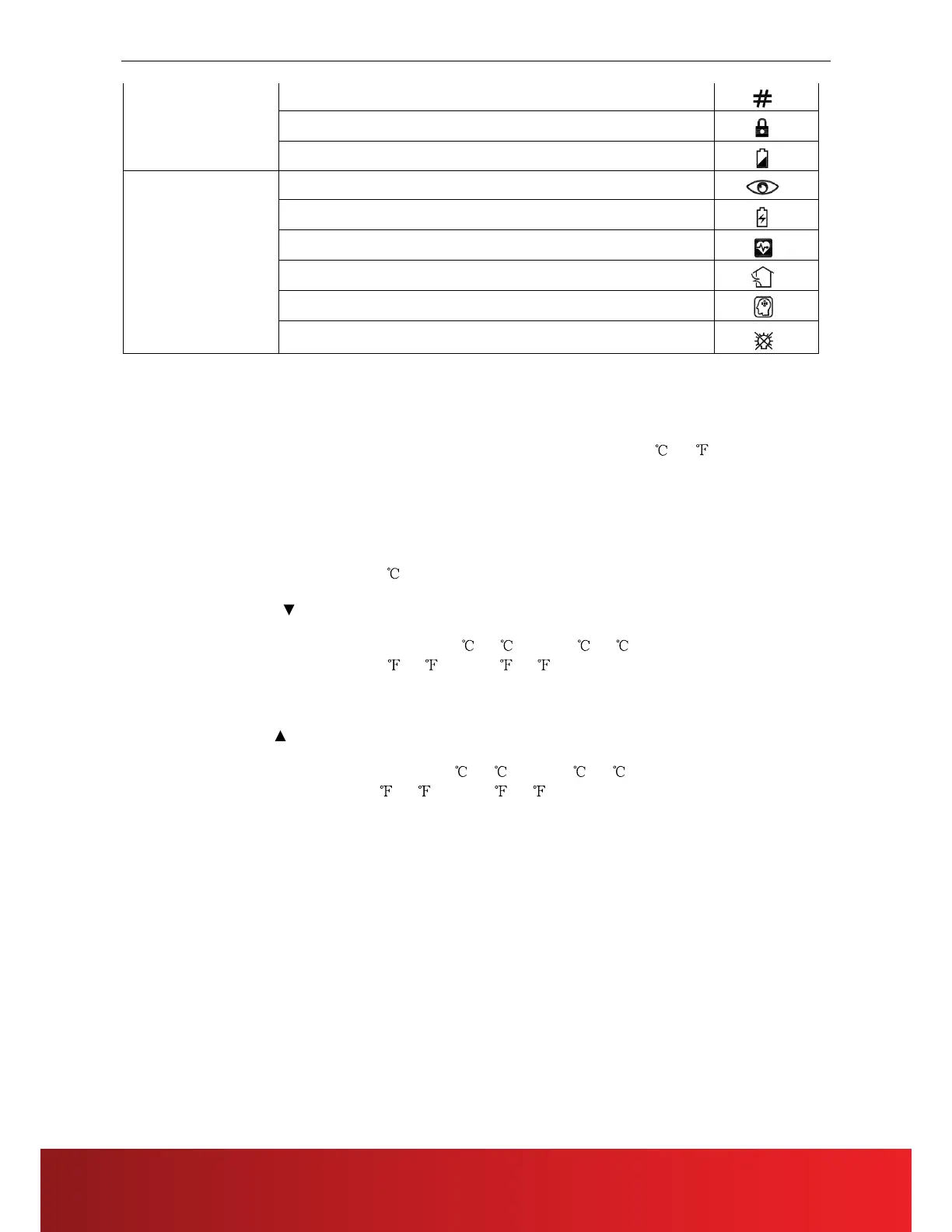
lamplight
Button function of remote controller
ON/OFF
When pressing this key, the remote controller switches by "on, off, on" circularly.
When the first power on, the working state is set by default: setting temperature 25
(77 ), automatic mode,
automatic fan speed, internal and external pendulum wind, no TURBO, no sleep, no timer, no lock).
When the power on is not the first time, the state before shutdown is recovered. After shutdown, the sleep, TURBO,
ECON and timer functions will be canceled.
Mode
When pressing this key, the remote controller swiches by "automatic, cooling, dehumidification, fan, heating,
automatic" circularly.
The dehumidification mode is locked at 25
and the temperature can not be adjusted. The internal pendulum wind
stays unchanged according to the state before switching, but the external pendulum wind is forced to close.
Temperature reduction
Temperature setting: when pressing this key, the setting temperature will be reduced by 1. The temperature of
centigrade model will be reduced progressively by "32
, 31 , ……, 17 , 16 ". The temperature of fahrenheit
model will be reduced progressively by "90
, 89 , ……, 62 , 61 ". When pressing this key in dehumidification
and fan mode, the temperature will not change.
In the clock setting state (the clock icon will flicker to show the prompt), this key is used to set the clock time.
Keep pressing will continuously change the temperature.
Temperature addition
Temperature setting: when pressing this key, the setting temperature will be added by 1. The temperature of
centigrade model will be added progressively by "16
, 17 , ……, 31 , 32 ". The temperature of fahrenheit
model will be added progressively by "61
, 62 , ……, 89 , 90 ". When pressing this key in dehumidification
and fan mode, the temperature will not change.
In the clock setting state (the clock icon will flicker to show the prompt), this key is used to set the clock time.
Keep pressing will continuously change the temperature.
Up and down swinging (External pendulum wind)
Pressing this key in the dehumidification mode, the external pendulum wind is forced to close.
Pressing this key in the other modes, the external pendulum switches by "swing, fixed wind, swing" circularly.
Left and right swinging (Internal pendulum wind)
Pressing this key in the dehumidif
ication mode, the internal pendulum wind stays unchanged according to the state
before switching.
Pressing this key in the other modes, the internal pendulum switches by "swing, stop, swing" circularly.
“FAN -”
When the first power on, the remote controller is set to the automatic wind speed by default. In dehumidification
mode, the wind speed is fixed to low wind and is not adjustable. By pressing the wind speed key, there is no response
to the remote controller.
Pressing this key in the other modes, the wind speed switches by "aut
omatic wind speed, high speed, middle speed,
low speed, automatic wind speed " circularly.
“FAN +”
When the first power on, the remote controller is set to the automatic wind speed by default. In dehumidification
mode, the wind speed is fixed to low wind and is not adjustable. By pressing the wind speed key, there is no response
to the remote controller.



 To Next Page