EVGA X299 Micro (131-SX-E295)
- 112 -
Be
low Voltages is Temperatures. This covers the CPU (socket), PWM, SYS, individual
CPU cores, and the CPU package, which reports temperatures from the CPU Register.
The bottom section is for Fans, which displays the RPM of all fans currently plugged in
to the motherboard using the 3-pin or 4-pin fan header.
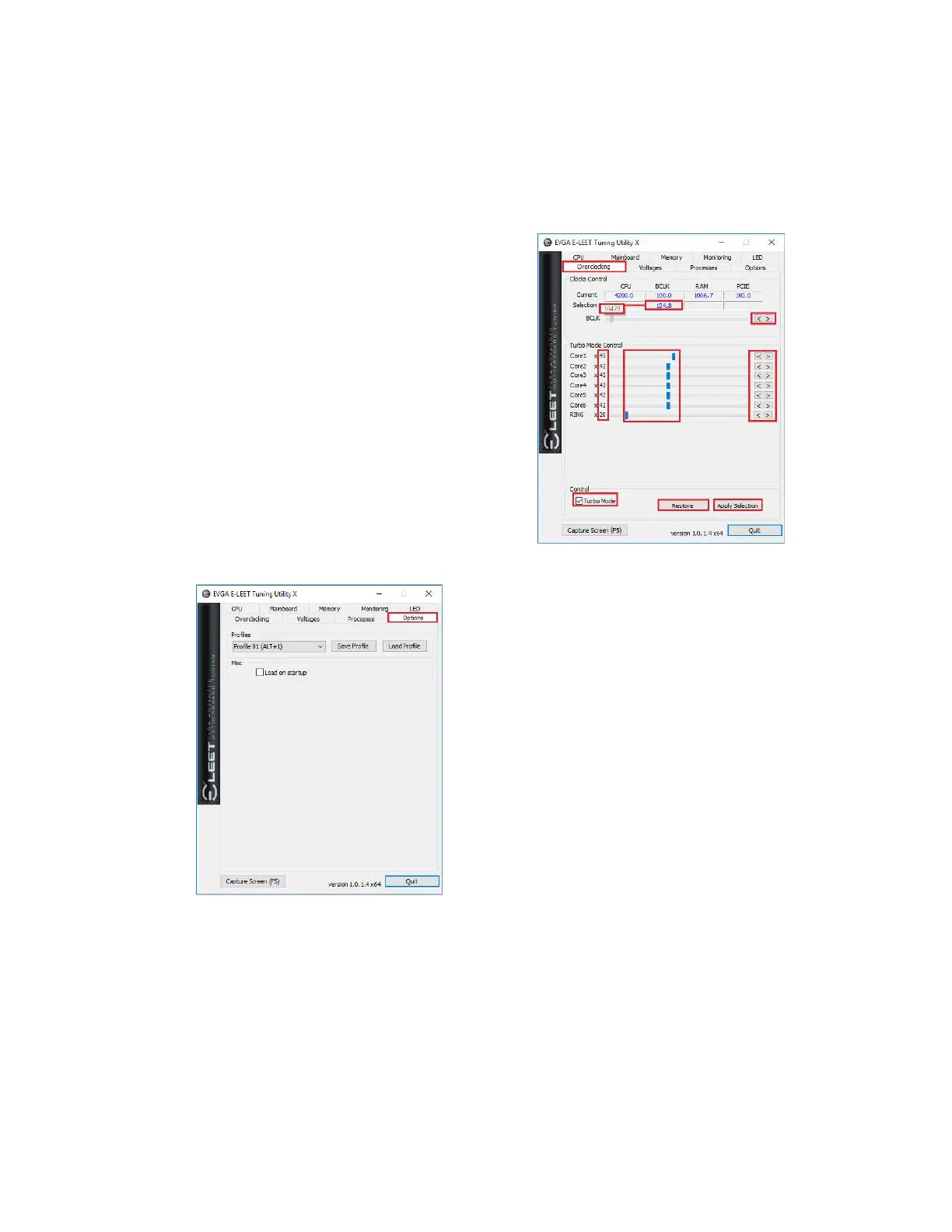
The next tab is “Overclocking,” which covers
adjustments to the BCLK, individual Cores, and
the RING.
The BCLK can be adjusted by either manually
moving the slider, or clicking on the arrows to
the right. The BCLK can be adjusted by
hundredths of a MHz. For example, the slider
will show 10478, whereas the monitor will show
104.8 (rounded).
The Cores and the RING are adjusted in the
same fashion, except they are adjusted by whole
numbers, rather than fractions.
At the bottom is a checkbox for “Turbo Mode,”
which is required to adjust clock multipliers. The
Restore and Apply Settings buttons are there to
either revert to factory default, or make your
changed settings live.
The Options tab is for managing your E-LEET
profiles. You can save overclock profiles made
in the previous section, as well as selecting an
option to load a profile at boot. Use care,
however, when setting a profile to load on
startup; if the overclock is unstable, it may
prevent your system from booting to the OS.



 To Next Page