22
5.Operation
If you want to cancel the timer setting ,follow this below
Outlet water temperature
Timer state
Pressing " "
lasting for 2S
The current timer state
The "ON" and " 1 "
icons are flashing
Pressing " "
The icon " ON ","1" and
the icon hour are flashing.
Pressing " "
you can cancel
the first timer
on setting
Outlet water temperature
Cancel timer on
Pressing
" "
5. Operation
21
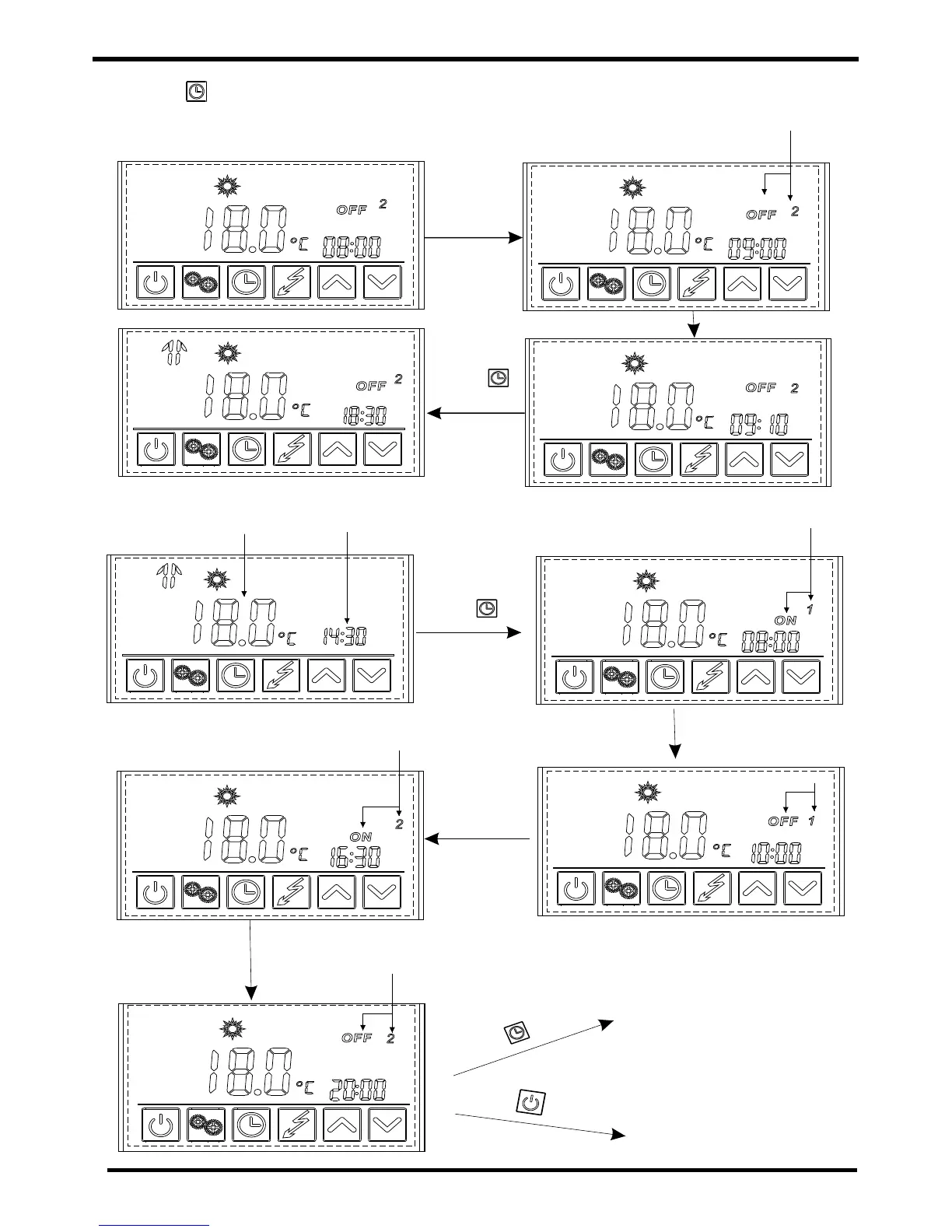
Press " " and hold for 2s to enter
into the next setting without confirming
the previous one.
Set the hour.
OFF 2
Press
to confirm
the tim e.
Set the minute.
Example: Running period 1: 8:00~10:00; Running period 2: 16:30~22:00.
Outlet water temperature
Current tim e
Press " "
and hold for 2s.
ON 1
OFF 1
Confirm the time after setting.
Confirm the
time after
setting.
ON 2
Confirm the time after setting.
OFF 2
P
r
e
s
s
"
"
to
c
o
n
f
irm
Successful setting
P
res
s "
"
to
ca
n
c
e
l
th
e
s
ett
ing
a
nd exit.
Without saving


 To Next Page