5. Operation
24
5.10 Fan mode setting
Press " " and hold for 2s for the first time to change the fan mode to low speed running
and the fan will run at low speed when the unit target temperature is reached. Press " "
and hold for 2s again to change the fan mode to high speed running and the fan will run at
high speed when the unit target temperature is reached. Press " " and hold for 2s for the
third time to change the fan mode to shut-down and the fan will stop running when the unit
target temperature is reached.
Definition of the fan icon
1. (Running) : shows that the fan is running at high speed
2. (Running): shows that the fan is running at low speed.
3.Fan icon disappears: shows that the fan is shut off.
4. (Static) : shows that the fan will run at high speed when target setting temperature
is reached.
5. (Static) : shows that the fan will run at low speed when target setting temperature
is reached.
5.9 Hydropower heater setting
The Hydroboost heater can be turned on when the unit is heating or standby.
Press " " once to turn on the Hydroboost heater and press " " again to shut it off .
Hydropower heater
Hydropower heater
Fan mode
5.Operation
23
5.8 Vacation mode
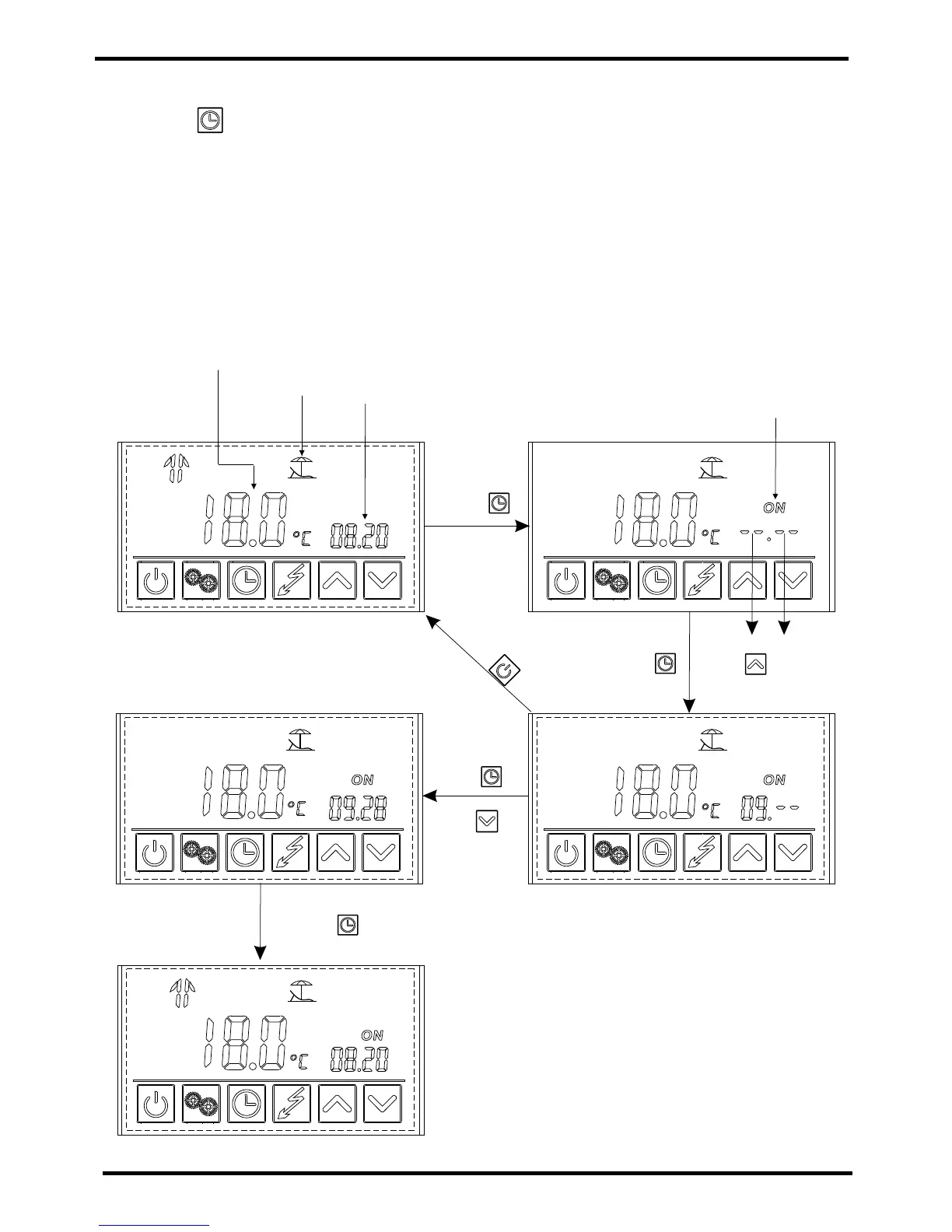
Press " " and hold for 2s to enter into the timer setting interface. The symbol "ON "
and the date parameter are flashing at this time. Then set the date in the same way as "2.6 ".
Vacation mode
Outlet water temperature
The current date
ON
Press "
and hold for
2s.
Press " " then " "
to set the date to September
Press" "
then " "
Press " " to save
Pre
ss
"
"
to ca
ncel
Month day
Example: Set the start-up date on September 28.(Note: )
Note:
Turn off the unit before.


 To Next Page