+1.317.845.5710
+5255.56080817
+44.1438.310163
USA (Corporate Headquarters)
Mexico
Europe/Middle East/Asia
48
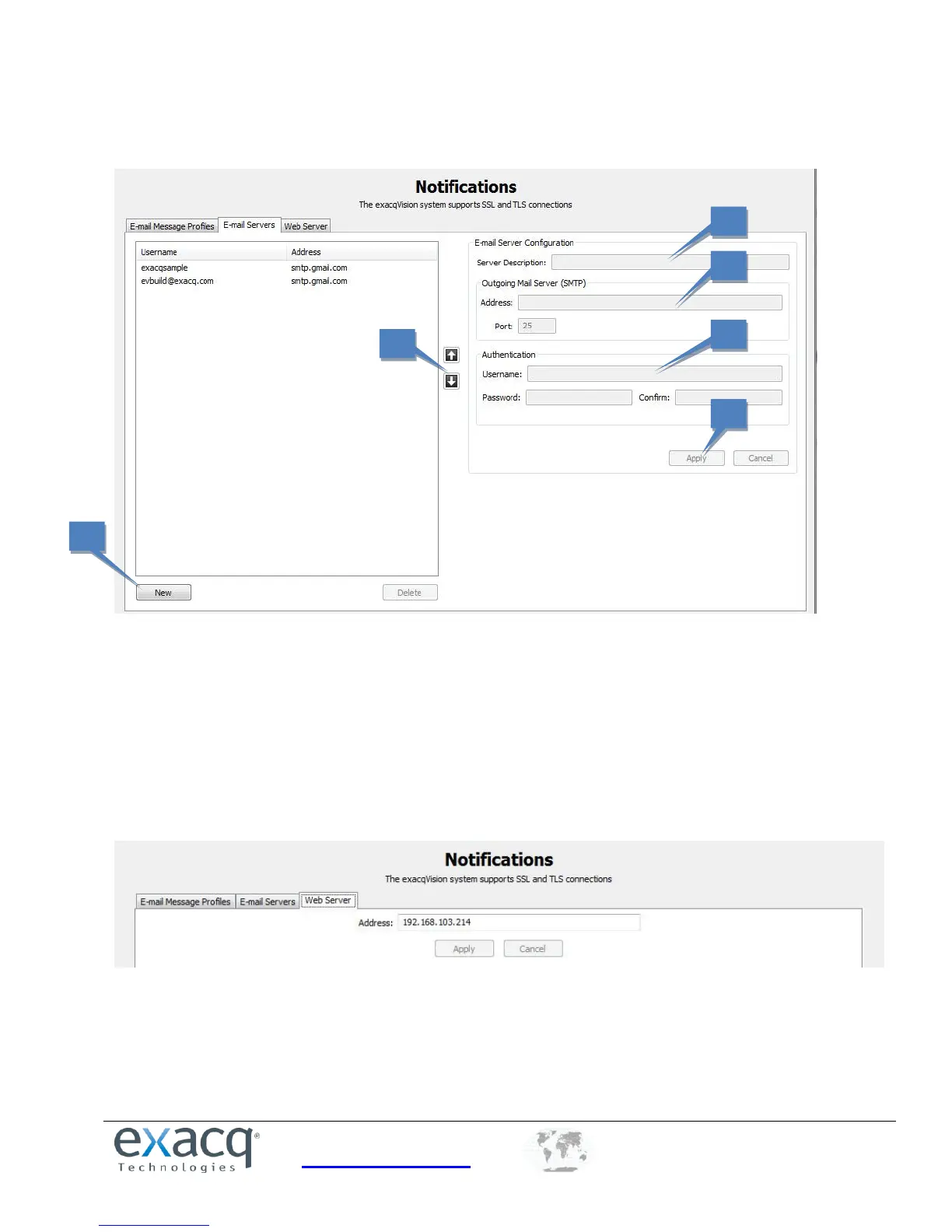
The E-mail Servers Configuration tab allows you configure the outgoing SMTP mail server that sends email from the
exacqVision system. This information can be provided by the network administrator.
1. Click New.
2. In the Server Description field, enter a unique, descriptive name of email server.
3. In the Outgoing Mail Server (SMTP) section, enter the address and port number (25 is the default) of the
outgoing mail server.
4. If your email server requires authentication, enter a valid Username and Password in the Authentication section.
5. Click Apply to add the email server to the list.
6. To change the order of the email servers, select a server from the list and then click the up or down button.
The Web Server tab allows you to enter the IP address of the web server so that email notifications can include a direct
link to video associated with a notification.


 To Next Page