+1.317.845.5710
+5255.56080817
+44.1438.310163
USA (Corporate Headquarters)
Mexico
Europe/Middle East/Asia
77
The System Information page also includes a Login History tab and an Audit Trial tab when you are connected to a
compatible system (not available in exacqVision Start).
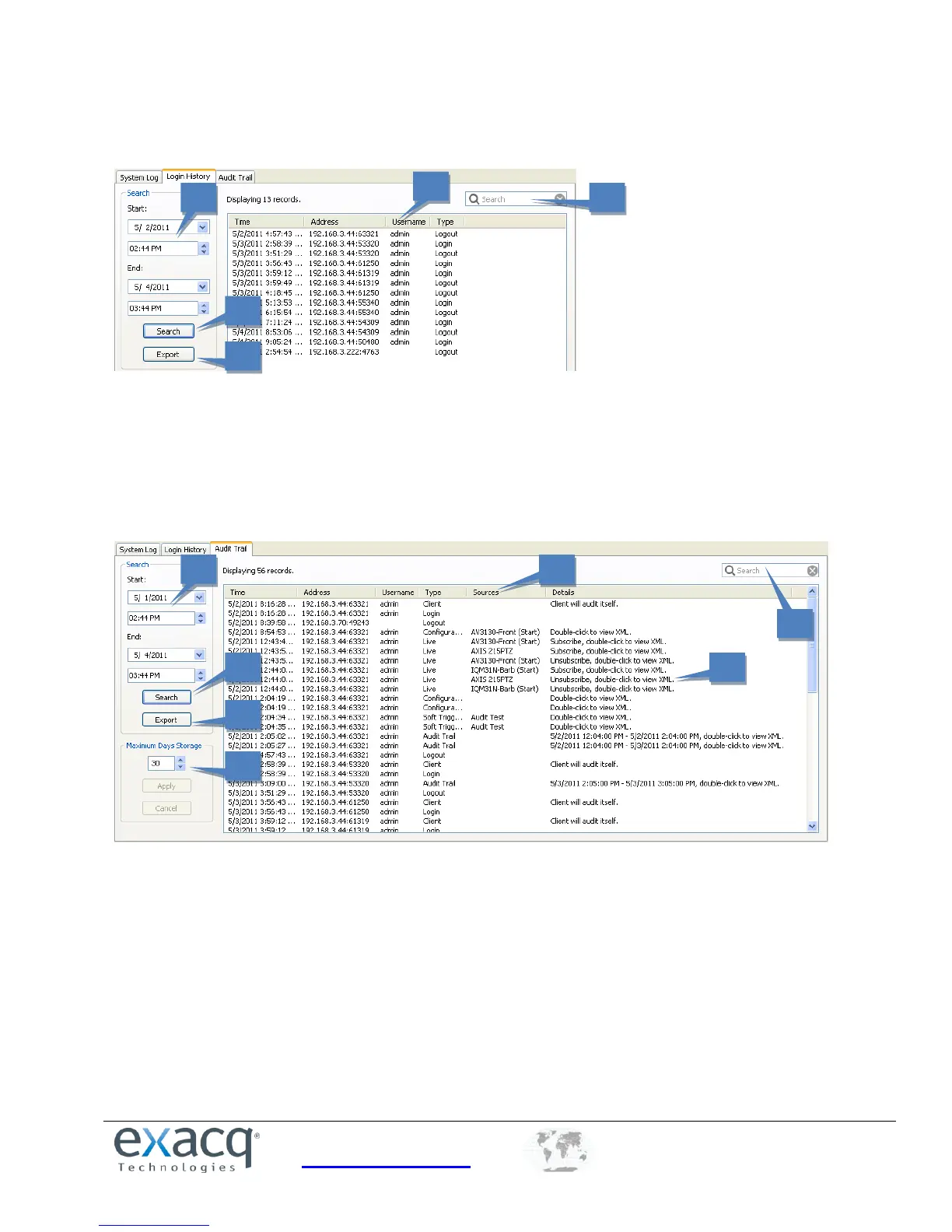
To view the login history for the system, complete the following steps:
1. Select a start date and time and end date and time.
2. Click Search to list all login and logout actions in that time range.
3. To filter the list, enter a word in the Search column. Only actions containing the word are then displayed.
4. To resort the list, click any column title.
5. Click Export to save the information as a separate log file.
To view an audit trail of various actions that have been performed on the system, complete the following steps:
1. Select a start date and time and end date and time.
2. Click Search to list all login and logout actions in that time range.
3. To filter the list, enter a word in the Search column. Only actions containing the word are then displayed.
4. To view an action in XML, double-click its entry.
5. To resort the list, click any column title.
6. Click Export to save the information as a separate log file.
7. Select the maximum number of days that the actions should be stored on the system and click Apply.


 To Next Page