+1.317.845.5710
+5255.56080817
+44.1438.310163
USA (Corporate Headquarters)
Mexico
Europe/Middle East/Asia
82
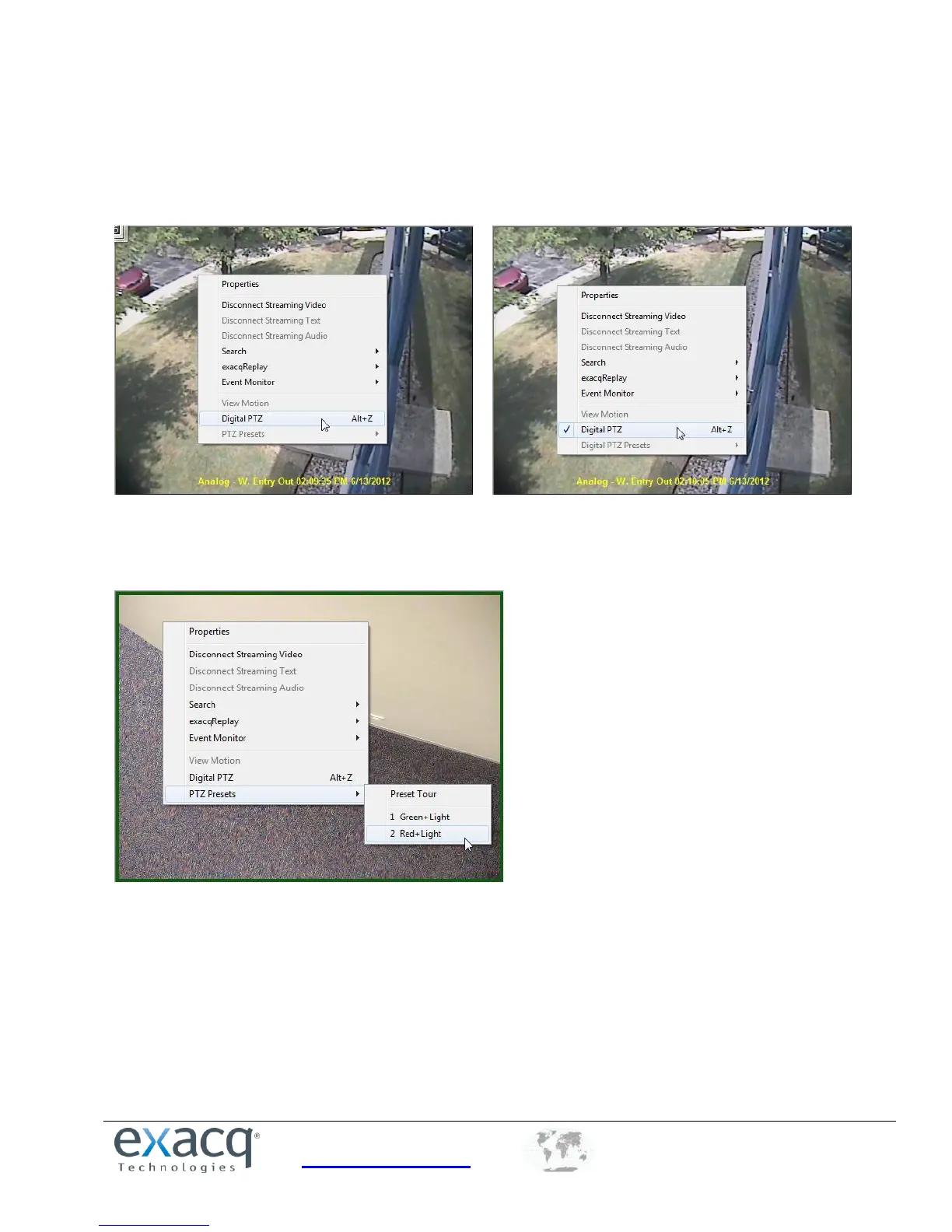
Even without a PTZ camera, digital PTZ allows you to zoom in and pan around an image (if digital PTZ has not been
disallowed during setup). To enable digital PTZ, right-click the video window and select Digital PTZ.
NOTE: On supported fisheye-enabled cameras, Digital PTZ is replaced by a Fisheye menu that can be used to de-warp
video.
For directions on how to set up a Preset button, the “Camera Settings” section of this manual. In addition to calling
presets using the PTZ/preset panel, you can use your mouse to access the PTZ presets by right-clicking anywhere in the
camera’s video window, selecting PTZ Presets, and then selecting the name of the preset.


 To Next Page