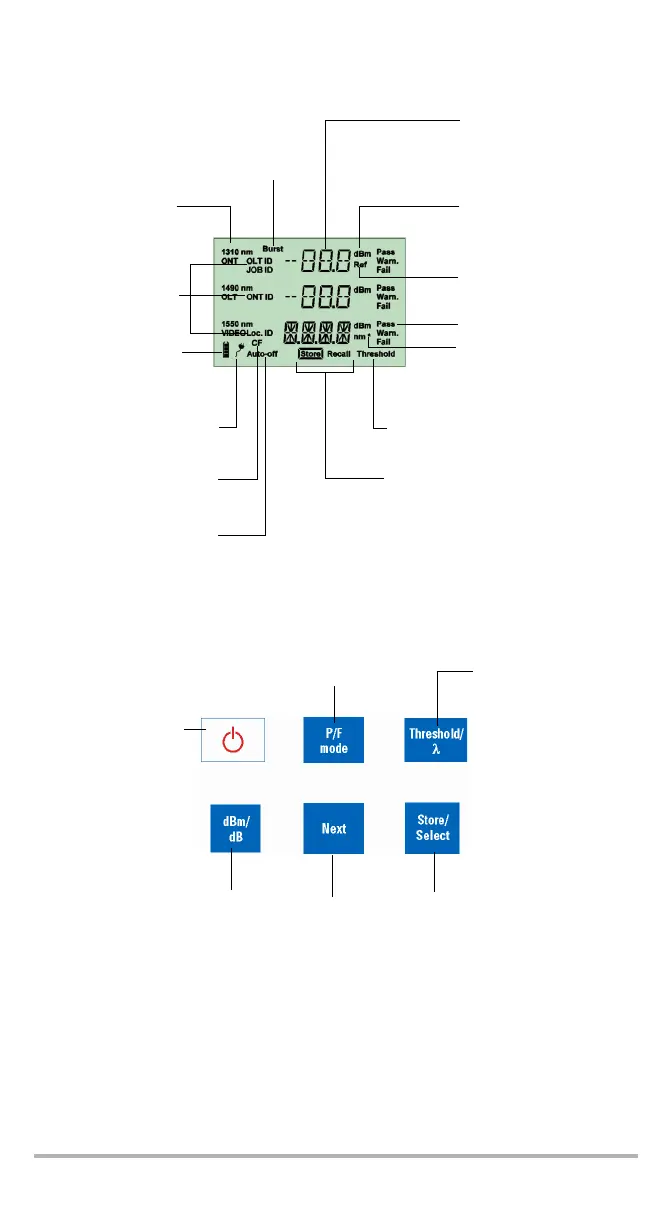
Batteries in use
(with level;
blinking when
weak)
Status; FTTx operation only
Signal (wavelength);
FTTx operation only
Power level
Reference values displayed;
OPM operation only
Display
Auto-off activated
AC adapter plugged in
Units
Storage mode either to save results
or recall settings.
Threshold selection mode activated;
FTTx operation only
Selected wavelength
corresponds to a calibration
wavelength;
OPM operation only
Indicates the presence of “keep-alive”
signal (which prevents
communication loss during periods of
idleness) or any other data packet
Correction factor not
equal to 0 dB
Information fields
that will be stored
PRESS: Turns unit on
Controls auto-off
Exits special modes
HOLD: Turns unit off
PRESS: Accesses the storage
mode; in selection mode, selects
the value.
HOLD: Accesses the data recall
mode; in Recall mode, accesses
the delete item function
PRESS: For FTTX
operation, accesses
threshold selection mode;
for OPM operation,
selects the next
wavelength in the list.
HOLD: For FTTx operation,
displays the current
threshold values.
PRESS: Activates/deactivates Pass/Fail mode
(not possible during nulling, threshold verification,
LEDs/LCD verification)
HOLD: Selects the FTTx or OPM measurement
Keypad
(available only for OPM)
PRESS: Switches between dBm
and dB units
HOLD: Takes the input power as
reference power
PRESS: In selection
mode, goes to the next
value; for OPM
operation, goes to the
next wavelength in the
list
HOLD: If VFL option is
present, changes the
VFL state between OFF,
ON CW and ON 1 Hz



 To Next Page