PPM-350C 17
To test in Pass/Fail or Normal mode:
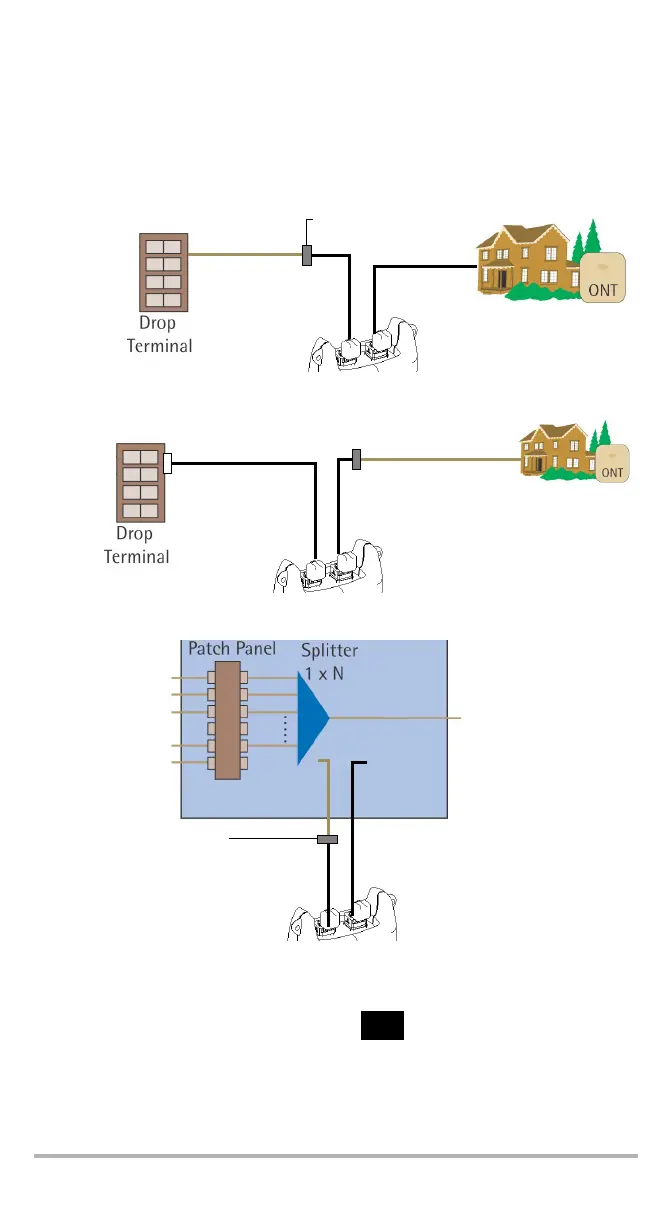
1. Inspect your fibers and clean them properly if needed (see Cleaning and
Connecting Optical Fibers on page 11 for details).
2. Connect as shown:
3. Tur n unit on.
4. If you want to test in Pass/Fail mode:
Ensure that LEDs are on. If not, press .
Ensure that the desired threshold set is selected (see Selecting a Threshold
Set on page 14).
Results are now available.
Test at the premises
Tes t j u m p e r
ONT port
Tes t jum p e r
OLT/video port
Drop cable
Bulkhead connector
Test at the drop terminal
Tes t jum p e r
ONT port
Tes t j u m p e r
OLT/video port
Bulkhead connector
Drop cable
ONT port
Tes t j u m p e r
OLT/video port
Splitter’s output pigtail
Bulkhead connector
Te s t ju m pe r
Test at the fiber distribution hub (FDH)



 To Next Page