9
EN
- To avoid the sensor/s and console pairing failure during new console setup, please power up
the sensor(s) rst, and then press [ SENSOR/WiFi ] key on the main unit.
PLACING THE WIRELESS THERMO-HYGRO SENSOR
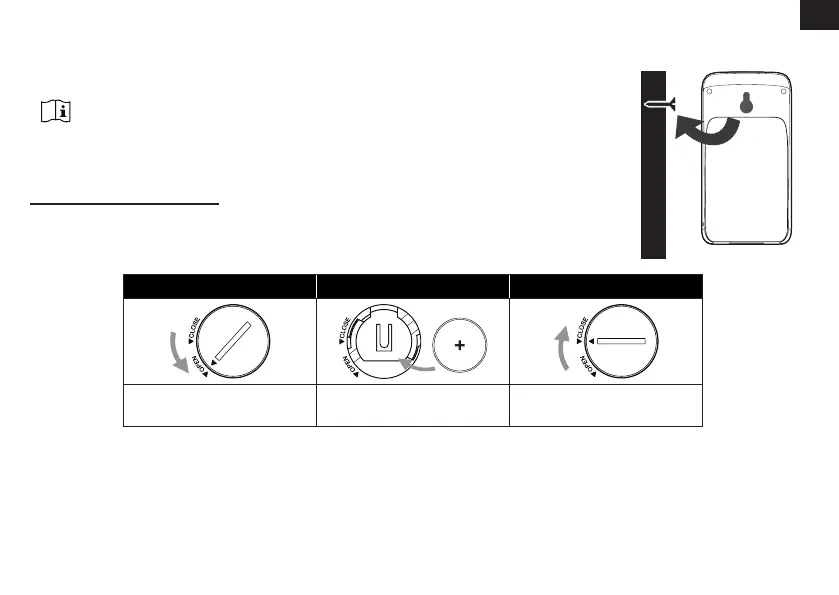
Place a screw on the wall that you wish to hang the sensor on.
Hang the sensor onto the screw by the wall mounting holder. You
can also place the sensor on a table by itself.
SETUP THE CONSOLE
INSTALL THE BACKUP BATTERY
Backup battery provides power to the console to retain clock time and
date, max/min records and calibration value.
Step 1 Step 2 Step 3
Remove the console
battery door with coin
Insert a new CR2032
button cell battery
Replace the battery door.
NOTE:
- The backup battery can back up: Time & Date, Max/Min records and calibration value.
- The built-in memory can back up: Router setting server settings.
POWER UP THE CONSOLE
1. Plug in the power adapter to power up the console.



 To Next Page