7GBCFI EXTEL MEMO - 09/2010 - V1
Important :
It is essential that the electric latch or lock installed has a mechanical memory like all products marketed by
Extel. For the wiring diagram please consult the label on the back of the monitor and the back of the video camera.
USAGE
a. Minimum requirements
• Setting the language
The menu is originally in French. However it is possible to change the language of the menu.
• Setting of the time
Your device is ready to work. Other settings are available. We advice you to read them in order to
optimise your installation.
6
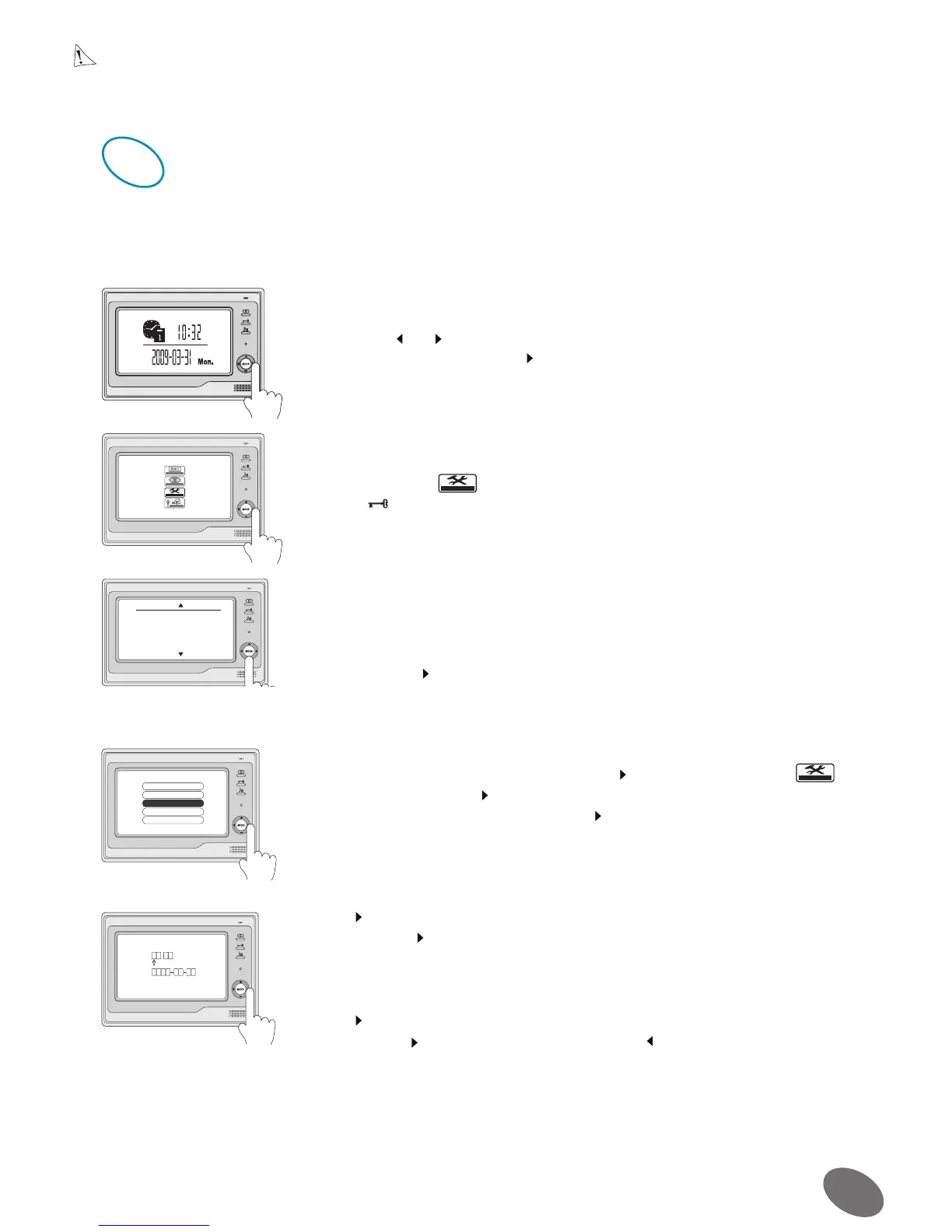
• When the monitor is in standby mode (screen turned off), press one of the
buttons +,-, or
• The clock is displayed, press to go to the next menu.
• Select the icon
VHWXS
with the keys + or –
• Press for 3 seconds to access the language menu
• 7 possibilities 1 English 2 French 3 Spanish 4 Portuguese
5 German 6 Italian 7 Dutch
• Select the language with the keys +/ -
• Validate with
SOD\
PRQLWRU
VHWXS
H[LW
(QJOLVK
)UDQoDLV
(VSDxRO
3RUWXJXrV
• Enter in the “menu” by pressing twice the key and select the icon
VHWXS
with + / -, validate with
.
• Select “advanced setting” validate with
.
• A password must be entered
• Use + / - to increment / decrement
2XWGRRU7RQH
0RQLWRU7LPHPLQ
$GYDQFHG6HW
$XWR5HFRUG2))
([LW
• Use to go to next digit
• Validate with
• The password is “2008”
• Select “Setting Date / Time”
• Use + / - to change the date and the time
• Use to go to next character
Validate with
or exit without validating with
7,0(
'$7(


 To Next Page