8GB CFI EXTEL MEMO - 09/2010 - V1
b. Using of videophone
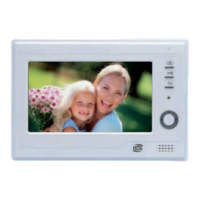
• A call from the outdoor station button triggers the ringer and causes the monitor to light up for about thirty
seconds. Once the visitor has been identified, press on the
key to establish communication.
N.B. : Pressing this key just once is enough to establish communication with the outdoor station.
• Once communication is over, either wait for the delay time (about 1 minute 30) or turn the monitor off using
the
key.
• To resume communication and bring the image back, press twice on the
key.
• The catch or mechanism is activated using the
key.
(Caution : the control is only valid if the screen is turned on)
• At any time you can launch a A/V record of 10 seconds, of your conversation by pressing the key
• It is possible to supervise outside (without conversation) by pressing once the key . The duration of the
viewing time is adjustable (next chapter b.)
ADDITIONAL SETTINGS
a. Selection of the ring tone
• Enter in “menu” by pressing twice the key and select the icon “setting” validate with
• Select “outside ring tone” and scroll through the ring tones with (The last ring tone listened will be selec-
ted for the next call.).
• Select “exit” with the keys + / - and validate with to exit the menu.
b. Settings of the video surveillance mode
• When you use your video door phone in video surveillance mode, the image will be displayed for one minute
(factory setting) It is possible to modify this time out from 30 seconds to 10 minutes as follows:
• Enter the “menu” by pressing twice the key
and select the icon “setting” validate with
• Select “duration of surveillance” with the keys + / -. Select the desired time with the keys and
• Select exit with the keys + / - and validate with pour sortir du menu.
c. Video recording of the visitors mode
• This function (originally enabled) allows recording an A/V sequence of 10 seconds when a visitor calls from the
roadside panel.
• Enter in “menu” by pressing twice the key
• Select the icon “setting”, validate with
• Select “automatic record”, choose ON or OFF with the key
• Select “exit” with the keys + / - and validate with to exit the menu.
To view the ideas refer to the chapter f « Memory Mode and SD card».
d. Restoring default parameters
• Enter in “menu” by pressing twice the key and select the icon “setting”, validate with
• Select “advanced setting” validate with
• Enter the password “2008” with the keys + / - to increment and to go to the next digit, validate with
• Select “information” validate with on “Restoring default setting” validate with
• Select “exit” and validate to exit the menu.
e. Settings of the monitor
• Turn on the screen with the key and press
• Use the keys + / - to set or select, and to validate and go to the next menu or to exit.
7


 To Next Page