26 EN
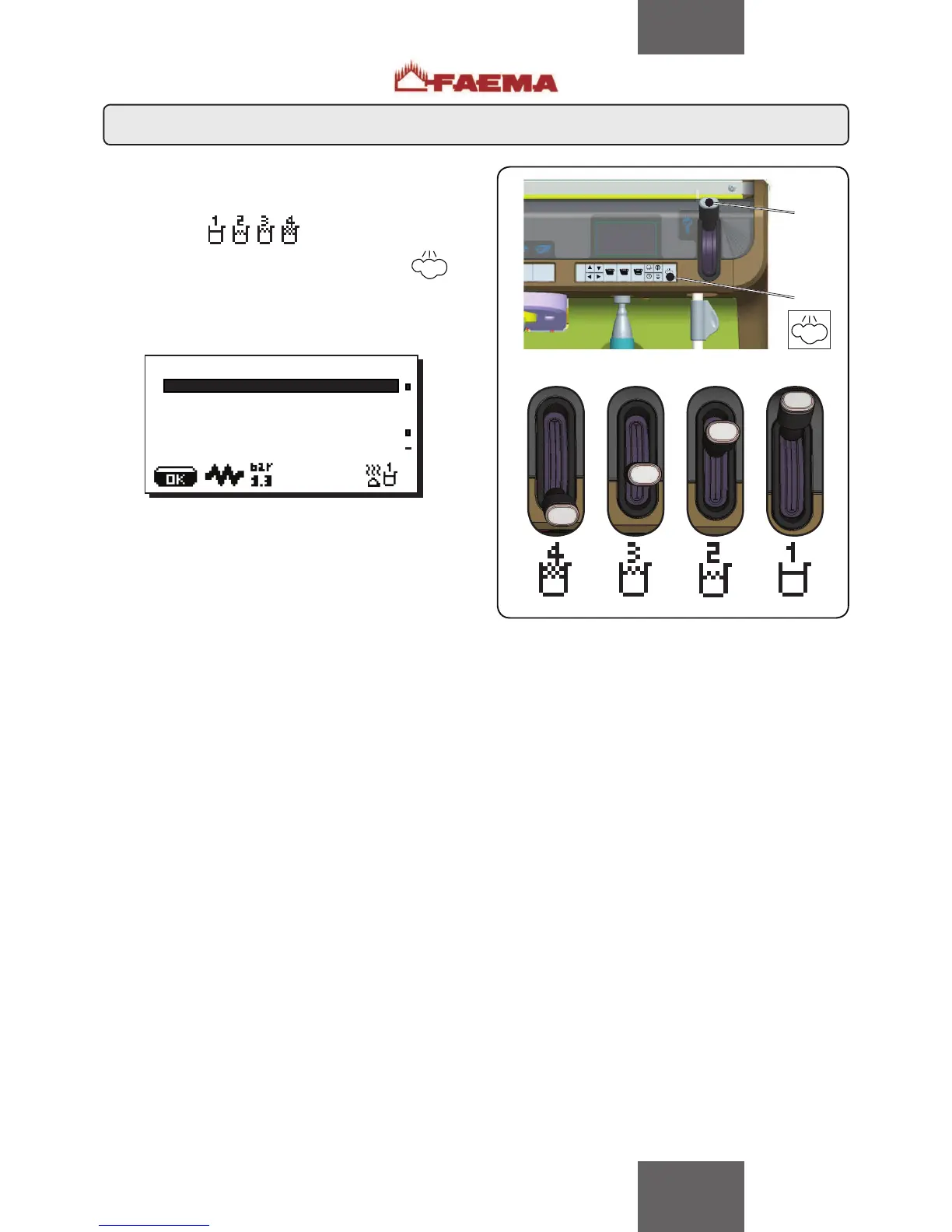
Move the "steam selector lever" (11) to one of the 4 possible
positions. According to the selection made, one of the following
icons will appear in the lower right hand corner of the display:
Press the "AUTOSTEAM automatic steam key" ()
the following will appear on the display:
7KHIROORZLQJSDUDPHWHUVFDQEHPRGL¿HG
7VWRSVWHDP (“xxx°C” temperature for hot milk or frothed milk).
Setting options:
VHWWLQJ
• manual steam stop
$Q\QXPEHUEHWZHHQ&·&)·)
• automatic steam stop
2))VHWWLQJ
• steam stop disabled
HPXOVLRQOHYHO (a different emulsion level can be chosen for
frothed milk: the value can be set between “0 ÷ 100”, where 0
indicates no emulsion and 100 indicates continuous emulsion).
Proceed as described to set the other positions of the "Steam
selector lever" (11).
À.(<0(18
type steam and air
T stop steam 060°C
emulsion level 050
.H\PHQX6WHDPDQGDLUVHOHFWLRQ



 To Next Page