321
1 2
3
2
English
28 EN
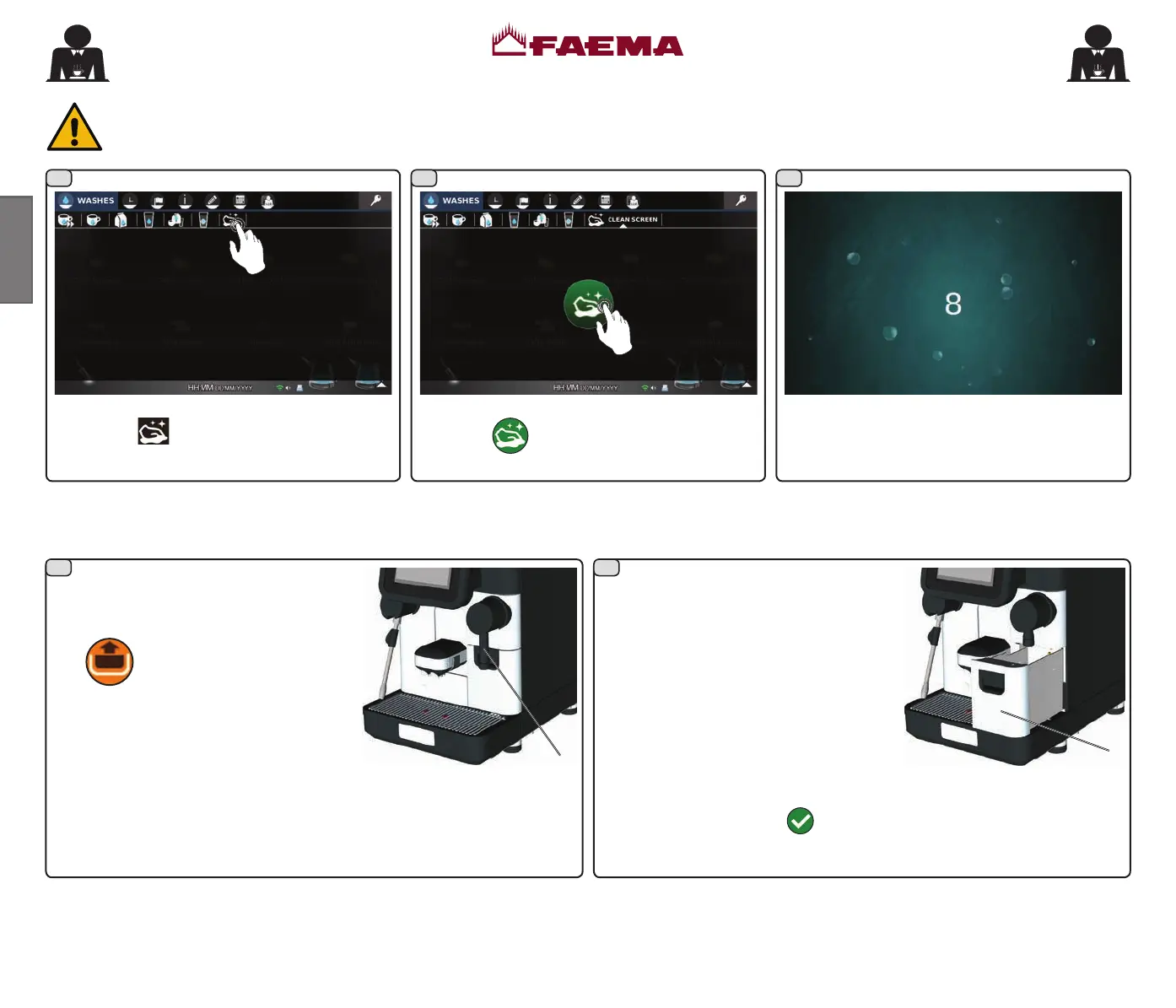
TOUCH SCREEN
To avoid accidental activation of the touch screen during cleaning:
Warning: to clean the touch panel, use only a dry anti-static microbre cloth.
Do not use: • detergents or liquids in general; • paper or rough cloths.
A 15-second countdown will begin in which to
clean the touch screen.
Press the
icon displayed at the centre of
the screen.
Select the
icon related to cleaning the
touch screen.
GROUNDS DRAWER (2)
Pull out the grounds drawer (2), empty it
and wash it under running water.
Thoroughly clean the drawer housing
area (2) with a damp cloth, removing
any organic residue.
NOTE: if conrmation mode has been activated by the technician, the
operator must conrm drawer emptying before removing the drawer. If
conrmed using the icon
, the grounds count is reset.
To remove, lift the hot water dispensing
spout (3). Note: the need to empty the
grounds drawer is also highlighted by the
icon
on the touch screen.
After the icon appears, 10 more coffee-based beverages can be dispensed,
after which an animation will be seen on the touch screen to empty the
drawer. Any additional dispensing is blocked and the grounds drawer
must be emptied.
02_QUICK_UNICO_1815_USA_en_fr.indd 28 11/04/2018 11:24:56



 To Next Page