7. Auto Charging Docking Station:
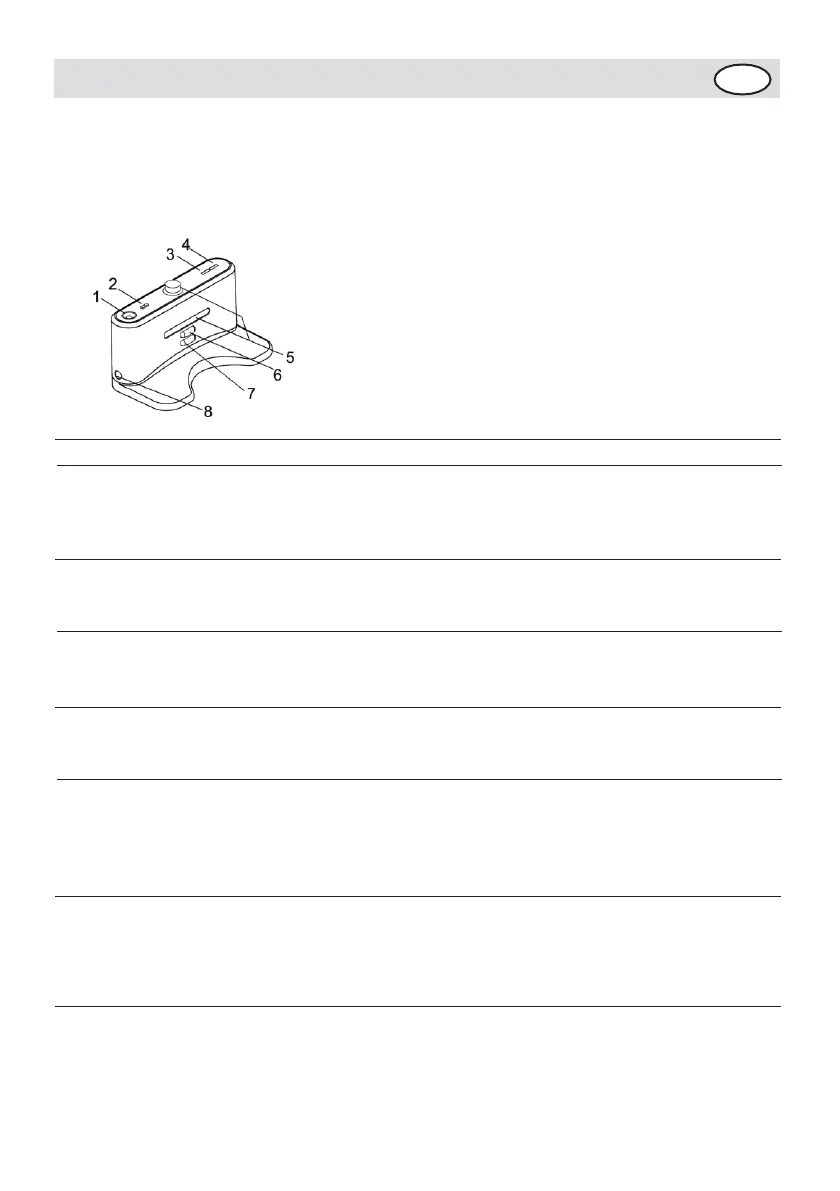
7-1 Recharger Display and Control Panel:
Overall Display Function Instructions
1.LED decorative light (a little essence can
be placed above) 2.Decorative light switch
3.Power LED 4.
Charging indicator
5.Signal
transmitting 6.
Charging positive
pole 7.Charging
negative pole
8.Charging power DC socket
7-2 Using Method & Functional Status of the Docking station:
No. Function Guide Function Information
1 LED decorative light Turn on the decorative light to activate the
atmosphere, and
place in the glowing center of the
light a little essence, which will give
off charming aroma after heating.
2 Decorative light switch Press the switch to turn on/off while the
decorative light is on.
3 Power LED The Power LED will light when the Docking
Station is
connected with the power, or turn off if not
connected.
4 Charging indicator The indicator will flicker while the
recharger is connected with the cleaner.
5 Signal transmitting Transmitting signal is the only way to lead
the cleaner to
return the Docking Station for charging, so
the signal transmitting position should be
clean for long without any obstacle on it.
6-
7
8
Recharging
positive &
negative
electrode
Charging power
DC socket
The electrode and that of the Cleaner are
connected to charge under contact mode, so
the position should be clean without any
obstacle on it while using, or there will
be impact to the charging.
The power DC socket, called recharger for
short, used to connect output terminal DC24V
of the adaptor, is the charging transit
station between the Cleaner and adaptor, so
the recharger should be placed against the


 To Next Page