8. Space Isolator:
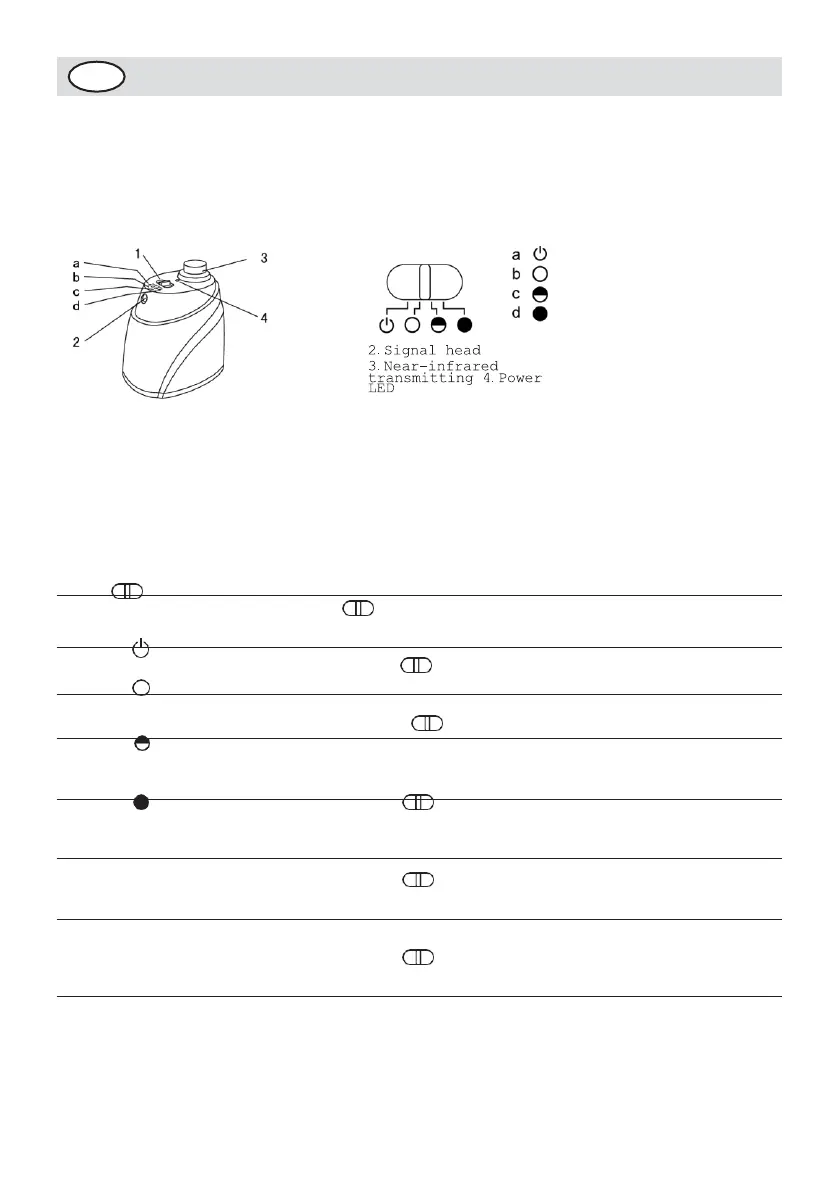
Space Isolator Display and Control Panel:
Overall Display Function
Instructions
1.Toggle switch
Turn
off Low
Middle
High
head
Function Introduction of Space Isolator:
Space Isolator, an accessory of the cleaner, can block area by
sending special infrared signal so as to prevent the Cleaner
from entering some unnecessary areas.
Using Method & Functional Status of Space Isolator:
No
.
1
2
3
4
Name
Toggle switch
a Turn off
b Low
c Middle
d High
Infrared wall
transmitting
signal head
Near-infrared
transmitting head
Power LED
Function Information
You can switch the function by sliding
repeatedly: Turn off, Low, Middle
and High.
Slide to the position, then the power is
off.
Slide to Low and turn on the power,
you can select
the distance within 4m as
required by infrared wall.
Slide to Middle and turn on the power,
you can select
the distance within 6m as
required by infrared wall.
Slide to High and turn on the power,
you can select
the distance within 8m as
required by infrared wall.
Slide , then you can adjust the
distance of the Space
Isolator.
The near-infrared transmitting signal
makes the Cleaner run outside the Space
Isolator scope of 50-100cm without any
impact to it.


 To Next Page