4. Installation of Battery:
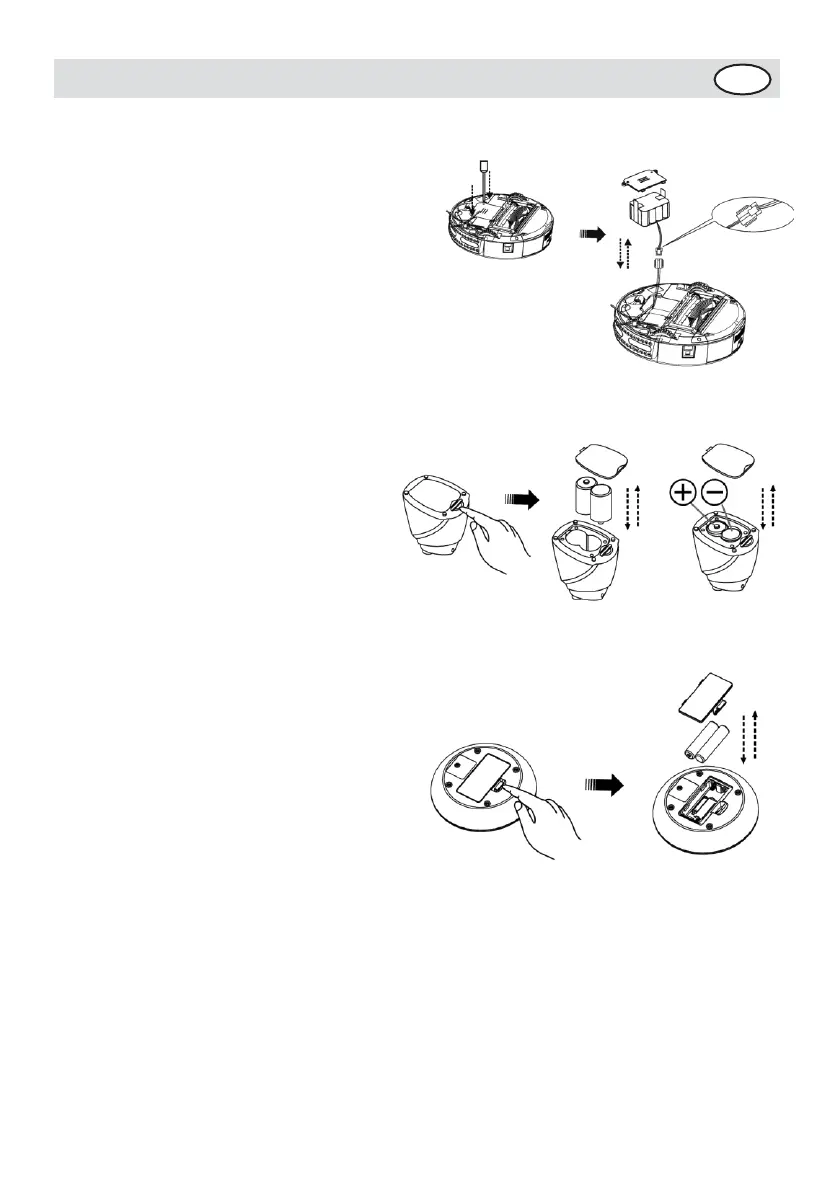
Battery installation of the Cleaner:
1. Release the screw with a
screwdriver, open its base
plate. (Refer to Figure 1 )
2. Connect two terminals
during battery
installation. (Refer to
Figure 2)
3. Place the positive and
negative poles correctly for
fear of the damage due to
wrong poles.
4. Set the cleaner in charging
status to keep the best
performance of the battery
while the cleaner is not in
use.
5. Ensure using the original
battery of the manufacturer
for installation, otherwise
there may be damage or
accident.
Battery installation of the Space
Isolator:
1. spin the pivot as per
figure 1 and the cover
will open.
2. Please place the batteries
(not included) with correct
polarity (+/-) (Refer to
Figure2)
3. The right place of
battery. (Refer to Figure
3)
4. Please take out the
battery if it was unused
for long.
Battery installation of the
remote control:
1. Open the battery cover and
then replace the battery.
(Refer to Figure 1)
2. Please place the batteries
(not included) with correct
polarity (Refer to Figure 2)
3. P
l
e
a
s
e
t
a
k
e
o
u
t
t
h
e
b
a
t
t
e
r
y
i
f
i
t
w
a
s
u
n
u
s
e
d
f
o
r
l
ong.


 To Next Page