4
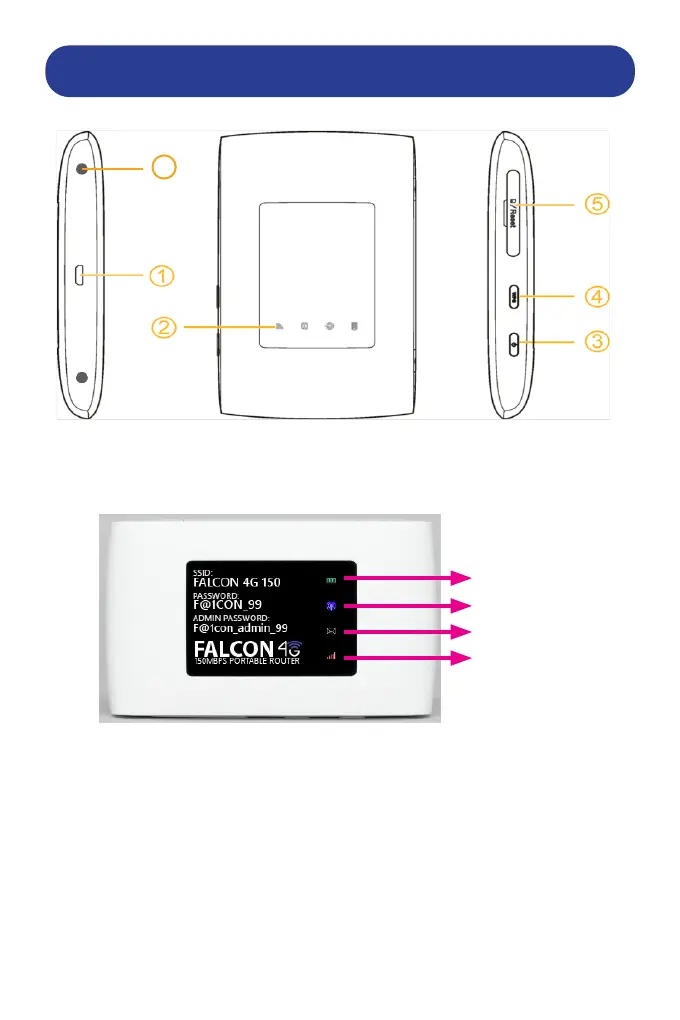
GETTING TO KNOW YOUR FALCON 4G ROUTER
1. Micro USB connector for connection to computer or charger.
2. LED indicators.
3. Power button. Hold button to turn on/o the device.
4. WPS button (Wi-Fi protected setup) and on/o Wi-Fi.
Hold button for 5 seconds to activate WPS.
Short press to turn on/o Wi-Fi function.
5. Micro-SIM card slot & also Reset button to reset to factory defaults.
6. TS9 External Antenna Inputs x 2. For connection of roof mounted or
portable amplied antennas.
BATTERY
WI-FI
SMS
NETWORK
6


 To Next Page