5
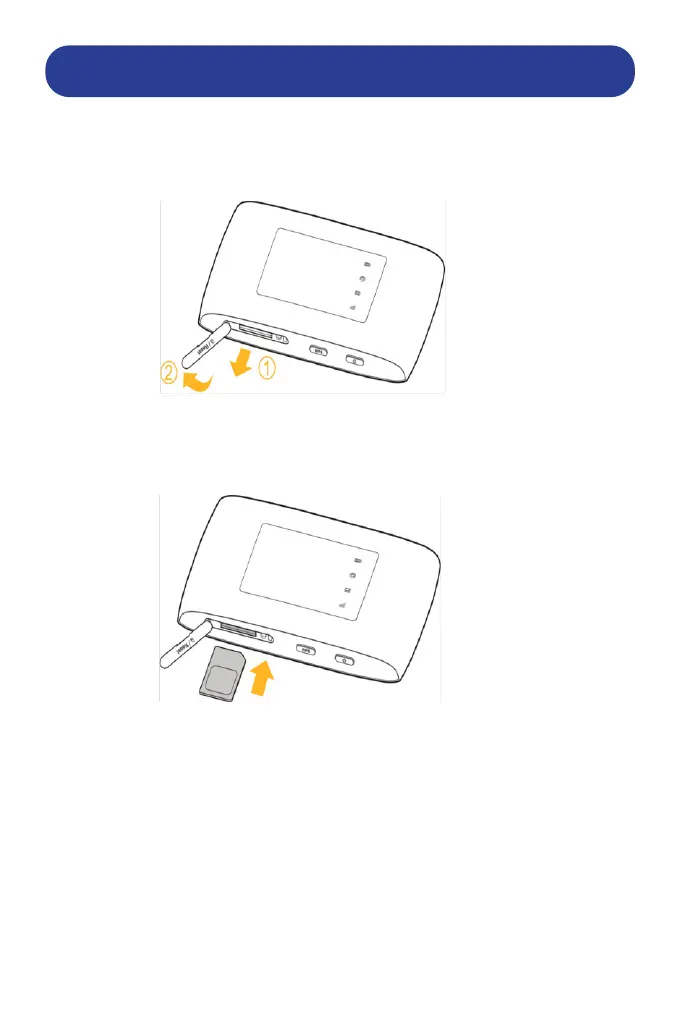
1. Open the Micro-SIM card slot cover.
Pull open the SIM / Reset rubber ap to access the SIM slot. Be careful
not to pull to hard on the ap as this may disconnect it from the router.
2. Install a Micro-SIM card to the Micro-SIM card slot.
WARNING! Your device does not support other SIM sizes such as Full
SIM cards, Nano-SIM cards or any other non-standard Micro-SIM cards.
To avoid damage to the device, ensure that you use a Micro-SIM
which is the medium sized SIM card usually supplied with a SIM card
selection.
Once the SIM is installed, ensure that the battery has sucient charge
Press and Hold the Power button at the bottom of the router to power
the router on. The Power Button is the button listed as number 3 on the
previous page.
The router will cycle through the 4 LEDS whilst it boots up. Once the
router is booted up the LEDs will change as indicated on the next page.
INSTALLING A SIM CARD


 To Next Page