EN
us-pc@fangor.cn
27
EN
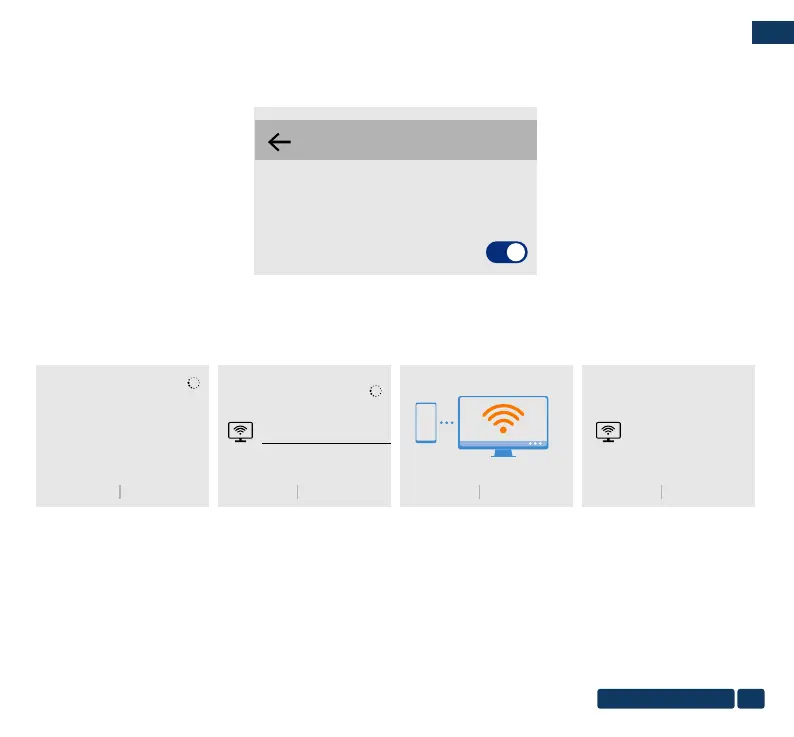
Step2: Click "WLAN" on your Android device, turn on the "WiFi-Scan" function , But do not connect any WiFi.
Step3: Choose ”Phone Network Data” and turn on it.
Mobile network
GENERAL
Mobile data
Data usage fees may apply.
Step4:Open the Multi-screen/Miracast on your Android device , choose the correct SSID name. Then the connection is
succeeded.
Wireless projection
HELPCANCEL
Searching for devices...
Make sure that projection is enabled on the external
display
HELPCANCEL
Wireless projection
Available devices
Dualcast-2677E9A9
HELPCANCEL
Wireless projection
Connecting to Dualcast-2677E9A9...
HELPCANCEL
Wireless projection
Available devices
Dualcast-2677E9A9
Connected


 To Next Page