ENGLISH
20 / 55
Infrastructure (AP)
- Infrastructure mode is used to connect computers with wireless network adapters, also
known as wireless clients, to an existing wired network with the help from wireless router
or access point. Please follow following steps to configure your wireless network.
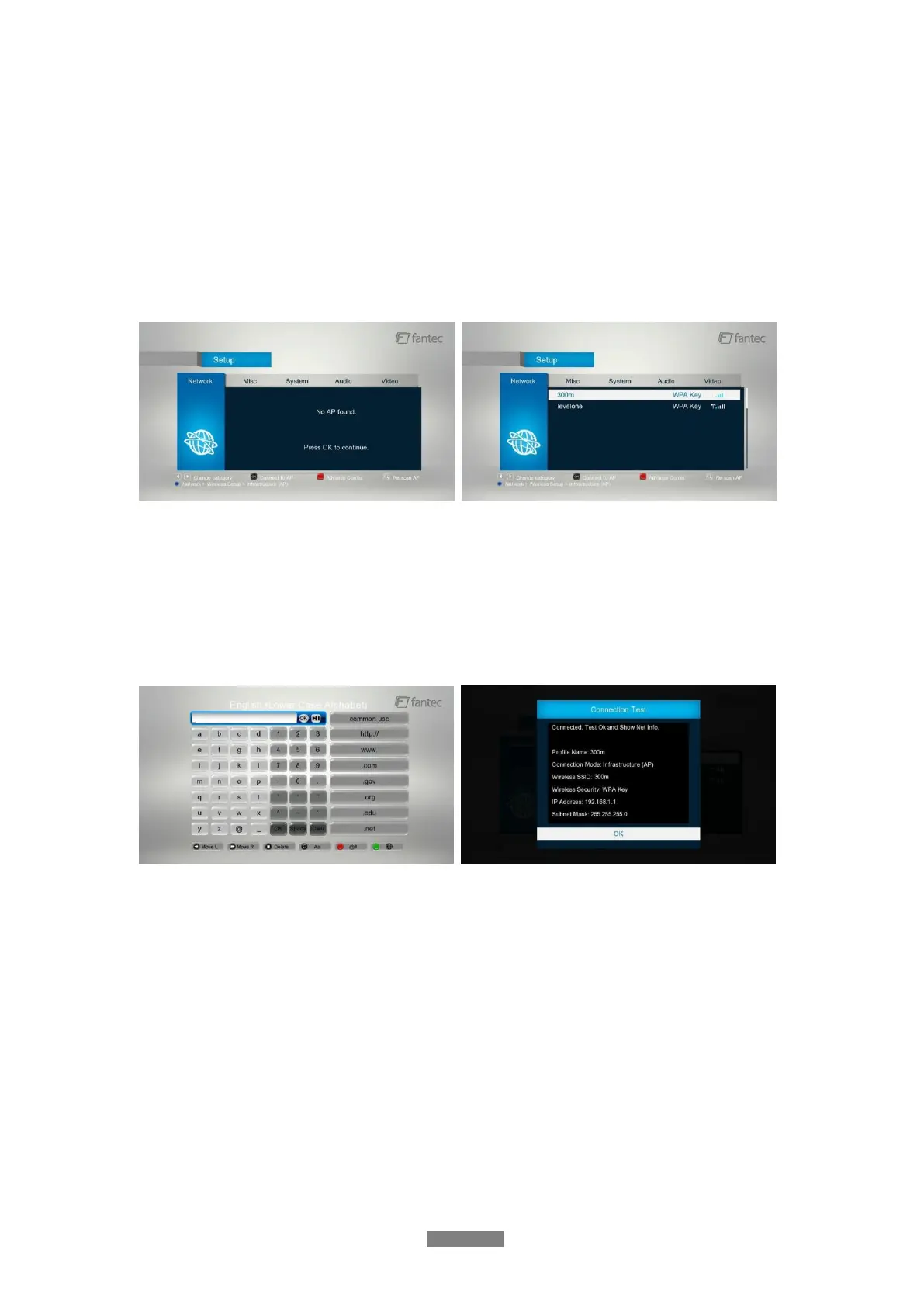
Step 1: Scanning AP(Access Point)in your network
Follow the prompting message on the screen and press the Zoom button to select
Infrastructure (AP) mode and update the access points list, and all SSID will be displayed on
the screen.
Step 2: Enter WEP / WPA key.
Press OK to input encryption keys via the virtual keyboard. Press the navigational buttons to
select, OK to input, FF to move cursor left, FR to move cursor right, Zoom to switch between
uppercase and lowercase, Stop to delete a character, Red to make more symbols available,
Green to change the language of the virtual keyboard, OK to confirm and to start testing the
connection.
The testing process will take for a while, please be patient to wait. If the test is ok, the network
information (Profile Name, IP address, Subnet Mask, Gateway, etc.) will be displayed on the
screen.



 To Next Page