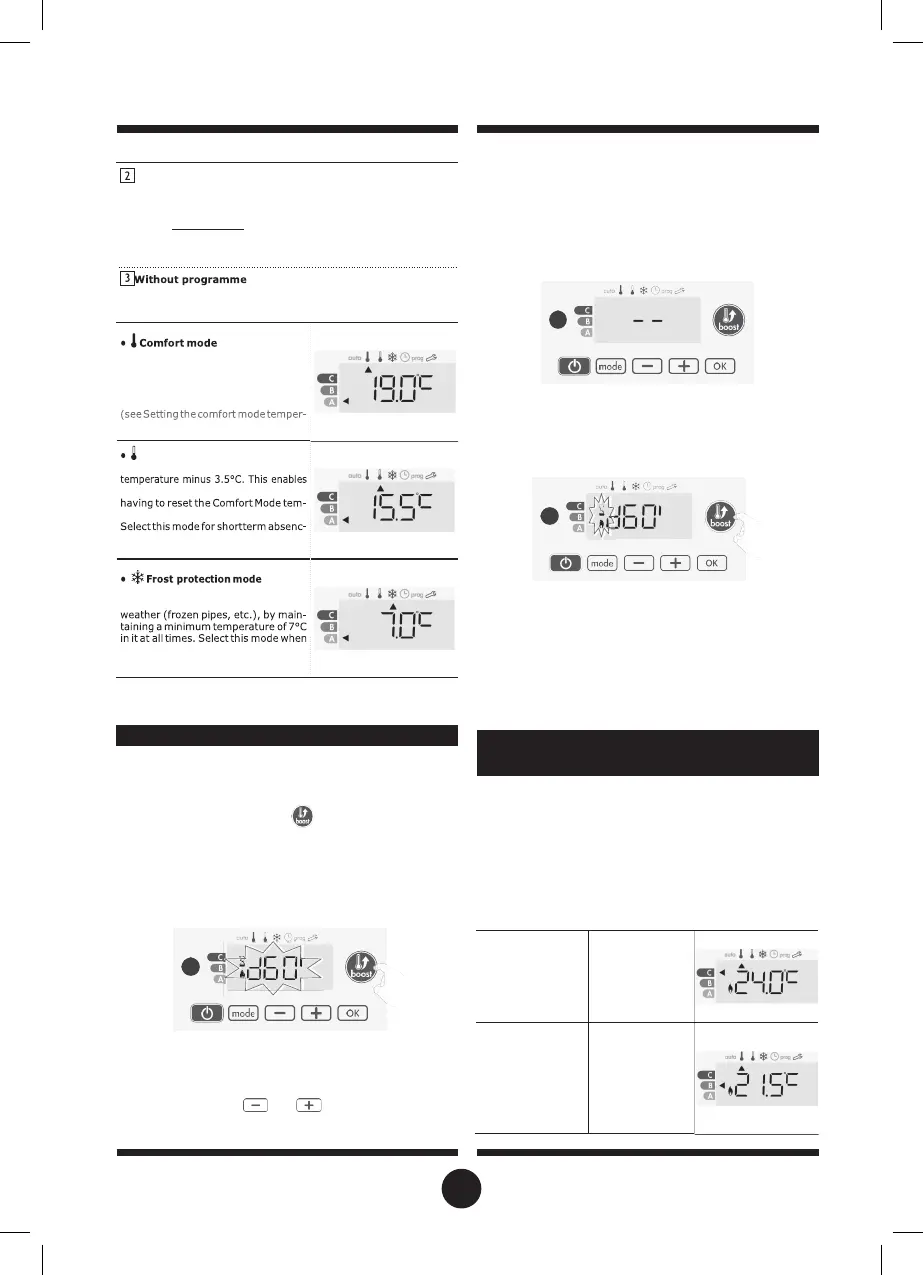
Mode overview
Display
Programming by pilot wire
If you do not want to use the programming feature, the deviceˇs
default setting is non-stop Comfort for 7 days a week, you do not
have to change any settings. Orders sent by the pilot wire will only
be applied in Auto mode, thus your device will automatically receive
and apply the programmed orders sent by your power manager or
your time switches (see Information about remote control by pilot wire
page 9).
After 1 minute, the Boost count begins and the time is running,
minute by minute.
Comment: After 1 minute, you can modify temporarily the du-
ration: it will be valid only for this active Boost and therefore
non-recurring.
The Boost can stop for 2 different reasons:
-
An order "Stop" has been sent by your energy manager through
the pilot wire:
if the 7 day and daily programme is not enabled or no orders are
being sent by pilot wire, then your deviceˇs factory settings mean that
it will operate in nonstop Comfort mode, 7 days of the week.
The device stops, −− appears. The cursor moves above auto.
When the order Comfort will be sent, the device will be restarted
until the count end.
-
If the ambient temperature reaches the maximal Boost
temperature during the count:
Restoring factory settings See page 13.
BOOST FEATURE
Important:
the Boost mode can be enabled at any time, what-
ever the current operating mode (Auto, Comfort, Eco or Frost
protection).
To activate Boost mode, press
, the desired temperature
setting will be set at maximum for the time period you request.
60 minutes display will flash by default.
- First press = Boost.
During the first minute: the boost symbol and the heating indica-
tor appear and the duration count flash.
During the first minute, you can modify the Boost duration from 0
to the maximal authorised duration of the Boost, such as
defined during the user settings (see page 12 for more details)
by intervals of 5 minutes (or more quickly by push superior to
2 seconds) by pressing
and
. This modification will be
saved and effective for the next Boost.
The device switches off but the Boost mode is always active :
the count is always displayed, the Boost symbol and the heat-
ing indicator flash on the display. When the temperature drops
under the maximal authorised temperature, the device will be
restarted until the count ends.
- Second press = Boost cancellation.
The cursor moves above the previous active mode and the set-
ting temperature appears.
France’s Agency for Environment and Energy Management
(ADEME) recommends a Comfort setting temperature lowerr or
equal to 19°C.
In the device display, a selector indicates the energy comsump-
tion level by positioning it in front of the colour: red, orange or
green. So, depending on the setting temperature, you can
choose your level of energy usage. As the temperature setting
increases, the consumption will be higher.
The gauge appears in Auto, Comfort, Eco and Frost protection
modes and whatever the temperature level.
GAUGE CONSUMPTION, ENERGY
SAVINGS
Non-stop Comfort mode. The device
will operate 24 hours a day to achieve
the temperature which has been set
(e.g. 19°C). The Comfort mode tem-
perature level can be set by the user
ature page 6).
Eco mode
Eco, which means the Comfort Mode
you to lower the temperature without
perature.
es (between 2 and 24h ) and during
the night.
This mode enables you to protect
your home against the effects of cold
you will be away from your home for a
long time (more than 5 days).
C - Red colour
High Temperature
level: it is advisa-
ble to significantly
reduce the
temperature.
Setting tempera-
ture > 22°C
When the setting
temperature is
higher than 22°C
B - Orange colour
Average temper-
ature level: it is
advisable
to slightly reduce
the setting temper-
ature.
temperature Ç
22°C
When the setting
temperature is
higher than 19°C
and lower or
to 22°C
13


 To Next Page