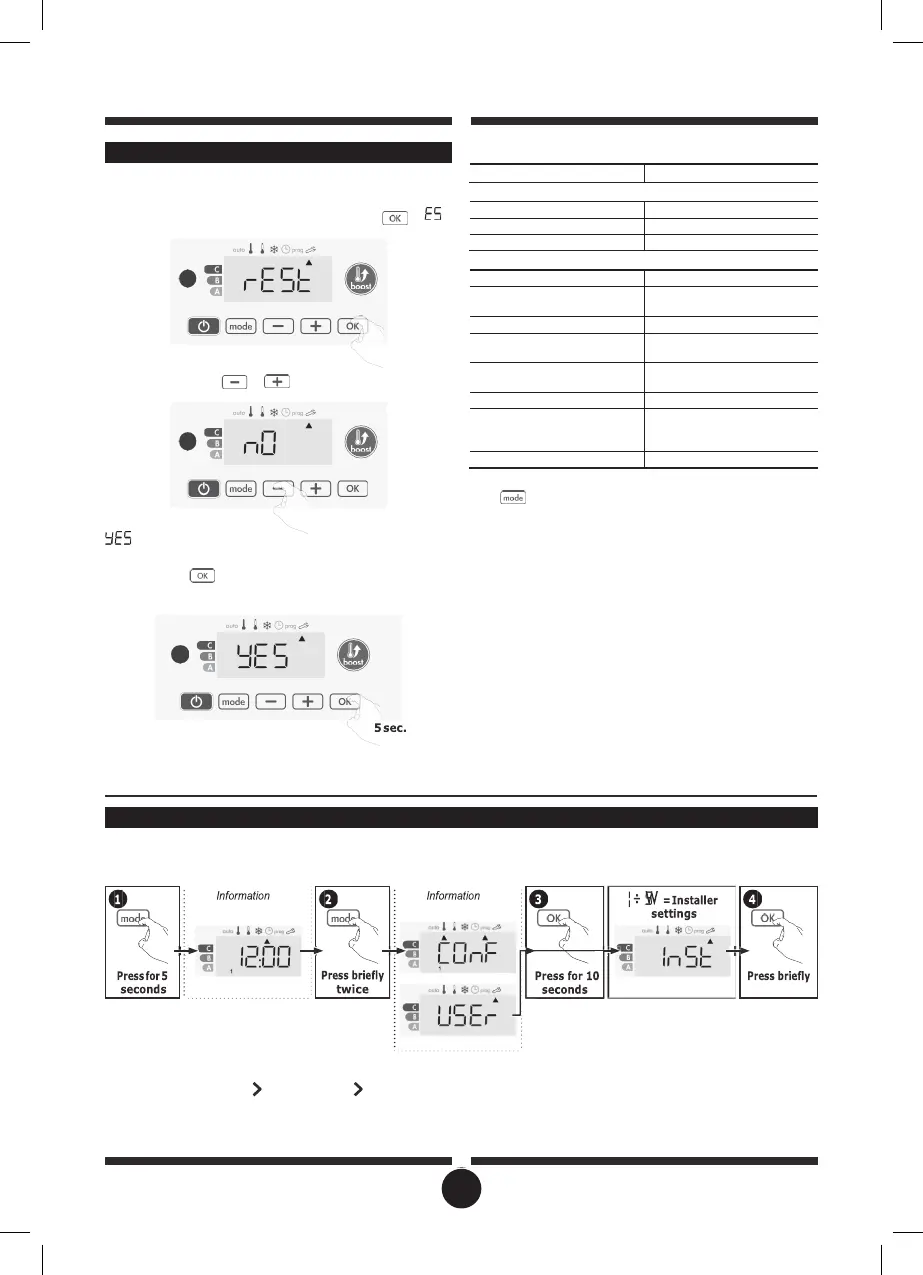
RESTORING FACTORY SETTINGS
In order to a coming back to factory settings, proceed in the
following order:
1-
From the setting of the temperature unit, press .
«
W
appears on the display.
2-
NO appears. Press
or
to select YES.
= Factory settings reset
÷2
= Factory settings not reset
3-
Press the key
for 5 seconds. The device returns to its initial
configuration and goes back automatically to the home dis-
play of the user settings.
The following factory values will be effective:
Parameters
Factory settings
Operating
Comfort setting temperature
19°C
Boost duration
60 min.
Keypad lock
Disabled
User settings
Backlighting
L3
Eco mode temperature
lowering-level
-3,5°C
Frost protection temperature
7°C
Minimum set of Comfort
setting temperature
7°C
Maximum set of Comfort
settingtemperature
30°C
Maximal Boost duration
60 min.
Maximum ambient
temperature for the automatic
stop of the Boost
35°C
Temperature unit
°C
Press to exit the user settings.
INSTALLER SETTINGS
ACCESS
You access to installer settings in 4 steps:
From Auto, Comfort, Eco or Frost protection mode :
Setting sequence:
Open window detection PiN code lock Restoring factory settings
display
displays
21


 To Next Page