Customizing the PIN code
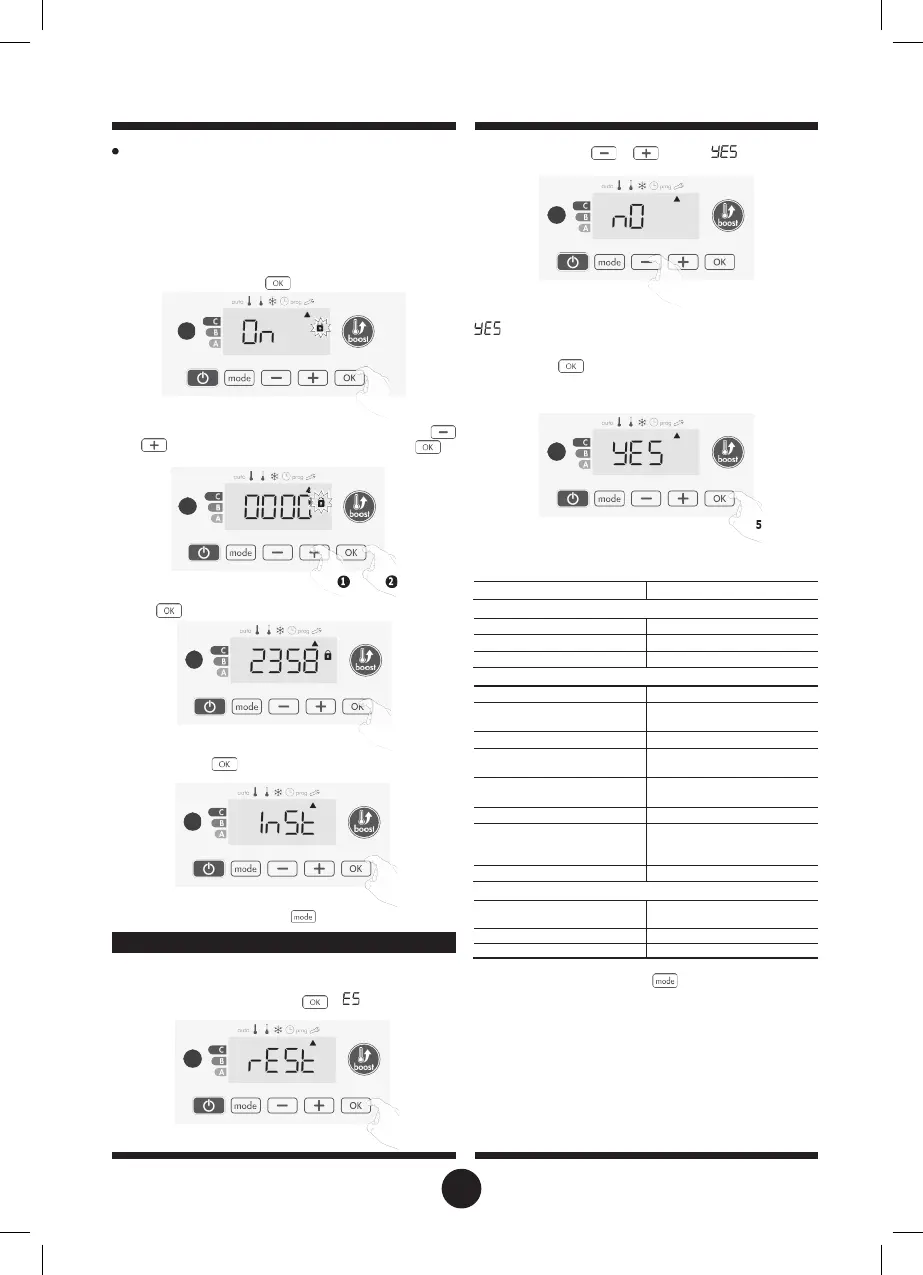
If you have just activated the PIN code, follow the stages de-
scribed below.
Alternatively, you must copy the steps 1 and 2 of the initialisation
process as well as the steps 1 and 2 of the activation process
before personalising the PIN code.
Please remember that the personalisation of the PIN code can
only be set once the initialisation and activation of the PIN code
has been completed.
1- When
2÷ appears, press for at least 5 seconds.
2-
÷2
appears. Press or to select .
5 sec.
= Factory settings reset
÷2
= Factory settings not reset
3- Press the key
for 5 seconds. The device returns to its initial
configuration and goes back automatically to the home dis-
play of the installer settings.
2-
The 0000 code appears and the first number blinks. Press
or
to select the first desired number then press
to
save and exit. Repeat this operation for remaining 3 numbers.
sec.
The following factory values will be effective:
3-
Press
to confirm. The new code is now saved.
4-
Press again on
to exit setting PIN code mode and go
back to the home display of the installer settings.
To exit the Installer settings, press
twice.
RESTORING FACTORY SETTINGS
If the PIN code protection is disabled, the user and installer settings
are re-initialized:
1- From the PIN code setting, press .
«
W
appears briefly
on the display.
Operating
Comfort setting temperature
User settings
Eco mode temperature
lowering-level
-3,5°C
Frost protection temperature
Minimum set of Comfort
setting temperature
7°C
Maximum set of Comfort
setting temperature
30°C
temperature for the automatic
35°C
Installer settings
Automatic open window
detection
Enabled
To exit the installer settings, press
twice.
23


 To Next Page