10- Press
or
to display the desired duration.
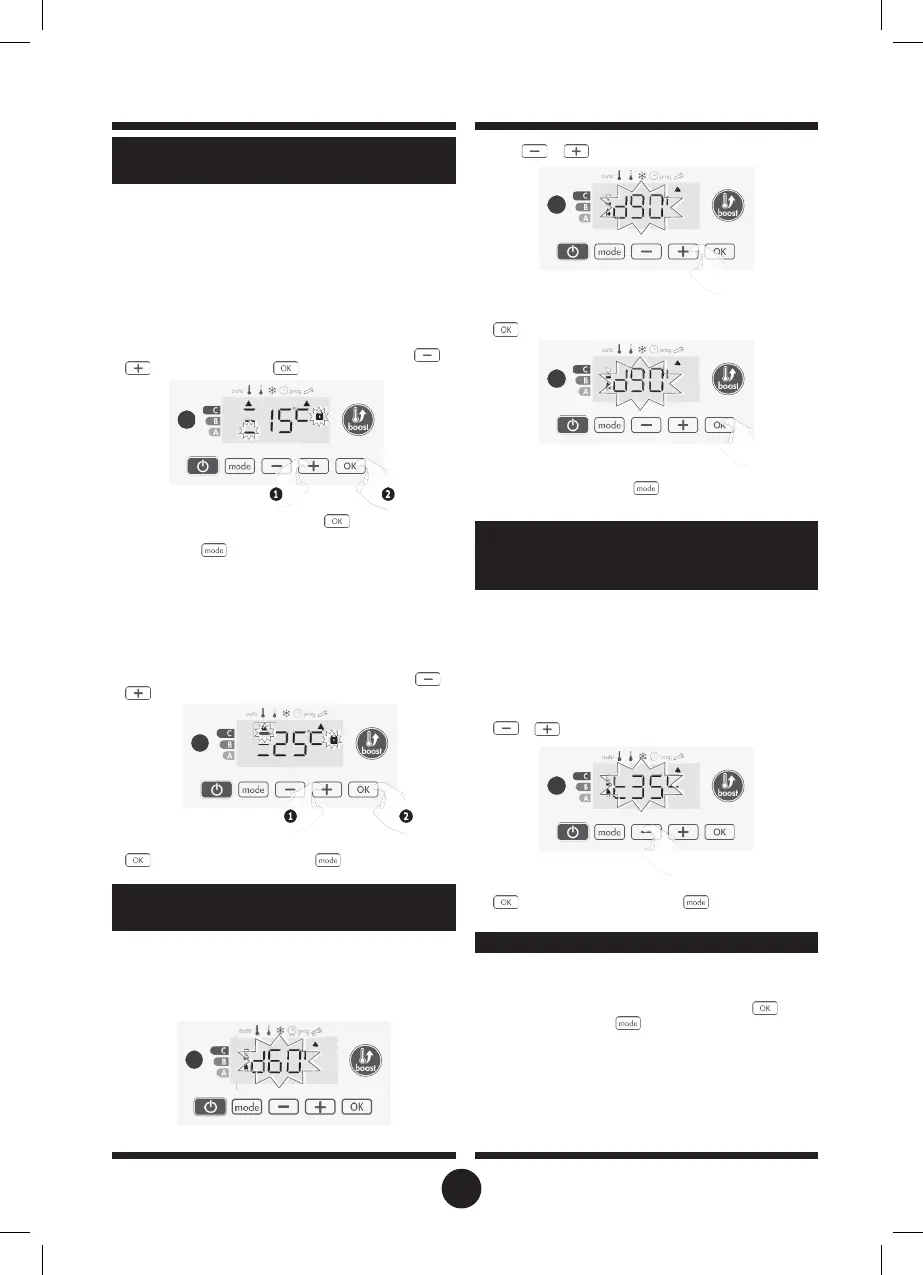
You can limit the setting temperature range by introducing a
maximum and / or minimum setting, preventing unintentional
changes in temperature.
•
Low temperature limit
Locking of the setting range using a minimum temperature stop,
preventing the temperature from being set below that temper-
ature.
The minimum setting is preset to 7°C. You can adjust from 7°C to
15°C by intervals of 1°C.
7-
To change the minimum temperature setting, press
or
then save by pressing
.
If you do not want to change it, press
: the device chang-
es automatically to set the maximum setting. To exit the user
settings, press
twice.
•
High temperature limit
Locking of the setting range using a maximum temperature in-
crease, preventing the temperature from being set above that
temperature.
The maximum setting is preset to 30°C. You can adjust from 19°C
to 30°C by intervals of 1°C.
8-
To change the maximum temperature setting, press
or
.
To save and move automatically to the next setting, press
. To exit the user settings, press
twice.
The maximum duration of Boost is preset at 60 minutes. You can
adjust it from 30 to 90 minutes by intervals of 30 minutes.
9-
The Boost symbol and the heating indicator appears on the
display and the preset duration of 60 minutes flash.
11-
To save and move automatically to the next setting, press
.
To exit the user settings, press
twice.
When the Boost is enabled, the device has to heat the room
until the temperature limit: the maximum ambient temperature.
When it is reached, the Boost stops automatically.
It is preset at 35°C, you can adjust it from 25°C to 39°C by inter-
vals of 1°C.
The Boost symbol and the heating indicator appear on the dis-
play and the maximum temperature flashes.
12-
You can set the Boost maximum temperature by pressing
or
from 25°C to 39°C by intervals of 1°C.
13-
To save and move automatically to the next setting, press
. To exit the user settings, press
twice.
SETTING THE TEMPERATURE UNIT
The pre-set temperature unit is degrees Celsius. This setting can-
not be changed on this version.
14-
To move automatically to the next setting, press . To exit
the user settings, press
twice.
SETTING OF THE MAXIMUM DURATION
OF AUTHORISED BOOST
SETTING OF THE MAXIMUM AMBIENT
TEMPERATURE FOR THE AUTOMATIC
COMFORT SETPOINT TEMPERATURE
LIMIT
20


 To Next Page