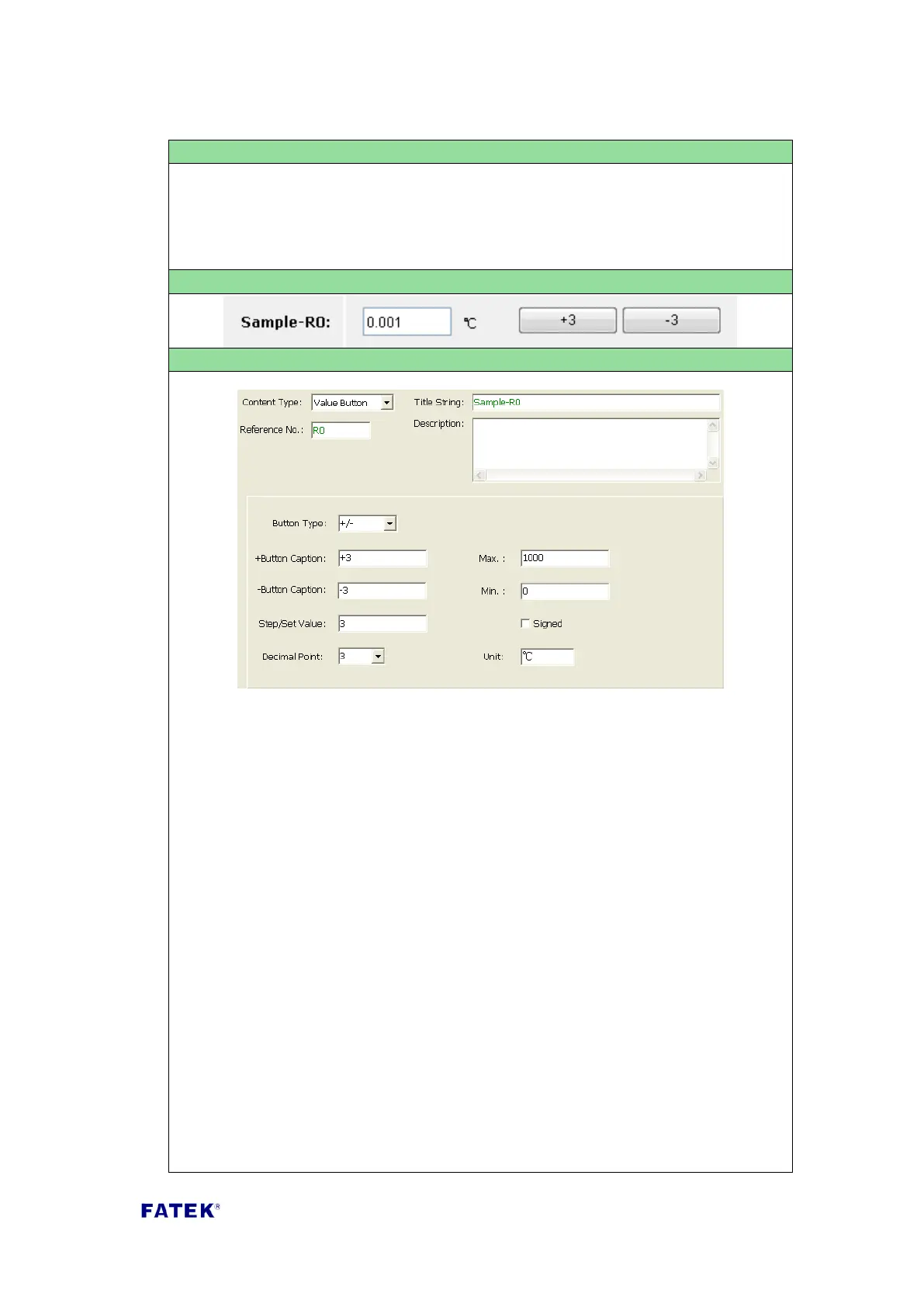
Used to display and control the contents of a register; it uses two buttons to
modified the value of register. For each press of button, the register’s value will
be increased or decreased by an amount.
Content Type: Select “Value Button”.
Title String: The title description of this control item, such as the text displayed
in the Sample Screenshot “Example-Value Button R0”.
Reference No.: The number of the actual register to be controlled. The
allowable reference are R, D, DR, DD type.
Button Type: There are following types can be selected
“Set”- when the button is pressed, the data on the register is set to a fixed
value;
“+” when the button is pressed, a fixed value will be added to the data on the
register;
“-” when the button is pressed, a fixed value will be subtracted from the data
on the register;
“+/-” when a certain button is pressed, a fixed value will be added or
subtracted from the data on the register.
+Button Caption: The text that will be shown on the button; when this button is
depressed, a fixed value will be added to the register content.
-Button Caption: The text that will be shown on the button. when this button is
depressed, a fixed value will be subtracted from the register content.



 To Next Page