Appendix 2-4
⑥ Under calendar display mode, press - key to display and modify the PLC station
number
⑦ Under calendar display mode, press Å key, can display the firmware version of PLC
and BDAP.
Note: No matter at which display screen, press <ESC> with 2 seconds will lead the
screen to calendar display.
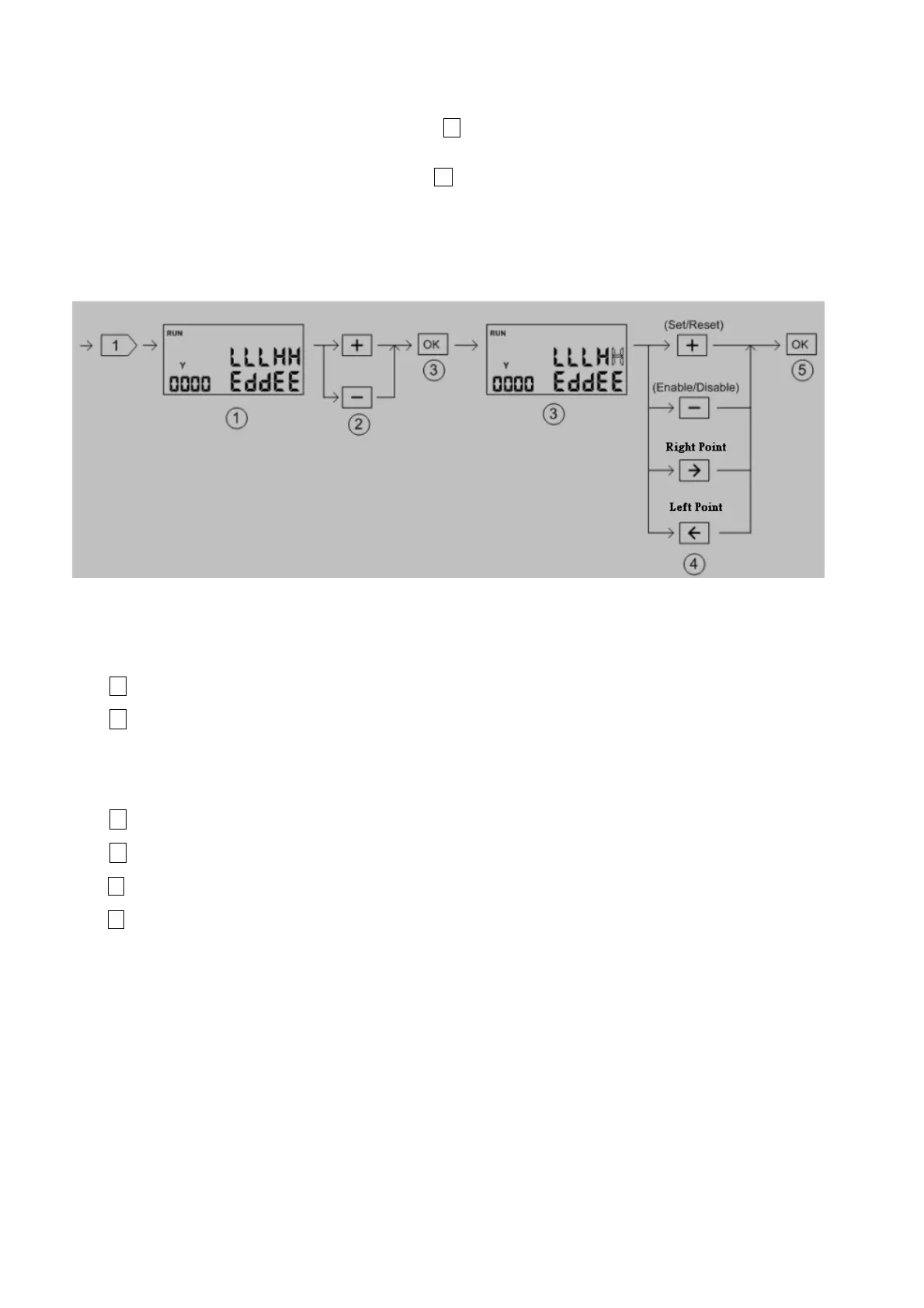
Discrete Element Monitoring:
○
1
Discrete element(X、Y、M、S) display screen show five consecutive points of status at one time. The
upper row is on/off status while the lower row is disable/enable status.
○
2
Element reference number adjust
+ key: Increase the reference number by 5
- key: Decrease the reference number by 5
○
3
Enter the element status editing state. The selected point will be blinked.
○
4
Modification of element ON/OFF、 Enable/Disable status
+ key: Change the ON/OFF status(toggle operation)
- key: Change the Enable/Disable status(toggle operation)
Æ key: Move cursor to the lower point to be edited(decrease the reference number)
Å key: Move cursor to the higher point to be edited(increase the reference number)
○
5
Finish the editing.



 To Next Page