2-19
Chapter 2: Motherboard information
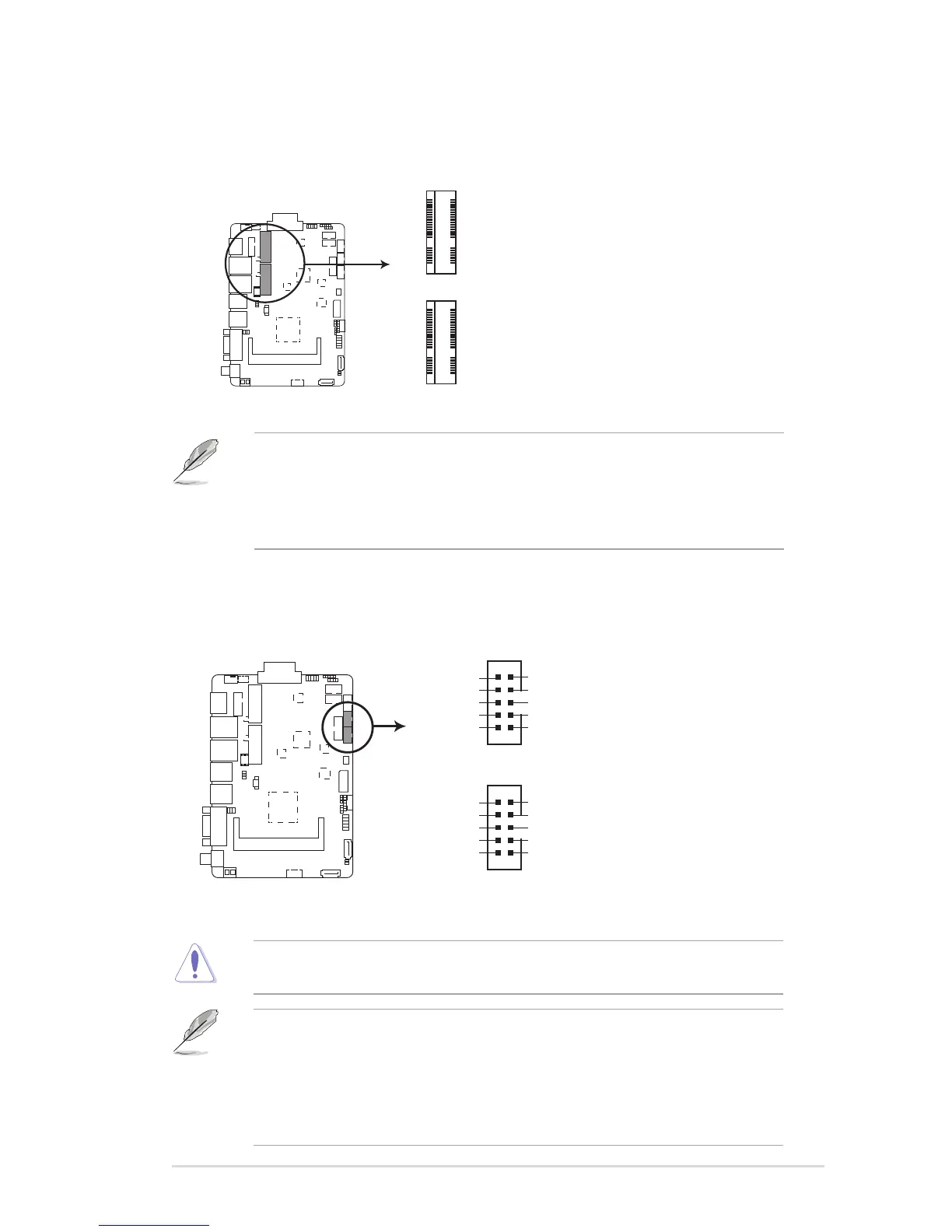
10. USB 2.0 connector (10-1 pin USBHUB_34, USBHUB_56)
TheseUSBconnectorscomplywithUSB2.0specications.
FAY-002 USB2.0 connectors
GND
GND
S_USB_PP5
S_USB_PN5
5V_USB
5V_USB
S_USB_PN6
S_USB_PP6
GND
GND
PIN 1
GND
GND
S_USB_PP3
S_USB_PN3
5V_USB
5V_USB
S_USB_PN4
S_USB_PP4
GND
GND
USBHUB34
PIN 1
Neverconnecta1394cabletotheUSBconnector.Doingsowilldamagethe
motherboard.
NOTES:
• TheUSBmodulecableispurchasedseparately.
• BeforeyouinstallWindows7operatingsystem,gotoBIOSSetup>
Advanced>XHCImode[Disabled],USB2.0(EHCI)support[Enabled],
andsetthembackwhenyounishinstallingtheoperatingsystem.
FAY-002 MINICARD connectors
MINI_CARD1
MINI_CARD2
9. Minicard connector
UsethisconnectortoconnectaMinicardreader.
NOTES:
• TheMini-cardmoduleispurchasedseparately.
• Mini_card1supportsmSATAfunctionviamodication.Pleasecheckthe
„OptionalmSATAManual“forfurtherinstructions.


 To Next Page