Operation
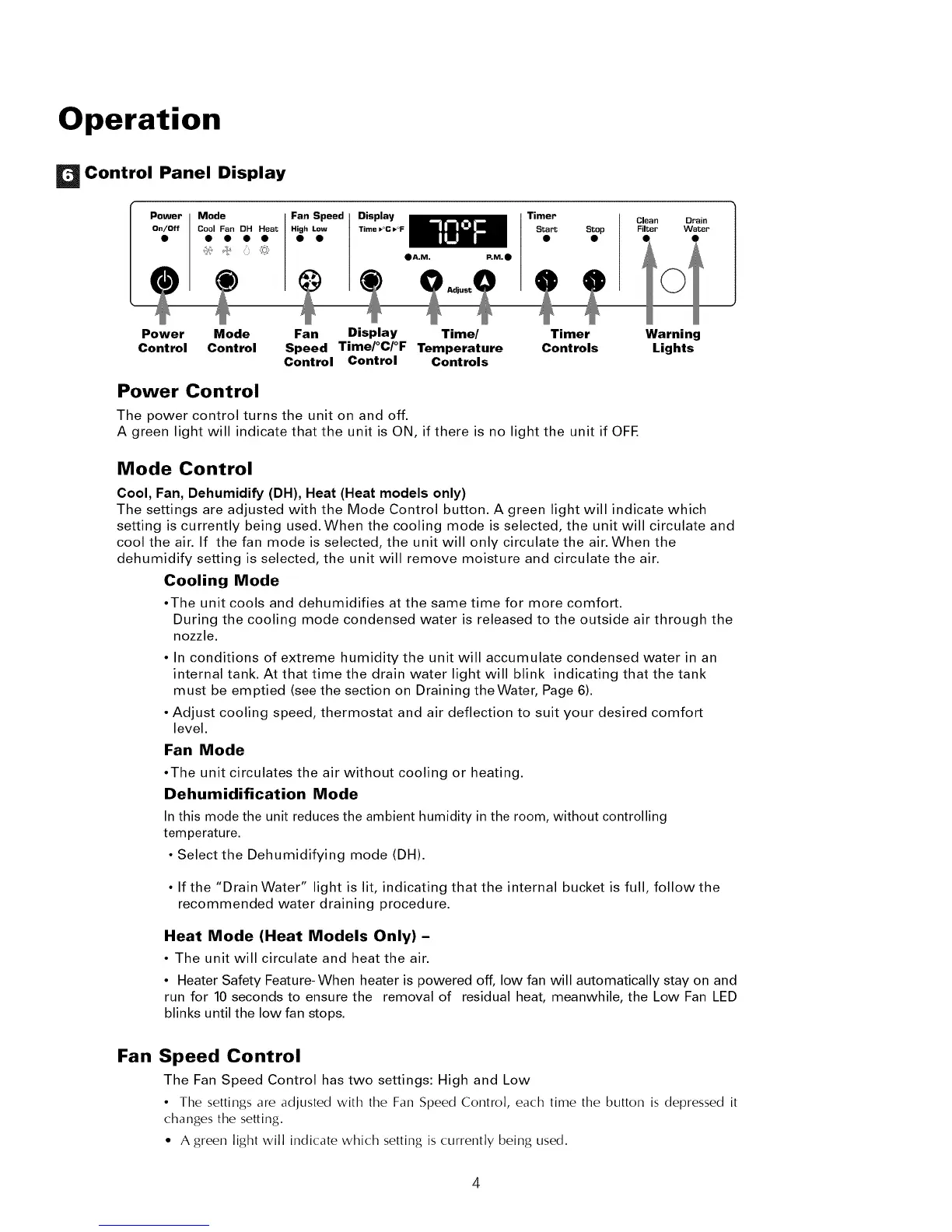
Control Panel Display
i
Mode
Cool Fan DH Heat
• A.M. P,M._)
Timer
Start Stop
Clean
Filter
Power Mode Fan Display Time/ Timer
Control Control Speed Time/°C/°F Temperature Controls
Control Control Controls
Power Control
The power control turns the unit on and off.
A green light will indicate that the unit is ON, if there is no light the unit if OFE
Warning
Lights
Mode Control
Cool, Fan, Dehumidify (DH), Heat (Heat models only)
The settings are adjusted with the Mode Control button. A green light will indicate which
setting is currently being used. When the cooling mode is selected, the unit will circulate and
cool the air. If the fan mode is selected, the unit will only circulate the air. When the
dehumidify setting is selected, the unit will remove moisture and circulate the air.
Cooling Mode
•The unit cools and dehumidifies at the same time for more comfort.
During the cooling mode condensed water is released to the outside air through the
nozzle.
• In conditions of extreme humidity the unit will accumulate condensed water in an
internal tank. At that time the drain water light will blink indicating that the tank
must be emptied (see the section on Draining theWater, Page 6).
• Adjust cooling speed, thermostat and air deflection to suit your desired comfort
level.
Fan Mode
•The unit circulates the air without cooling or heating.
Dehumidification Mode
In this mode the unit reduces the ambient humidity in the room, without controlling
temperature.
• Select the Dehumidifying mode (DH).
• If the "Drain Water" light is lit, indicating that the internal bucket is full, follow the
recommended water draining procedure.
Heat Mode (Heat Models Only) -
• The unit will circulate and heat the air
• Heater Safety Feature-When heater is powered off, low fan will automatically stay on and
run for 10 seconds to ensure the removal of residual heat, meanwhile, the Low Fan LED
blinks until the low fan stops.
Fan Speed Control
The Fan Speed Control has two settings: High and Low
• The settings are adjusted with the Fan Speed Control, each time the button is depressed it
changes the setting.
• A green light will indicate which setting is currently being used.



 To Next Page